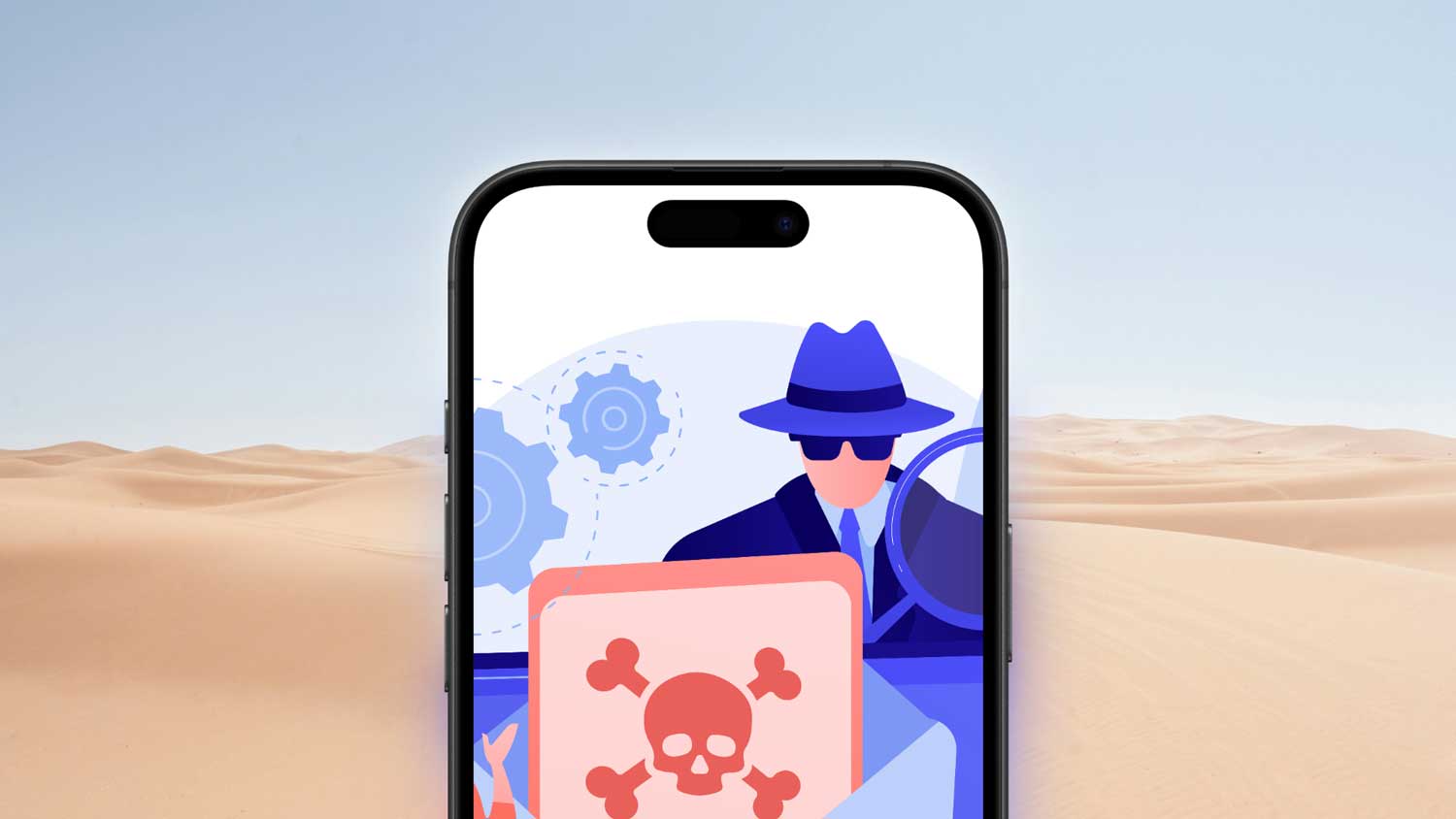
Worried about someone snooping on your iPhone? You’re not alone. In today’s digital world, protecting your personal information is crucial.
Spyware on iPhones is a real threat that can silently collect your data without you knowing.
But don’t worry – you can fight back. This guide will show you how to detect spyware on your iPhone, remove it, and keep your device secure.
Ready to take control of your digital privacy? Let’s get started!
How To Check If Your iPhone Might Have Spyware
Let’s talk about how to spot spyware on your iPhone. Before you can get rid of it, you need to know what to look for. Here are some warning signs that might mean your iPhone has been compromised:
1. Your battery drains faster than usual. If your iPhone’s battery life suddenly takes a nosedive, it could be spyware at work. These sneaky programs often run in the background, eating up your battery power.
2. Your data usage spikes. Spyware needs to send your information back to whoever’s spying on you. This can cause a big jump in your data usage. Keep an eye on your data – if it’s higher than normal, something might be up.
3. Your iPhone slows down. Is your iPhone not as quick as it used to be? Spyware can hog your phone’s resources, making it lag or freeze. Just remember, a full storage can also slow things down, so check that first.
4. You hear weird noises during calls. If your phone calls have strange echoes or background noises, spyware might be listening in. Clear calls suddenly turning fuzzy? That’s a red flag.
5. You see more pop-ups or get redirected while browsing. A sudden increase in pop-up ads or your browser sending you to unfamiliar websites could mean spyware. These programs often try to make money by messing with your browsing.
6. You get odd text messages. Watch out for strange texts full of random characters or symbols. Some spyware uses these to receive instructions from the person spying on you.
Your apps act strangely. If apps on your iPhone start opening by themselves or behaving oddly, spyware might be controlling them.
How To Detect Spyware On iPhone
Now that you know the signs, let’s talk about how to actively search for spyware on your iPhone. Here are some practical steps you can take:
1. Look closely at your apps. Take a good look at all the apps on your iPhone. Do you remember downloading each one? If you see an app you don’t recognize or that seems odd, be suspicious. Spyware often tries to look like a normal app.
2. Check what your apps can access. Look at the permissions for each of your apps. If an app is asking to access things it doesn’t need, that’s a red flag. For example, a simple game shouldn’t need to see your contacts or know your location.
3. Use security apps to help you. There are apps designed to find spyware. Try installing a trusted one like Avast, Lookout, or Norton from the App Store. These can scan your iPhone and let you know if they find anything suspicious.
4. Keep an eye on your iPhone’s activity. Watch your battery life, data use, and how hard your iPhone is working. If any of these suddenly increase for no reason, it could be spyware. You can check battery and data use in your Settings. For more detailed info, try an app like System Status.
5. Look for unfamiliar profiles. Go to “Settings”, then “General”, and look for “Profiles & Device Management” (or “VPN & Device Management” if your iPhone is newer). If you see any profiles you don’t recognize, it’s best to remove them. They could be dangerous.
6. Check your network connections. Use apps like Fing or Wi-Fi Analyzer to see what your iPhone is connecting to. These tools can show you if your iPhone is talking to any strange servers, which might mean spyware is sending out your information.
How to uninstall spyware on iPhone
So, are you sure that your iPhone contains spyware? Don’t worry. Here is what you can do to clean up your gadget:
1. Remove Suspect Apps
- Cancel the apps you don’t trust first.
- Press and hold the icon of an app until it starts to jiggle.

- Tap Remove App and select Delete App.
- This will remove the application and all its files from your iPhone.

2. Say goodbye to strange profiles
- Open Settings > General.
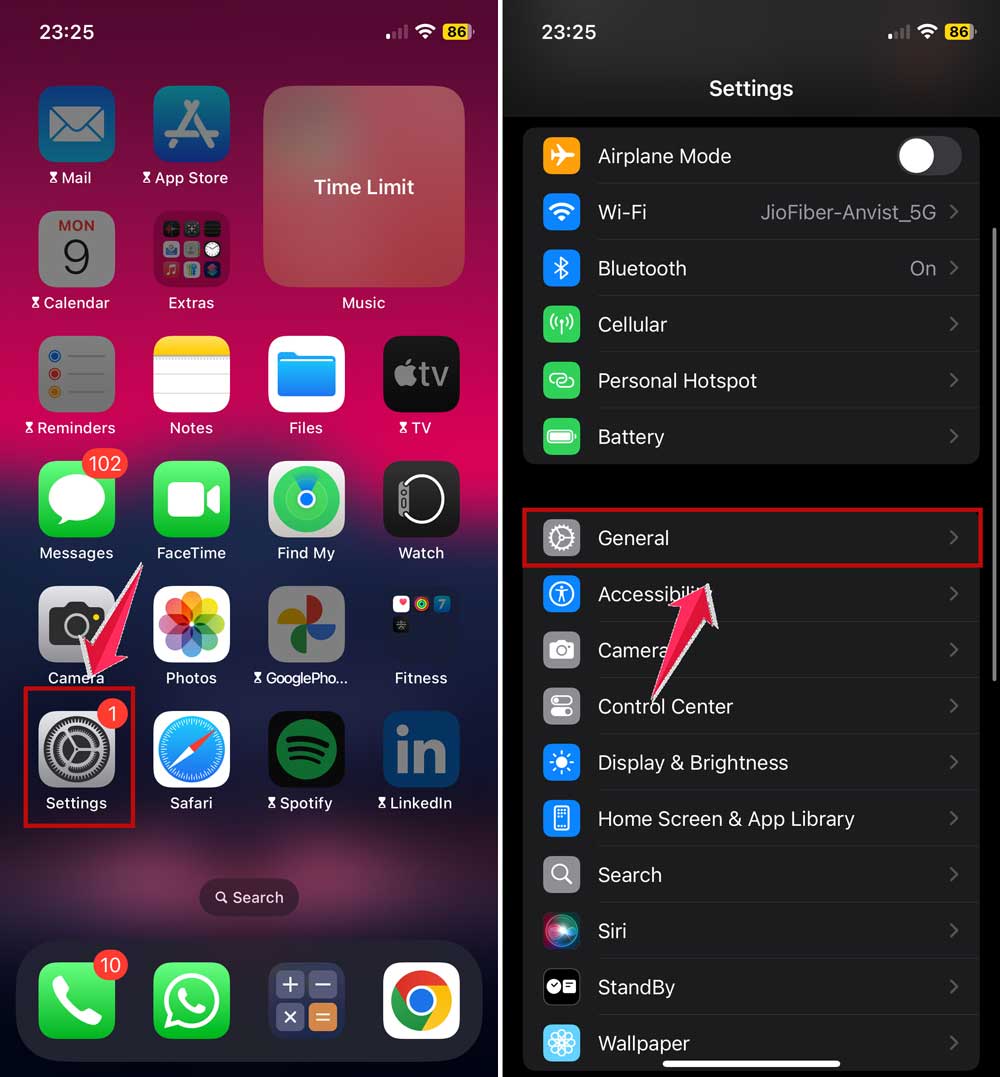
- Scroll for “Profiles & Device Management” (“VPN & Device Management” on newer iPhones)

- If you come across a profile that you do not recognize, tap on it and select “Remove Profile.”
- These can really have quite some power on your iPhone.
3. Keep your iPhone fresh with the new iOS
- Make sure you are running the latest version of iOS on your iPhone.
- Go to Settings > General.
- Now tap on Software Update
- Install if there’s an update to help protect your iPhone.

4. Start fresh with a factory reset
If you are still worried your iPhone has spyware, you can choose to reset your iPhone completely.
Before you do it, however, you’ll want to back up any important information that resides in your iPhone.
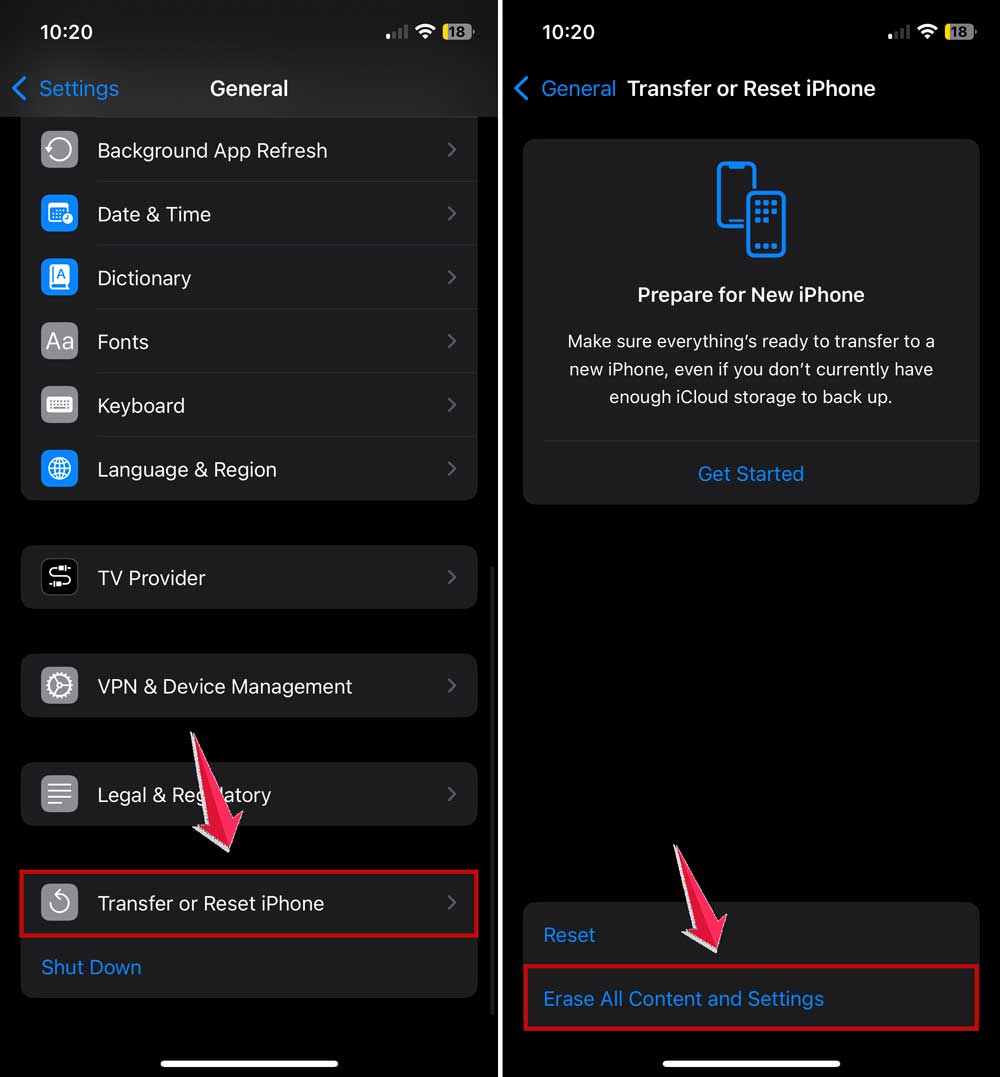
- To reset your iPhone, first go to Settings, then to General.
- Tap Transfer or Reset iPhone and select Erase All Content and Settings.
You should know that uninstalling spyware is not easy at all. If you cannot understand any of what’s happening, it’s fine to seek expert help.
It’s the most important thing to have taken action in securing your privacy.
Can You Get Spyware On iPhone, and How To Avoid It?
Yes, iPhones can become targets for spyware, but it’s less common compared to Android devices.
This is thanks to Apple’s rigorous app review procedures and robust security measures. Here’s how you can keep your iPhone spyware-free:
1. Download Apps Exclusively from the App Store
Apple’s App Store has strict review guidelines that significantly reduce the risk of encountering malicious software.
Always download your apps from official sources and steer clear of third-party sites.

2. Regularly Update Your iOS
Keeping your iPhone up to date is essential. Apple frequently releases updates that fix security holes and enhance device functionality.
To maintain optimum security, ensure your device is always running the latest version of iOS.
3. Be Wary of Suspicious Links
Exercise caution when clicking on links, especially those found in unsolicited emails or social media messages.
These could direct you to harmful websites or trick you into downloading spyware.

4. Implement Strong Passwords
While managing multiple passwords can be a hassle, strong, unique passwords are critical for protecting your accounts.
Use a password manager to help you create, store, and manage secure passwords. These tools can also generate strong passwords for you, adding an extra layer of security.
5. Enable Two-Factor Authentication (2FA)
Always activate multi-factor authentication for your accounts when available.
This method combines your password with a secondary code, which is often sent to your phone or generated by an app.
These codes are temporary and encrypted, refreshing every 30-60 seconds, adding an extra layer of security.
6. Stay Informed About Security Threats
Knowledge is power. Stay updated on the latest security threats by regularly checking security news.
Understanding new malware and phishing tactics will keep you vigilant and proactive against potential attacks.
7. Use a VPN
A Virtual Private Network (VPN) isn’t just for remote work access. Using a VPN on your phone encrypts your internet connection and protects your online activities, especially on public Wi-Fi networks where the risk of interception is high.

8. Be Mindful of App Permissions
Carefully consider the permissions requested by apps during installation or updates. Only grant permissions that are essential for the app’s functionality to prevent spyware from accessing sensitive data.
9. Audit Installed Apps Regularly
Periodically review and uninstall apps that you no longer use or do not recognize. Keeping your app inventory clean reduces the risk of spyware and other malicious software infiltrations.
10. Avoid Jailbreaking Your iPhone
Jailbreaking can strip away crucial security layers Apple has implemented to protect your device.
For optimal security, it’s best to avoid jailbreaking.
11. Secure Your Wi-Fi and Home Network
Ensure your home Wi-Fi is protected with a strong password, and use the latest encryption methods like WPA2 or WPA3.
Regularly update your router’s firmware and modify the default login credentials to block unauthorized access.
12. Consider an Antivirus App
While iPhones are generally resistant to viruses, using an antivirus app can provide an additional layer of defense.
These apps can help detect and remove spyware, offering peace of mind if you suspect your phone might be compromised.
13. Consistently Back Up Your Data
Regular backups are crucial in case your device is compromised. Use iCloud or iTunes to back up your data regularly, ensuring you can restore your iPhone if necessary.
In Conclusion To
Keeping your iPhone safe from spyware is an ongoing process, but it’s worth the effort.
By staying alert, using the App Store, keeping your iPhone updated, and following good security practices, you can protect your personal information.
Remember, your digital safety is in your hands. Stay informed, stay cautious, and enjoy your iPhone with peace of mind.
What do you think about these tips? Do you have any questions or concerns about iPhone security? Feel free to share your thoughts or experiences in the comments below.