Is your Apple Watch buzzing non-stop? Maybe you’re trying to save battery for later, or you just need a break from notifications.
Whatever your reason, you’ve come to the right place to learn how to turn off your Apple Watch.
You might be thinking, “Shouldn’t this be easy?” But if you’re new to Apple Watch or can’t find the power button, don’t worry.
It’s not as obvious as you might expect. Different models have different methods, and that’s why you’re here.
In this guide, you’ll learn the quick and easy steps to power down any Apple Watch model. Whether you have the latest version or an older one, we’ve got you covered.
You’ll also see how restarting your watch can solve those annoying glitches that pop up from time to time.
How to power off your Apple Watch?
Let’s walk through how to turn off your Apple Watch. There are actually two main methods you can use:
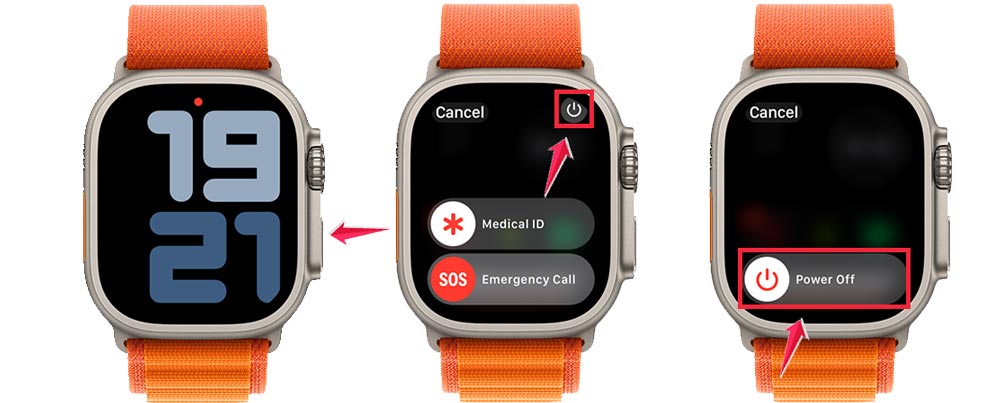
Method 1: Using the side button
- Make sure your watch is on your wrist or lying flat.
- Press and hold the side button (the oval button on the side) until you see options on the screen.
- Look for the “Power Off” slider at the top of the screen.
- Slide this power off slider from left to right.
- Wait a moment for your Apple Watch to shut down completely.
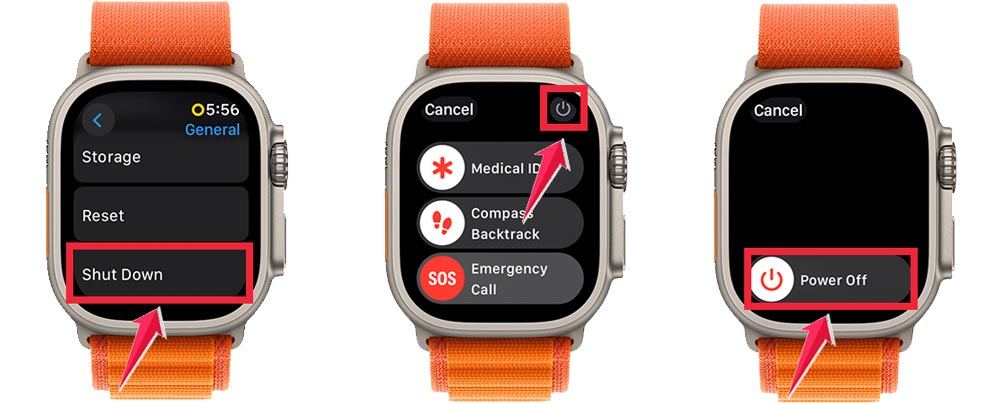
Method 2: Using the Settings app
- Press the Digital Crown to go to the Home screen.
- Find and tap the Settings app (it looks like a gear).
- Scroll down and tap on “General”.

- Scroll to the bottom and tap “Shut Down”.
- Slide the “Power Off” slider from left to right.
Both methods work for all Apple Watch models. Choose whichever is more convenient for you.
To turn your watch back on, just press and hold the side button until you see the Apple logo.
Remember, if your watch isn’t responding, you might need to force restart it. We’ll cover that in the next section.
How to force restart your Apple Watch
Sometimes your Apple Watch might freeze up or become completely unresponsive. When this happens, a force restart is your best option. Here’s how to do it:
- Press and hold both buttons at the same time. That’s the side button and the Digital Crown.
- Keep holding both buttons for at least 10 seconds. This might feel like a long time, but be patient.
- Release the buttons when you see the Apple logo appear on the screen.
- Wait for your watch to fully restart. This usually takes about a minute.

Remember, a force restart should be your last resort. Only use this method when your watch isn’t responding to any other inputs.
Don’t worry. A force restart won’t erase your data or settings. It’s just a way to give your watch a fresh start when it’s stuck.
The takeaway
Now you know how to turn off your Apple Watch and give it a fresh start when needed. These simple tricks can help you save battery life, fix minor glitches, and even give yourself a break from constant notifications.
Remember, powering off your watch is as easy as holding down the side button and sliding the power off switch. And if your watch ever freezes up, you can always use the force restart method by holding both buttons for about 10 seconds.
Some people think restarting their watch will erase their data, but that’s not true. A restart or even a force restart is completely safe and won’t affect your information or settings.
The most important thing to take away is this: you’re in control of your Apple Watch. Whether you need to conserve battery, troubleshoot a problem, or just want some quiet time, you now have the tools to manage your device effectively.
Don’t hesitate to use these methods whenever you need them. Your wrist (and your mind) will thank you.