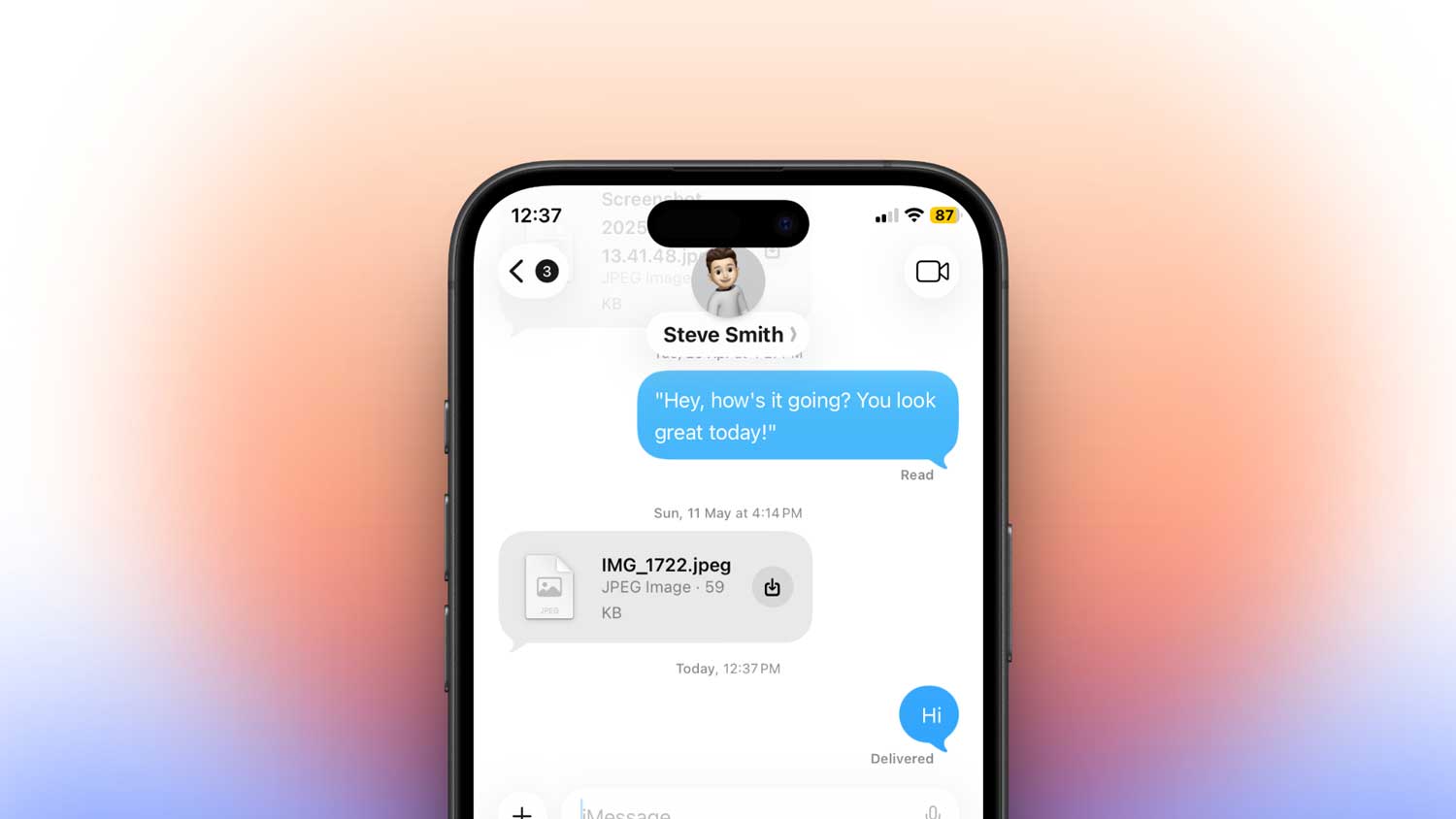
You send a message. You see “Delivered.” But deep down, you’re not sure if they actually saw it. Maybe you know their phone is on Do Not Disturb, and you’re now confused. Was it truly delivered, or is iMessage just messing with you?
Let’s clear this up, once and for all.
Yes, your iMessage will still say “Delivered” even when the other person has Do Not Disturb turned on.
But that doesn’t mean they saw it. Let me explain exactly what’s happening so you’re not left guessing anymore.
What Do Not Disturb actually does
When someone turns on Do Not Disturb, their iPhone doesn’t reject your messages. It doesn’t block anything. It just makes things quiet.
So your iMessage still gets delivered. The only thing that changes? Their phone won’t ring or vibrate. No banner pops up. No sound. That’s it.
The message is silently waiting in their inbox. And you’ll see the “Delivered” tag just like normal.
So if you’re sitting there refreshing the chat, hoping for that tag to show up. Don’t worry. It will. Just don’t expect a reply right away. They’re not ignoring you. They might just not know you texted.
Do Not Disturb doesn’t mean blocked
Let’s clear up another confusion while we’re at it.
Do Not Disturb is not the same as being blocked. If you’re blocked, your message won’t get delivered at all. The “Delivered” tag won’t show. That’s a very different situation.
But if it does say “Delivered,” you’re not blocked. Their phone is just set to be quiet. And maybe they’ll respond later when they’re back online or out of focus mode.
You can still reach them with exceptions
Want to make sure someone always gets your messages, even if they’re on Do Not Disturb?
You can set exceptions. To do it, you can follow these steps below.
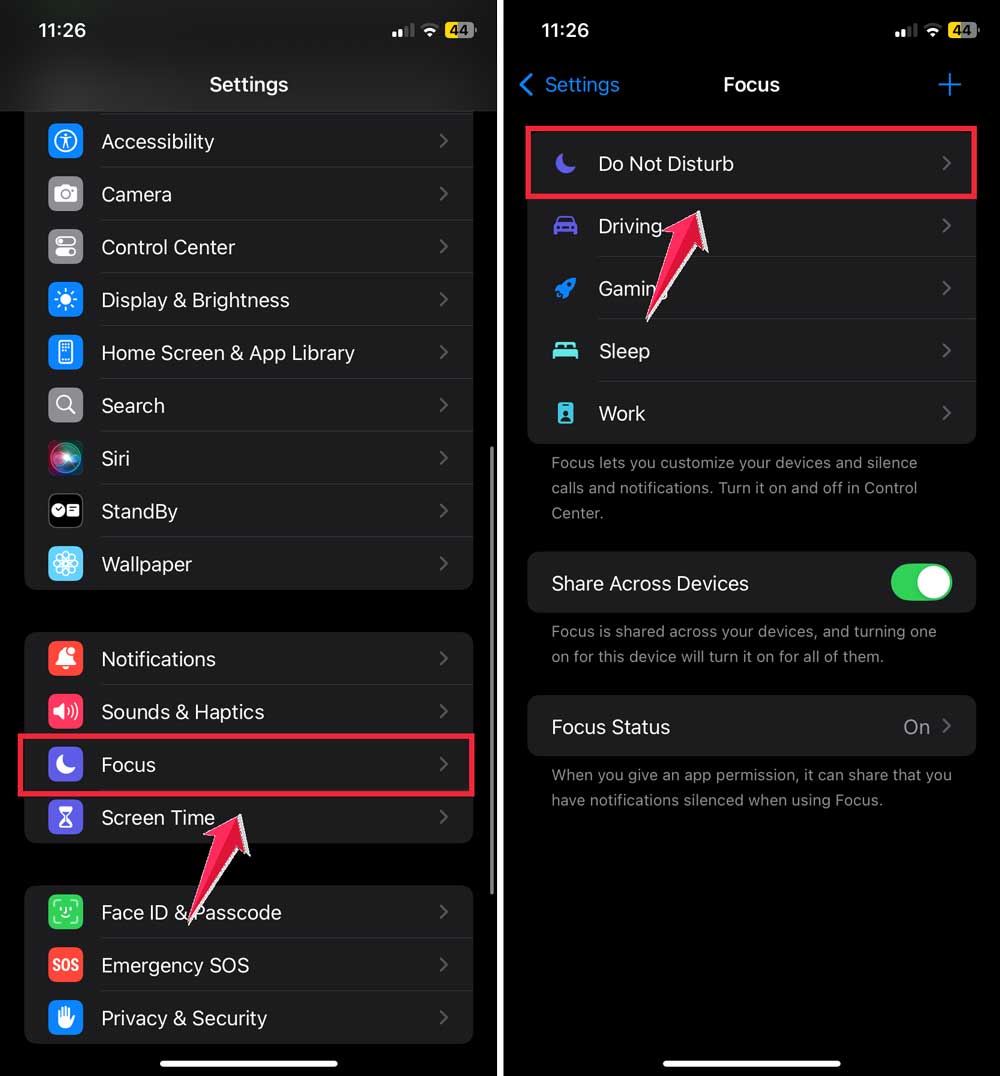
- Open Settings on your iPhone.
- Tap Focus, then choose Do Not Disturb.
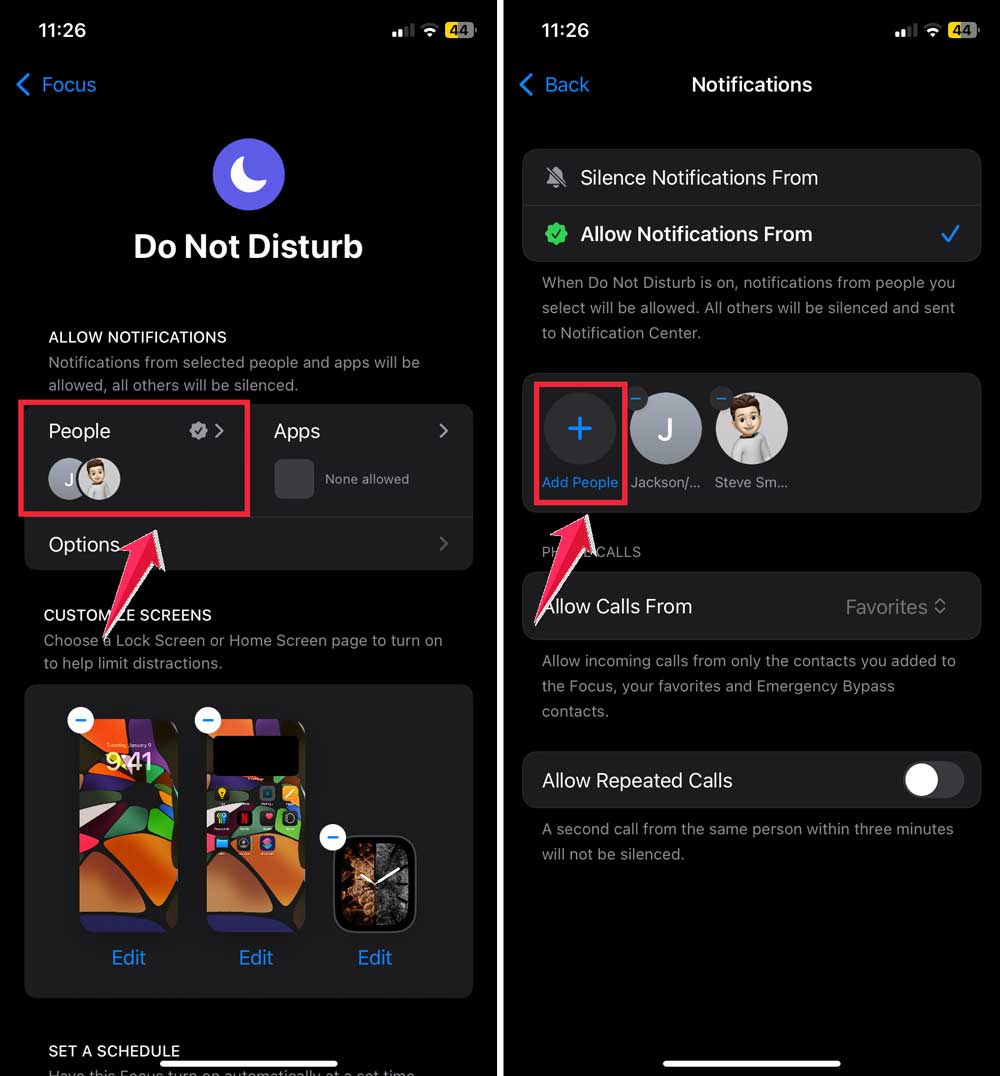
- Now tap People and then tap Add People.
- Choose the contacts who should be allowed to break through DND.
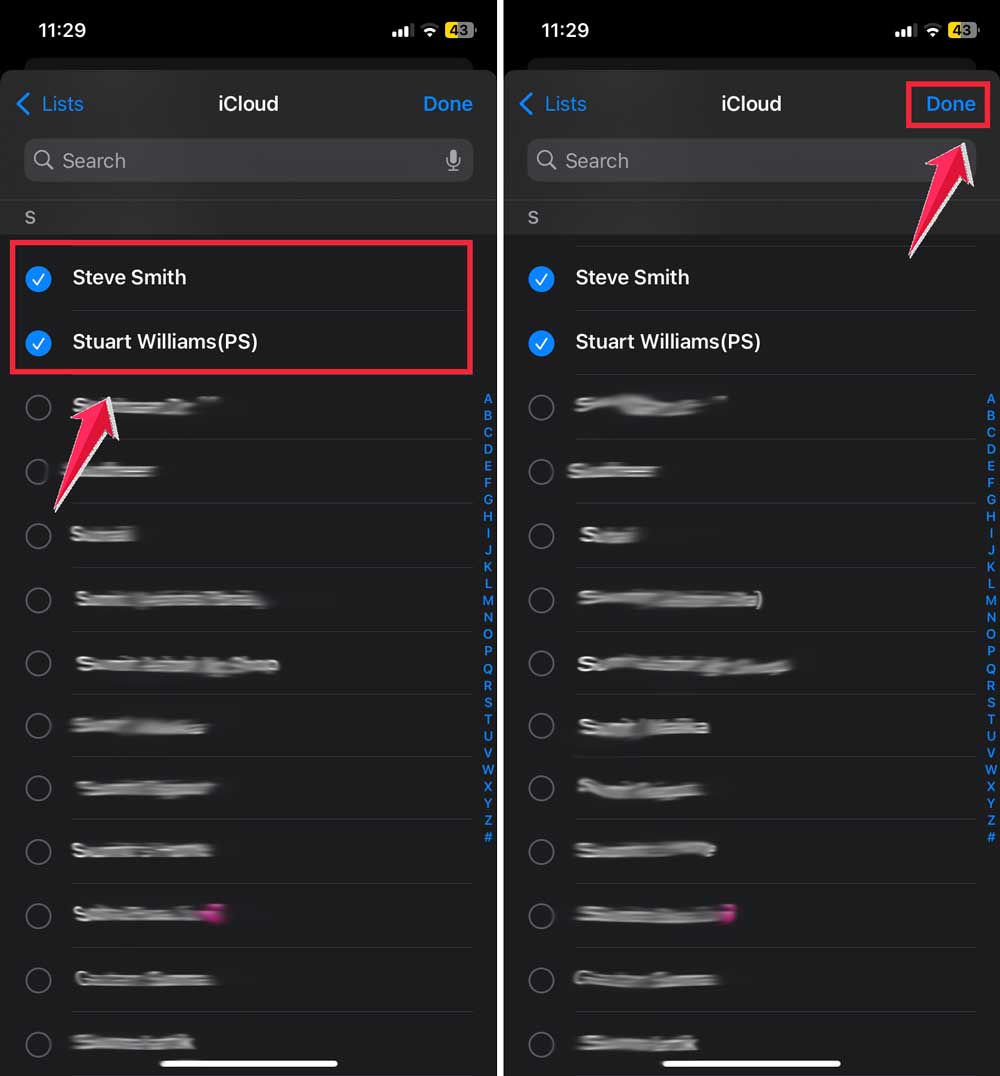
That’s it. These people can now send you messages or call you. And you’ll get notified even with DND on.
If someone adds you to their exception list, your messages won’t just get delivered quietly. They’ll show up with a proper sound or pop-up, too.
Does Do Not Disturb change message colors?
Nope. DND does not affect message color at all.
If you’re seeing a blue iMessage bubble, it’ll stay blue.
If you’re seeing a green SMS bubble, it stays green.
Do Not Disturb has zero impact on that. The color is based only on whether you’re messaging another iPhone user (blue for iMessage) or not (green for SMS).
So don’t overthink the bubble color when someone’s phone is quiet. It doesn’t mean anything about DND.
Will your message go through if their phone is off?
No. If someone’s phone is off, you won’t see “Delivered.” That’s because the message hasn’t reached their phone yet.
The same thing happens if they have no signal or aren’t connected to Wi-Fi or mobile data.
Once their phone comes back online and connects to iMessage servers, your message gets pushed in. And that’s when you’ll finally see “Delivered.”
So if you’re not seeing that tag, they might be:
- Out of network
- Their phone is off
- Or, yeah… You might be blocked (but don’t jump to that conclusion just yet)
What about repeated calls during DND?
Here’s a fun thing Apple added.
If someone calls you twice within 3 minutes, the second call can break through Do Not Disturb.
This is great if there’s an emergency and someone needs to reach you.
But for texts and iMessages? They’ll still just be delivered silently. No, repeating your texts will not change that.
Calls have a special exception. Texts don’t.
iMessage still works perfectly during DND
Yes, iMessage continues working normally during Do Not Disturb.
Messages get sent. Messages get received. Just quietly.
And when the other person finally checks their phone, they’ll see your message there waiting. The app doesn’t delay anything. It just doesn’t make a sound.
If you’ve been wondering whether your iMessage is “stuck” when someone has DND on. Stop worrying. It’s not stuck. It’s right there in their inbox.
Want peace and quiet but still get important texts?
Let’s say you’re the one who needs silence, but there are a few people you can’t afford to miss. your boss, your partner, or someone in the family.
You don’t have to choose between focus and being available. To do:
- Open Settings on your iPhone.
- Tap Focus > Do Not Disturb.
- Go to People, then Allow Notifications From. Add those contacts.

Now you can enjoy the calm of Do Not Disturb while still getting notified about what matters.
Can Do Not Disturb delay messages?
No. It doesn’t delay or slow anything down.
Messages arrive on time.
They just don’t ring your phone.
So even if someone says, “Sorry, I just saw your text. DND was on,” what they mean is: “I didn’t check my phone for a while.” Not that the message came late.
Messages are always delivered right away. DND doesn’t interfere with that.
Will messages expire or disappear?
Nope. Your messages don’t expire or vanish just because DND is on.
Everything you send sits safely in their inbox. waiting for them to read it when they’re ready.
Even audio messages stay there (unless they’ve set auto-delete, but that’s a different setting).
So no need to resend messages thinking they were lost. They weren’t.
If you really need a reply urgently
If it’s important, and you’re not getting a response, here’s what you can try:
First, check if the message says “Delivered.” If yes, it’s on their phone.
Still no response? Try calling once. If it goes to voicemail, try calling again within 3 minutes.
If it rings on the second call, then you know DND is on, and you broke through.
Still no answer? Maybe they’re just busy. Or not ready to reply.
Give it time. If it’s truly urgent, find another way to reach them.
The takeaway
You don’t have to keep guessing anymore. Now you know exactly how Do Not Disturb works with iMessage.
Your iMessage will say “Delivered” even if their phone is on DND.
It doesn’t block anything. It just keeps notifications silent.
They’ll get your message. They’ll see it eventually. You just might not get a reply instantly.
If you’re worried, check the “Delivered” status. That’s all you need to confirm it reached them.
And if you want to make sure someone always gets your messages. Or you need quiet but still want to stay reachable. Just use the People exceptions in your Focus settings.
Do Not Disturb isn’t there to cut people off. It’s just there to give you breathing room. Messages still come through. Calls still ring (after two tries). And your conversations don’t disappear.
You’ve now got full clarity. No more second-guessing “Delivered.”
Got questions? Or want us to explain how to tell if you’re blocked vs. just on Do Not Disturb? Leave a comment and we’ll clear that up too.