You’re staring at your iPhone, scratching your head. Where did that important audio message go? You know you saved it, but now it seems to have vanished into thin air. Don’t worry, you’re not alone in this digital maze.
Every day, millions of people send and receive audio messages. They’re quick, convenient, and perfect for those times when typing just won’t cut it. But when you need to find that crucial voice note later, it can feel like searching for a needle in a haystack.
Maybe it’s your grandma’s secret recipe, whispered to you over the phone. Or perhaps it’s your friend’s directions to that hidden beach you’ve been dying to visit. Whatever it is, you saved it for a reason, and now you need it.
The good news? Your iPhone hasn’t lost those messages. They’re tucked away safely, waiting for you to find them. In the next few minutes, we’ll unravel this mystery together.
You’ll learn exactly where to look, how to access your saved audio messages, and some nifty tricks to keep them organized. Ready to dive in and solve this digital puzzle?
Where do your saved audio messages go?
When you save an audio message on your iPhone, it doesn’t just vanish into thin air. Your saved voice notes have a specific home, and it’s easier to find than you might think. Let’s uncover where these messages are stored and how you can access them whenever you need.
Voice Memos
The Voice Memos app on your iPhone is where your saved audio messages live. Think of it as a digital vault for all your important voice notes.
But here’s something crucial to remember: you need to actively save these messages. If you don’t, they’ll remain in your Messages app and eventually expire.
How to save your audio messages
- Open your Messages app and find the audio message you want to keep.
- Tap the play button next to the message. If it’s one you received, make sure to listen to it fully.
- After listening, you’ll see “Expires in 2m”.

- This will change to “Keep” – tap on it.
- Now, press and hold the audio message.
- From the options that pop up, choose “Save to Voice Memos”.

To find your saved message, go to your Home screen and open the Voice Memos app. Can’t spot it? Check your Utilities folder or use the App Library search. Your saved message will be right at the top of the list.
A friendly heads-up: When you choose to “Keep” a message, the sender can see that you’ve saved it.
How to keep audio messages in your Messages app
If you’d rather keep your audio messages right where they are, you can do that too. By default, these messages vanish after two minutes, but you can change this setting. Here’s how:
- Go to your Settings app.
- Tap on Messages.
- Scroll down to ‘Audio Messages’ and tap on Expire.
- Select Never.
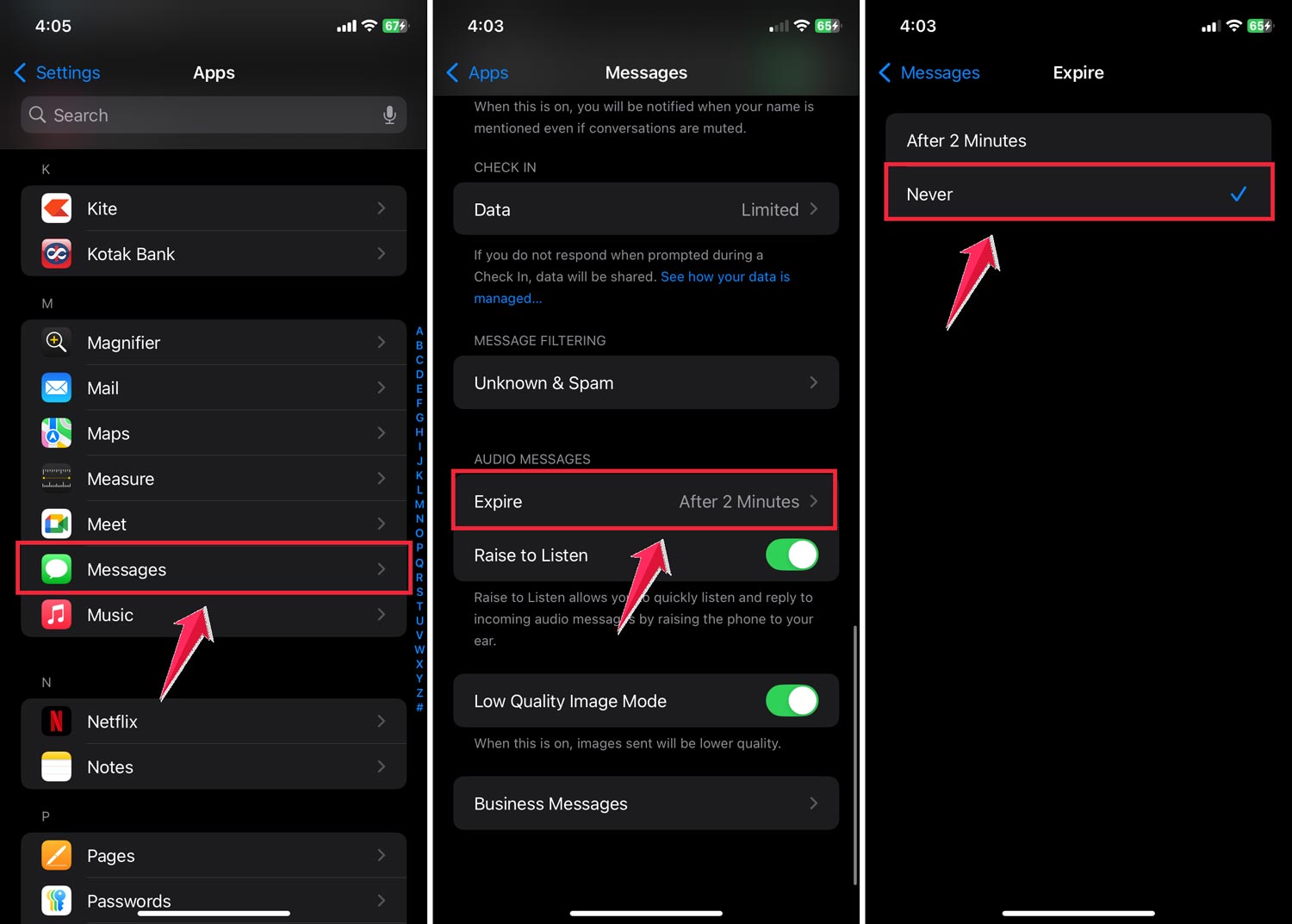
Now your audio messages will stay put in your Messages app indefinitely. But remember, this can eat up your iPhone’s storage pretty quickly. If space is tight, consider saving only your most important messages to Voice Memos and letting the rest expire.
There you have it! You now know exactly where your saved audio messages go and how to find them. No more lost voice notes or forgotten instructions. Your important audio messages are always just a few taps away, ready when you need them.
The takeaway
Finding your saved audio messages on your iPhone doesn’t have to be a puzzle. You now know that these important voice notes are safely stored in the Voice Memos app, ready for you to access whenever you need them.
Remember, you have options. You can save specific messages to Voice Memos for long-term keeping, or adjust your settings to retain all audio messages in your Messages app. The choice is yours, depending on what works best for you and your storage needs.
Don’t forget, actively saving messages is key. Those quick voice notes won’t stick around forever unless you tell your iPhone to keep them. But now that you know how, you’ll never lose an important audio message again.
So go ahead, save those precious voice notes from your loved ones, keep those important instructions handy, and enjoy the convenience of audio messaging without the worry of losing anything important. Your iPhone’s got your back, and now you know exactly how to make the most of it.
What do you think about this conclusion? Feel free to share your thoughts in a single line.