If you’ve been wondering whether you should pay for extra iCloud space, you’re in the right place. Let’s break it down in a way that’s easy to understand.
Do you need more iCloud storage? Well, it really depends on how you use your Apple devices. If you’re someone who loves taking lots of photos and videos, you might find that extra storage space pretty handy.
But if you mainly use your iPhone or iPad for checking emails and scrolling through social media, you might not need to shell out for more space.
I’ve been working with Apple products for over ten years and run a lifestyle blog, so I know firsthand how quickly storage can fill up when you’re creating content.
That’s why I want to help you figure out if buying more iCloud storage is the right choice for you.
So, let’s get started and help you make the best decision for your needs!
How Much Storage Do You Really Need?
Let’s talk about storage and figure out how much space you actually need for all your digital stuff. The first step is to check how much storage you’re currently using. This is your starting point or “storage baseline.”
Now, let’s break it down a bit. You might be wondering how much space your photos, songs, and videos take up. Here’s a simple guide to help you understand:
- Photos: These can vary quite a bit in size. On average, a photo might take up anywhere from 5MB to 30MB. If you love taking pictures, this can add up quickly!
- Music: A single song file can be pretty small or a bit larger, ranging from about 100KB to 50MB.
- Videos: Videos are the real space-eaters. One video file can be anywhere from 1GB to 8GB, especially if it’s high quality or very long.
Take a moment to think about what you have on your device. Are you someone who takes lots of photos? Do you have a big music collection? Or do you like to record and save videos? Your answer will help you figure out how much iCloud storage might be right for you.
Remember, it’s not just about what you have now, but also what you might want to save in the future. If you’re planning to take more photos or videos, or if you want to keep everything backed up safely, you might want to consider getting more storage space.
How to Figure Out How Much Storage Space You Need
Let’s work together to figure out how much iCloud storage you really need. The key is to think about what you typically store on your device. Are you someone who loves taking photos, listens to a lot of music, watches videos, or maybe does all of these? Let’s break it down:
Photos. If you’re like many people, you might take about 5 photos a day. Each photo is usually around 1MB in size. So, in a month, you could end up with about 150 photos, which adds up to about 150MB. Over a year, that’s nearly 2GB just for photos!
Music. Let’s say you enjoy listening to music and the average song is about 4MB. If you add a new album (about 12 songs) to your collection each month, that’s roughly 48MB. Over a year, you’re looking at about 576MB, or just over half a GB.
Videos. Videos can take up quite a bit of space. If you record a 5-minute video each week, and each minute is about 30MB, that’s 150MB per week. Over a month, that’s 600MB, and in a year, it adds up to about 7GB.
When you add all of this up, you’re looking at about 9.5GB of new content each year. And this is just a conservative estimate! If you take more photos, add more music, or record more videos, your storage needs will be higher.
Remember, this is just new content. You also need to think about what you already have stored. Plus, don’t forget about other things that take up space, like apps, documents, and backups.
Is Buying iCloud Storage Worth it?
Deciding whether to buy iCloud storage is a personal choice that depends on your specific needs and habits.
Your Needs vs. Your Budget
Got Lots to Store?: If your digital life is full of photos, videos, and music, then investing in iCloud storage can be a smart move. It’s like having a secure digital locker for all your important files, keeping them safe even if something happens to your device.
Not Much to Store?: If you mainly use your device for basics like email and web browsing, and don’t keep much digital content, then paying for extra storage you won’t use might not make sense.
Start Small, Think Big
Testing the Waters: If you’re unsure, why not start with a small amount of extra storage? You can always upgrade later if you need more space.
In the end, it’s about what fits your lifestyle and budget. Think about how you use your Apple device. Do you like to keep everything, or do you regularly delete files you don’t need? Your answer will help you decide if buying iCloud storage is worth it for you.
What Are Some Alternatives to iCloud?
If iCloud doesn’t quite meet your needs, don’t worry! There are several other options you might find useful. Let’s look at a few popular alternatives:
#1 Dropbox
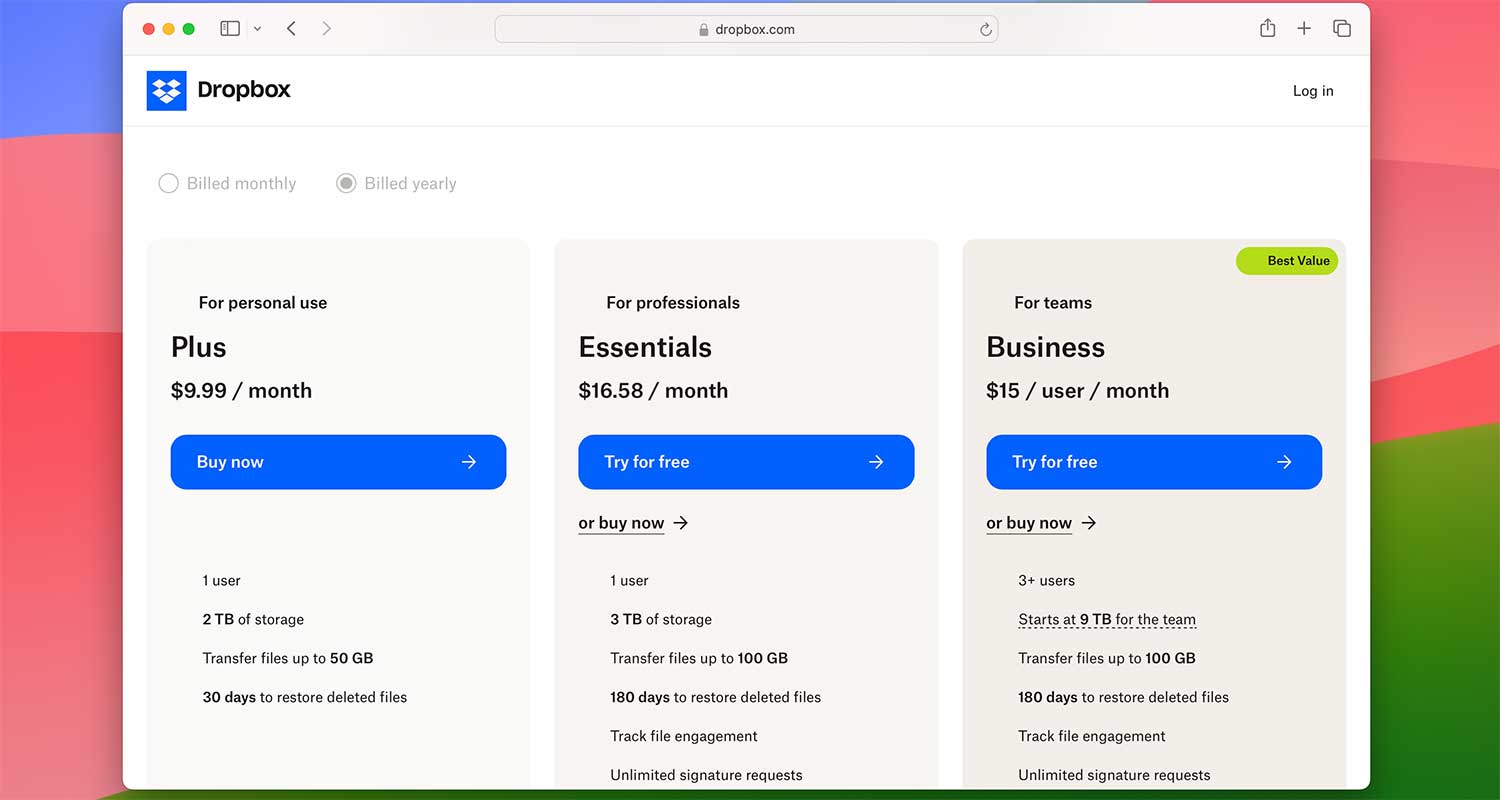
Dropbox is a cloud storage service that lets you store, sync, and access your files online from anywhere. You can start with a free 2GB plan, which is great for light users. If you need more space, they offer paid plans like Pro (2TB for $9.99/month) and Business options. Dropbox is excellent if you want easy access and file sharing across different devices.
#2 Google Drive
Google Drive offers a generous 15GB of free storage to start. If you need more, there’s a 100GB plan for just $1.99/month. It’s a good choice if you already use other Google services. However, it might be a bit tricky if you’re sharing files with people who don’t use Google Drive.

#3 External Hard Drives
External hard drives are portable storage devices that come in various sizes. They’re great for large collections of photos, music, or videos. If you like the idea of physically having your files and being able to use them across multiple devices without an internet connection, an external hard drive could be a good option.
Each of these alternatives has its strengths. Think about what’s most important to you – is it easy sharing, large storage capacity, or physical access to your files? Your answer will help you choose the best option for your needs.
Remember, you’re not limited to just one solution. Many people use a combination of these options to best suit their storage needs. Take some time to consider what works best for your lifestyle and tech habits.
Wrapping Up
We’ve explored iCloud storage and some alternatives, giving you a clearer picture of your options. Whether you’re an Apple enthusiast or new to digital storage, understanding your needs is crucial.
Remember, there’s no one-size-fits-all solution. Your ideal storage option should fit your lifestyle and habits. It’s about finding a comfortable, secure, and efficient way to keep your digital life organized.
Whether you choose iCloud or another option, what matters most is that your digital memories and important files are safe and easily accessible. Take your time, consider your needs, and pick the solution that feels right for you.
Now, we’d love to hear from you! What storage solution do you use? Have you tried iCloud or any of the alternatives we mentioned? Share your experiences or ask any questions you might have in the comments below. Your insights could help others make their decision!