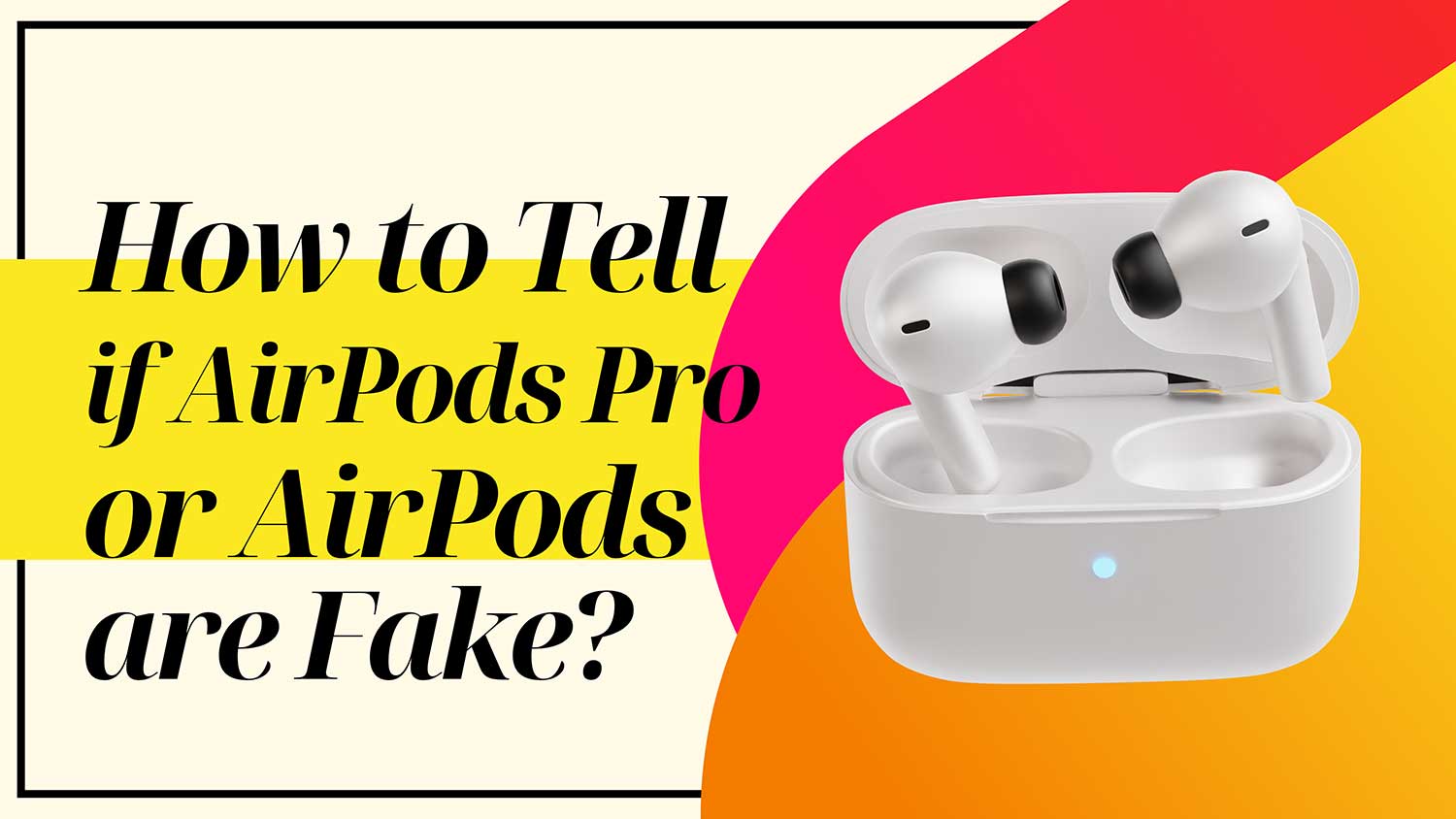
Are you worried you might have bought fake AirPods? Or maybe you’re about to make a purchase and want to be sure you’re getting the real deal?
You’re not alone. With the growing popularity of Apple’s wireless earbuds, the market has been flooded with convincing counterfeits.
Right now, you might be examining your AirPods, wondering if they’re authentic. Or perhaps you’re scrolling through online listings, trying to spot the warning signs of a fake. It’s a tricky situation, and the last thing you want is to waste your hard-earned money on a subpar product.
But don’t worry. You’ve come to the right place. In this guide, we’ll walk you through simple, effective ways to spot fake AirPods. Whether you’re holding a pair in your hands or considering an online purchase, we’ll show you exactly what to look for.
From packaging details to performance features, you’ll learn how to identify genuine AirPods with confidence.
By the time you finish reading, you’ll have the knowledge and tools to protect yourself from counterfeit AirPods. So let’s dive in and make sure you get the authentic Apple experience you deserve!
Why you should check if your AirPods are fake
Before we dive into the details, let’s talk about why it’s crucial to identify genuine AirPods. A lower price tag might tempt you, but there are crucial reasons to ensure you’re getting the real deal.
1. Genuine AirPods offer superior sound quality
First and foremost, authentic AirPods deliver superior sound quality. Apple’s engineering and technology create a listening experience that counterfeit products simply can’t match. From crisp highs to rich bass, genuine AirPods bring your music to life in a way that fakes can’t replicate.
2. Safety concerns
Safety is another key concern. Counterfeit electronics often cut corners on safety standards, potentially putting you at risk.
Genuine AirPods undergo rigorous testing to ensure they meet strict safety guidelines, giving you peace of mind while you enjoy your music.
3. Warranty and support
When you buy real AirPods, you’re also getting Apple’s warranty and support services.
If something goes wrong, you can count on expert assistance and potential repairs or replacements. Fake AirPods leave you on your own if issues arise.
4. You want to use them in long-term
Lastly, while authentic AirPods might seem pricier upfront, they offer better value for money in the long run. Their superior build quality means they’ll last longer, and their advanced features ensure you’re getting the full Apple experience.
Fakes might be cheaper initially, but they often break quickly or lack the functionality that makes AirPods special.
By choosing genuine AirPods, you’re investing in quality, safety, and a better overall experience. Now that you understand why it matters, let’s explore how to spot the real thing.
How to Tell if AirPods Pro or AirPods are Fake?
Now, let’s explore how you can tell if your AirPods are the real deal.
1. Check the packaging
Your first line of defense against fakes is the packaging. Apple takes great pride in its product presentation, so any irregularities can be a red flag. Here’s what to look for:
- Print quality: Apple’s packaging features crisp, high-quality printing. Look for blurry text or images.
- Materials: The box should feel sturdy and well-made, not flimsy or cheap.
- Spelling and grammar: Check for any typos or grammatical errors. Apple’s copywriting is always perfect.
- Snug fit: When you open the box, everything should fit snugly and precisely.
If you notice any issues with the packaging, it’s a sign that you might be dealing with counterfeit AirPods.
2. Examine the serial number
Every pair of authentic AirPods has a unique serial number. Here’s how to check it:
- Find the serial number on the charging case (inside the lid) and the packaging.
- Visit Apple’s coverage check website (https://checkcoverage.apple.com/).
- Enter the serial number and verify if it’s recognized as a legitimate Apple product.

Be aware that some sophisticated counterfeiters might use real serial numbers. While this check isn’t foolproof, it’s still a good step in the verification process.
3. Look for unique Apple features
Once you’ve paired your AirPods with your iPhone, you can check for features that are exclusive to genuine Apple products:
- Open the Settings app on your iPhone.
- Tap Bluetooth.
- Next to your AirPods, tap the info (i) icon.

Real AirPods will have features like:
- Noise Control (for AirPods Pro).
- Ear Tip Fit Test (for AirPods Pro).
- Spatial Audio.
- Automatic switching between Apple devices.
If these features are missing, you might have fake AirPods.
4. Assess the build quality
Genuine AirPods are built to high standards. Here’s what to look for:
- Smooth finish: The plastic should be smooth and uniform, without seams or rough edges.
- Precise fit: The AirPods should fit perfectly in their charging case.
- Sturdy hinge: The case’s hinge should feel solid and snap shut cleanly.
- Correct ports: Look for a Lightning port (or USB-C for newer models), not micro-USB.
Any signs of poor craftsmanship could indicate counterfeit AirPods.
5. Test the functionality
Real AirPods offer seamless functionality with Apple devices. Try these tests:
- Instant pairing: When you open the case near your iPhone, a connection prompt should appear immediately.
- Siri activation: Say “Hey Siri” or double-tap (depending on your model) to activate Siri.
- In-ear detection: Music should pause when you remove an AirPod from your ear.
- Touch controls: Make sure the touch-sensitive areas respond correctly.
If these features don’t work as expected, you might have fake AirPods.
6. Check the firmware
Genuine AirPods regularly receive firmware updates from Apple. Here’s how to check:
- Connect your AirPods to your iPhone.
- Go to Settings > General.
- Click on About.
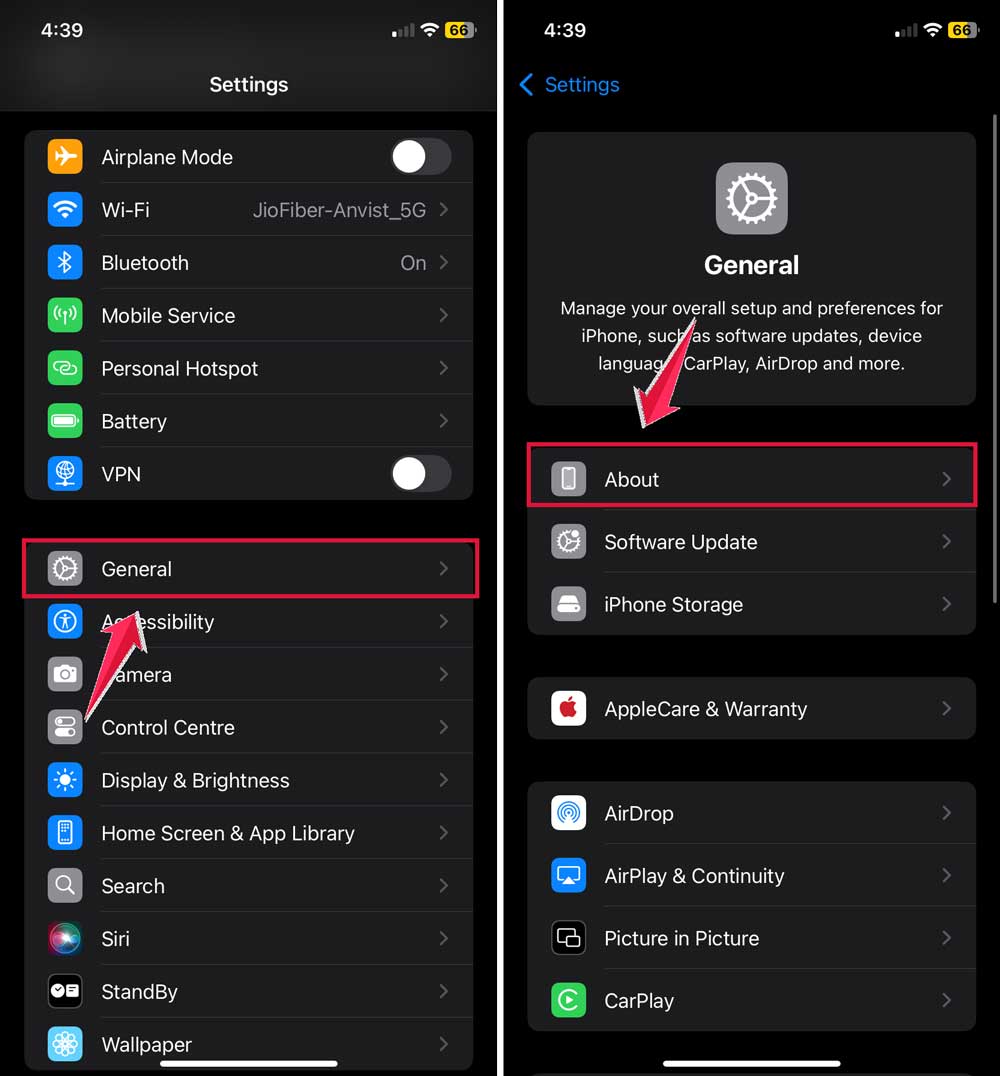
- Tap on AirPods.
- Look for the “Firmware Version” number.

Compare this number to the latest firmware version listed on Apple’s support site. If it’s significantly outdated or shows an unusual number, it could be a sign of counterfeit AirPods.
7. Evaluate the sound quality
While this can be subjective, authentic AirPods offer superior sound quality:
- Clear audio: Music and calls should sound crisp and clear.
- Balanced sound: There should be a good balance between bass, mids, and treble.
- Noise cancellation: For AirPods Pro, the active noise cancellation should noticeably reduce background noise.
If the sound quality is poor or features like noise cancellation don’t work well, you might have fake AirPods.
8. Use the Find My feature
Genuine AirPods integrate with Apple’s Find My network:
- Open the Find My app on your iPhone.
- Tap the Devices tab.
- Your AirPods should be listed here if they’re genuine.
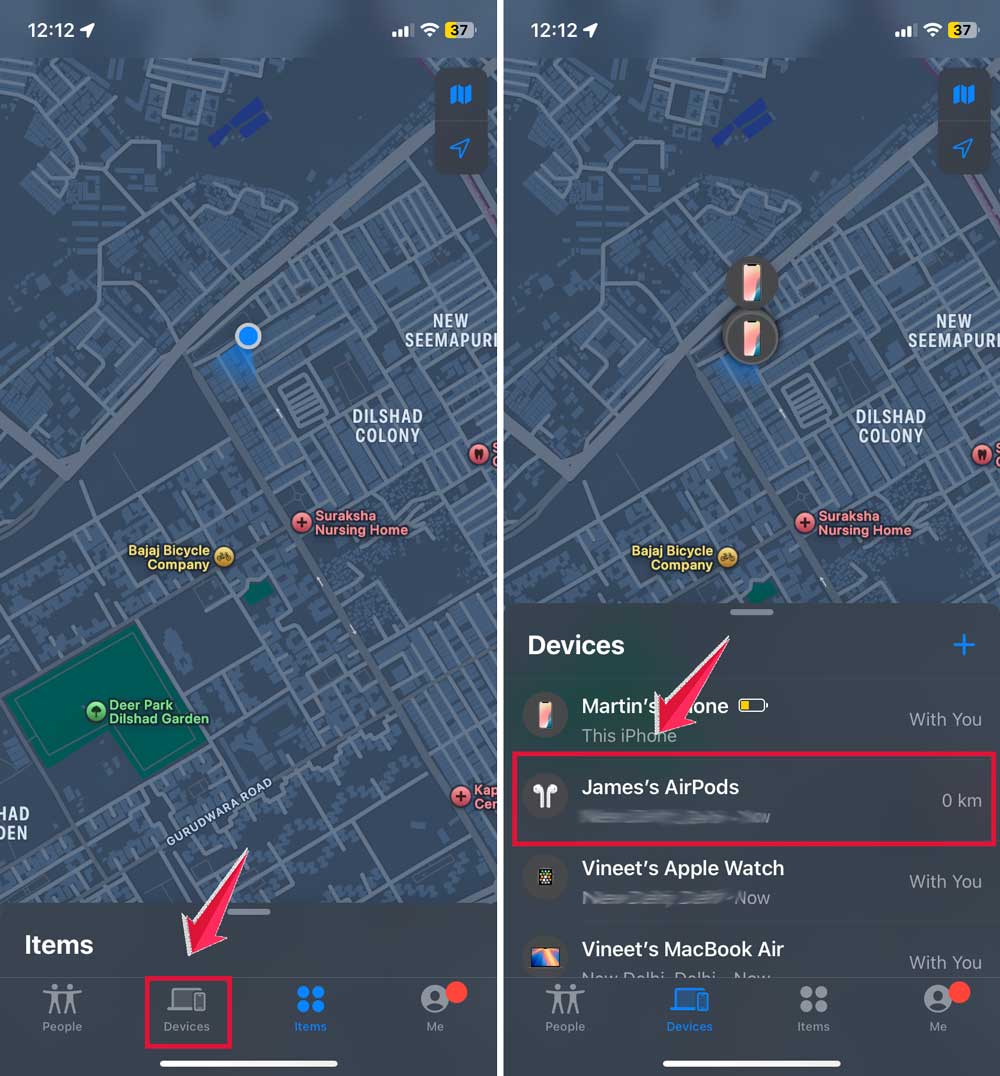
Counterfeit AirPods won’t appear in the Find My app, as they lack the necessary Apple chips.
What to do if you’ve bought fake AirPods

So you’ve gone through the checks and you’re pretty sure you’ve ended up with counterfeit AirPods. Don’t panic! There are steps you can take to address the situation:
1. Contact the seller immediately
Your first move should be to reach out to the seller. Explain that you believe the AirPods are fake and why. Most legitimate sellers will want to make things right. Be polite but firm, and request a full refund.
2. Report fraudulent listings
If you bought your AirPods from an online marketplace like eBay or Amazon, don’t stop at contacting the seller. Take a moment to report the listing as fraudulent. This helps protect other buyers and maintains the integrity of the platform.
3. File a dispute with your payment provider
If the seller isn’t cooperating, it’s time to bring in reinforcements. Contact your bank or payment service (like PayPal) and file a dispute. Explain the situation and provide any evidence you have that the AirPods are fake.
4. Let Apple know about the counterfeits
Apple takes counterfeiting seriously, and they want to know about fake products. Send an email to reportphishing@apple.com with details about your purchase. While they can’t help you directly, this information helps them combat counterfeiters.
5. Shop smart in the future
Remember, the safest way to avoid fake AirPods is to buy directly from Apple or authorized resellers. It might cost a bit more, but you’ll have peace of mind knowing you’re getting the real deal.
Don’t be too hard on yourself if you’ve fallen for fake AirPods. It happens to many people.
The important thing is to take action and learn from the experience. With the knowledge you’ve gained, you’ll be better equipped to spot genuine AirPods in the future!
The takeaway
Spotting fake AirPods can be challenging, but it’s crucial to ensure you’re getting the authentic Apple experience you paid for.
Throughout this article, we’ve explored various methods to identify counterfeit products and protect yourself from scams.
Remember, the key is to be vigilant and informed. Always check the packaging, serial number, and unique Apple features. Don’t be fooled by prices that seem too good to be true.
They often are. A common misconception is that all AirPods look and function the same, but genuine Apple products offer superior quality and exclusive features that fakes simply can’t match.
Ultimately, the most important takeaway is this: trust your instincts and do your due diligence. If something feels off about a pair of AirPods, it probably is.
By applying the knowledge you’ve gained here, you can shop with confidence and enjoy the true Apple experience. Stay savvy, and happy listening!
We’d love to hear about your experiences with spotting fake AirPods. Share your thoughts in a comment below!