Did you know that the average smartphone user receives around 96 notifications per day? That’s a lot of pings and buzzes!
If you’re feeling overwhelmed by messages from a particular person on WhatsApp, you might think blocking is your only option. You have other choices.
Sometimes, you don’t want to cut someone off completely, but you need a break from their messages.
Maybe it’s a chatty friend, a work colleague, or someone you’re not ready to block. Whatever the reason, WhatsApp offers ways to manage your conversations without resorting to blocking.
In this guide, you’ll learn about some handy tricks to avoid messages without the other person knowing. We’ll cover how to mute conversations, archive chats, and even lock them away.
These methods are simple to use and can help you regain control of your WhatsApp experience. Ready to discover how to find some peace in your digital world?
How to mute messages without blocking
Ever feel overwhelmed by constant WhatsApp messages? You’re not alone. Many people struggle with this, but blocking isn’t always the answer.
Let’s explore some friendlier ways to manage your conversations without cutting people off completely.
1. Use mute to avoid notifications
WhatsApp’s mute feature is a great way to quiet those chatty contacts. When you mute someone, their messages still come through, but you won’t get notifications. Here’s how to do it:
- Open WhatsApp and find the chat you want to mute.
- Tap the contact’s name at the top of the chat.
- Look for “Notifications“
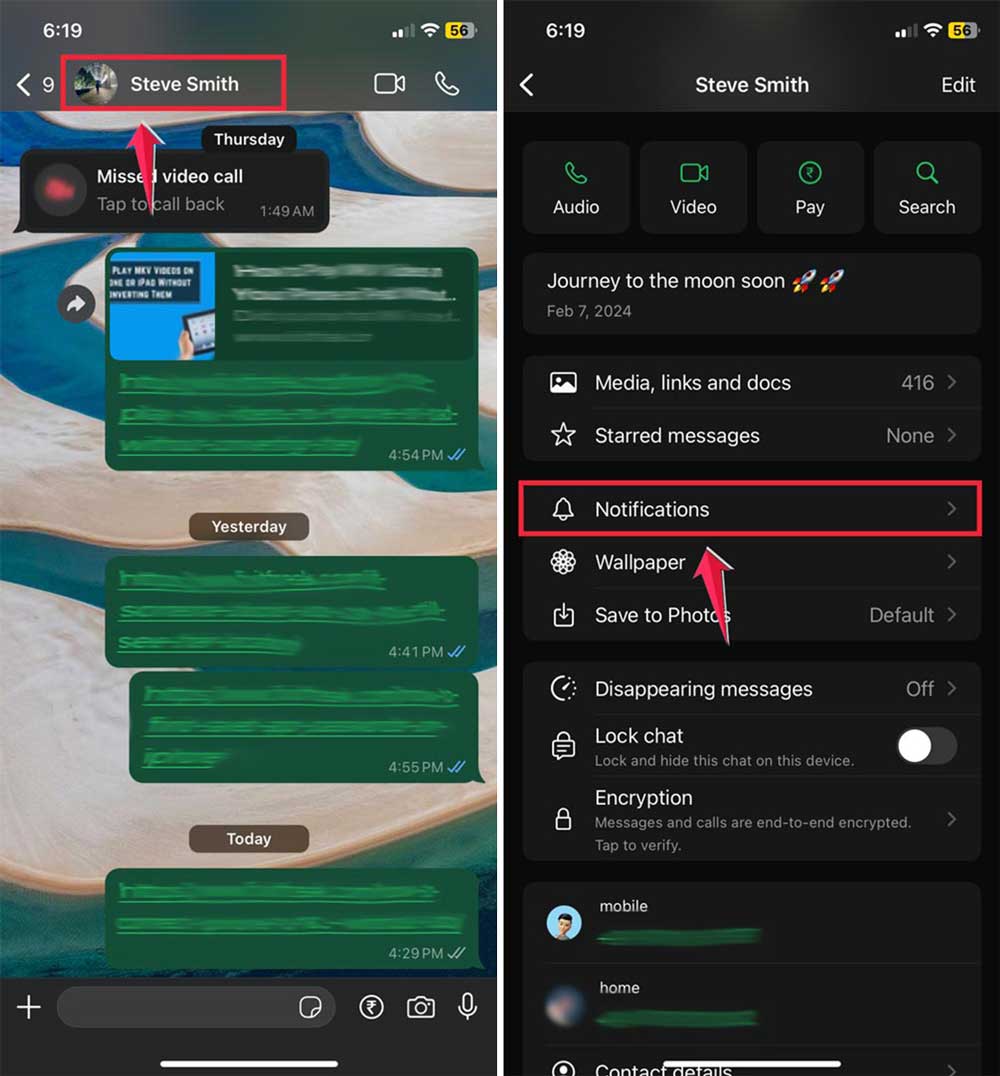
- Then “Mute notifications“.
- Choose how long you want to mute the chat. You can even select “Always” for permanent peace.
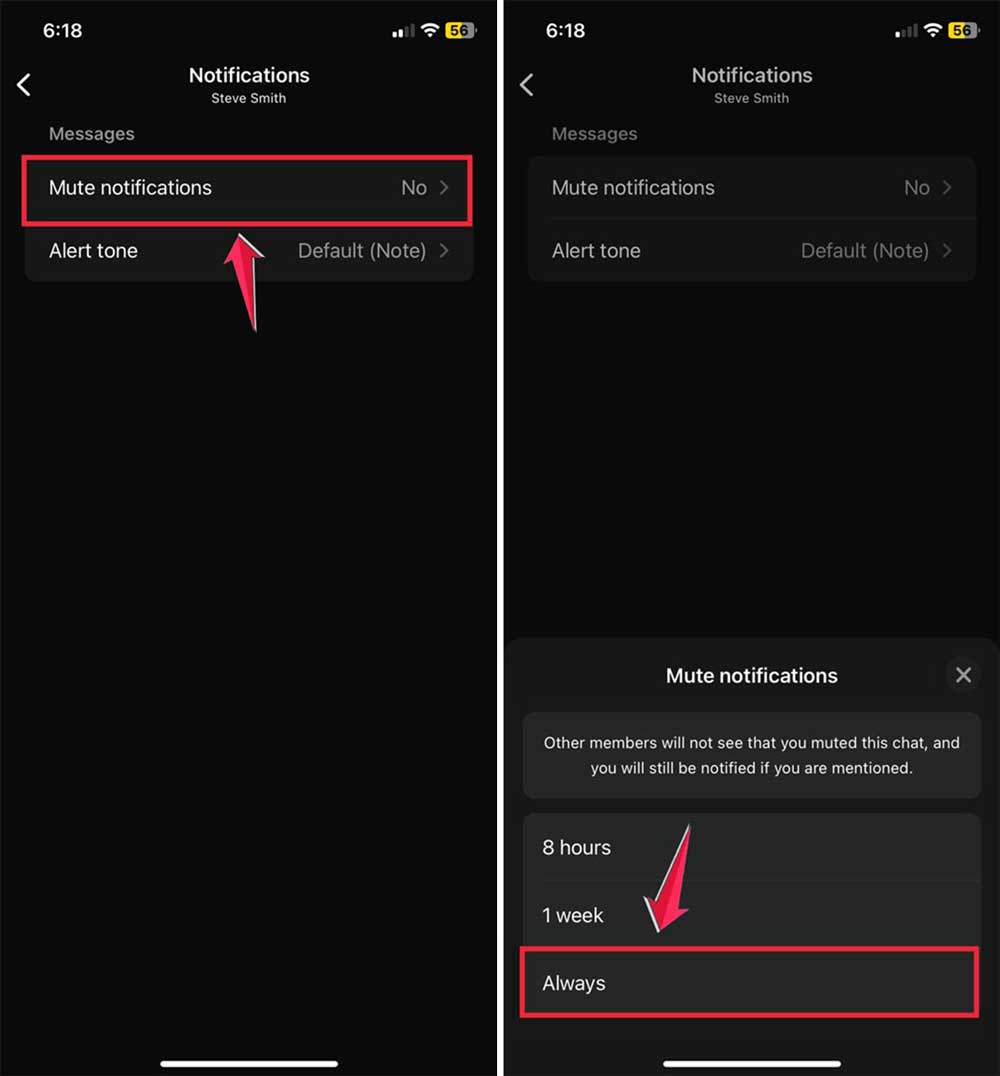
You’ll see a muted speaker icon next to the chat when it’s done. Remember, muting is different from blocking.
The messages are still there when you’re ready to read them.
2. Archive chats for a cleaner inbox
If you want to declutter your chat list, try archiving. This moves conversations out of sight without deleting them. Here’s a neat trick:
- Go to WhatsApp Settings, then “Chats“.
- Turn on “Keep chats archived“.
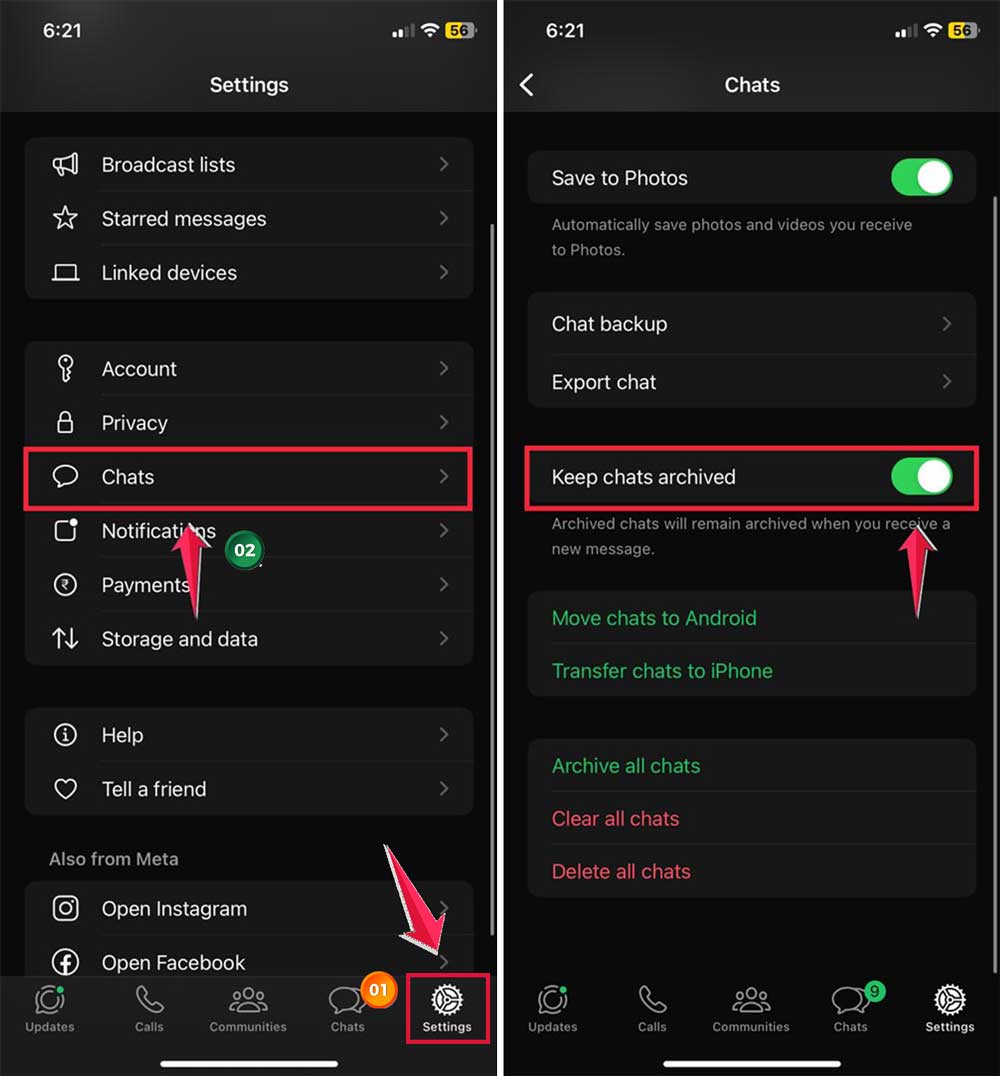
Now, archived chats will stay hidden even if you get new messages. To archive a chat:
- On Android: Long-press the chat and tap the archive icon (box with down arrow).

- On iPhone: Swipe left on the chat and tap “Archive“.

3. Mute and lock for extra privacy
For maximum peace, you can mute a chat and then lock it. This keeps notifications off and adds an extra layer of privacy.
After muting the chat:
- Open the chat and tap the contact’s name.
- Look for “lock Chat”.
- Turn this option on.

To view locked chats later, look for the “Locked Chats” folder at the top of your chat list. You’ll need to use your fingerprint or Face ID to open it.
These methods give you control over your WhatsApp experience without the finality of blocking. Try them out and see what works best for you.
Remember, it’s okay to set boundaries in your digital life. Your peace of mind matters!
How to handle messages from unknown numbers
You’ve learned how to manage messages from people you know, but what about those mystery numbers that pop up? Don’t worry, you’ve got options for those too!
1. Dealing with strangers on WhatsApp. Sometimes, it’s not your friends causing message overload but unfamiliar numbers. Here’s how you can handle them:
2. Blocking unknown numbers. If you’re getting messages from strangers that are really bugging you, blocking is an option. It’s a good choice when you’re sure you don’t want to hear from that number again. And if you change your mind later? No problem. You can always unblock them.
3. Silencing unknown callers. Your phone has a handy feature that can help with unknown callers, even outside of WhatsApp. Most smartphones let you silence calls from numbers not in your contacts. The call will still come through, but your phone won’t make a sound. If it’s important, they can always leave a voicemail.
This is especially helpful if you’ve been getting spam calls or suspect you’re being monitored.
Remember, it’s okay to set boundaries with unknown contacts. You don’t have to respond to every message that comes your way.
Your privacy matters, and these tools can help you maintain it. Try out these methods and see what works best for you. Stay in control of your WhatsApp experience!
The takeaway
Managing your WhatsApp messages doesn’t have to be all or nothing. You don’t need to choose between being overwhelmed by messages or blocking people completely. There are friendly ways to control your inbox and find some peace.
We’ve explored several helpful options. You can mute chats to stop notifications without missing messages.
Archiving lets you tidy up your chat list while keeping conversations accessible. For extra privacy, you can even lock chats away. And for those unknown numbers, you have tools to manage them too.
Some people think ignoring messages is rude, but it’s okay to set boundaries. Your mental well-being matters, and these tools help you protect it.
Remember, you’re in charge of your WhatsApp experience. Use these methods to create a balance that works for you. It’s all about staying connected on your own terms. Why not try one of these techniques today?
I’d love to hear your thoughts! Feel free to share your experience in a single-line comment below.