

Have you ever tried to play music from your Apple Watch, only to feel frustrated? You’re not alone. Many users face this limitation.
Picture this: You’re ready to work out, your watch is on, and you want your favorite playlist.
But when you hit play, you hear silence or see a message to connect headphones. This leaves many asking, “Why can’t my high-tech watch play music on its own?”
This isn’t a flaw in your watch or a mistake on your part. It’s a design choice by Apple. They balance features with battery life and size. Still, your Apple Watch can play a key role in your music experience.
In this article, we’ll look at practical ways to enjoy music with your Apple Watch. Whether you love fitness, music, or just want to use your device better, we have solutions for you.
You’ll discover handy apps and connection tricks. This way, your tunes keep playing wherever you are or whatever you’re doing.
Can we really play music through Apple Watch speakers?
Let’s clear up a common myth about playing music on your Apple Watch. Most Apple Watch models have great features.
However, they can’t play music through their built-in speakers. This may surprise users who expect their smartwatch to be a standalone music player.
The main reason is the watch’s small design and power limits. While the Apple Watch has a speaker, it’s mainly for phone calls, Siri responses, and notifications. It’s not meant for long music playback.
But don’t worry! There are still many ways to enjoy music with your Apple Watch. Let’s explore some creative alternatives to keep your tunes flowing.
Alternative 1: Watch Tube – YouTube on your wrist
If you’re looking for a workaround to play music through your Apple Watch speaker, the Watch Tube app might be just what you need. Here’s how to get started:
- Download Watch Tube from the App Store on your iPhone or directly on your Apple Watch.
- Open the app on your watch and select your region.
- Search for music videos or any audio content you’d like to play.
- Tap on a video to start playback.
With Watch Tube, you can adjust the volume using the Digital Crown and even continue playback when you exit the app. It’s a clever solution that turns your watch into a mini YouTube player.
Alternative 2: Connect to a Bluetooth speaker
Want to amplify your music experience? Your Apple Watch can act as a control center for a Bluetooth speaker. Just make sure your AirPods or audio device is set up properly. You can disconnect AirPods from previous owner in case they’re not pairing right.
Here’s how to set it up:
- Ensure your Bluetooth speaker is on and in pairing mode.
- On your Apple Watch, go to Settings > Bluetooth.
- Wait for your speaker to appear in the device list, then tap to connect.
- Once connected, you can control music playback from your watch while the sound comes through the speaker.
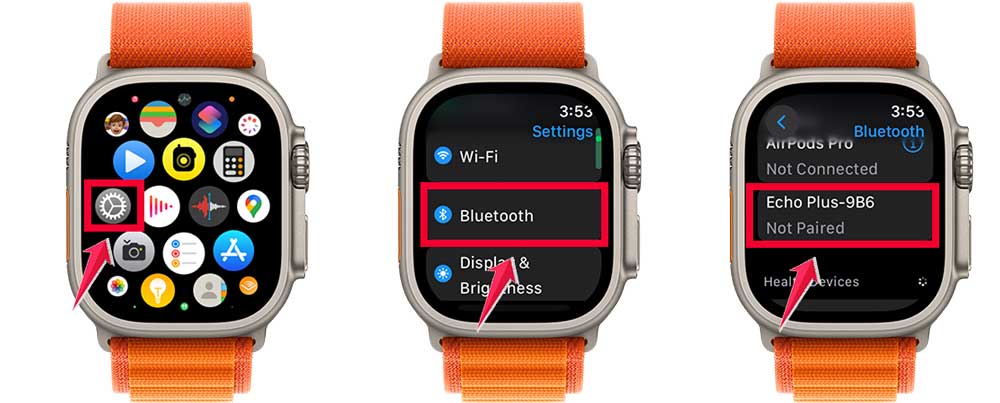
This method gives you the best of both worlds. The convenience of wrist controls with the sound quality of a dedicated speaker.
Alternative 3: Use your iPhone as the sound source
Don’t forget, your Apple Watch and iPhone make a great team. You can use your watch to control music playing on your iPhone:
- Start playing music on your iPhone.

- Open the Music app on your Apple Watch.
- You’ll see playback controls for the music on your iPhone.

You can enjoy excellent sound from your iPhone’s speakers or your headphones, all from your wrist.
These options may surprise you, but they offer flexible ways to enjoy music on your Apple Watch. Think of your watch as a control centre, not just a speaker.
Your Apple Watch is essential for your music experience. Everything you do with Watch Tube revolves around your watch.
This includes playing music, connecting to a Bluetooth speaker, and controlling your iPhone. Try these methods to see how your watch can enhance your music listening.
The takeaway
Your Apple Watch may not play music directly, but it can be your personal DJ. We explored creative ways to enjoy music with your smartwatch.
We found options such as the Watch Tube app for playback. You can connect to Bluetooth speakers for better sound.
Also, you can use your watch to control music on your iPhone. These methods turn your Apple Watch into a powerful music control centre.
Remember, view your Apple Watch as a versatile tool, not just a music player. By trying these methods, you can still enjoy your favourite tunes with wrist controls.
So go ahead, experiment with these options, and see what works best for you. Your Apple Watch might not be the speaker you expected, but it can enhance your music experience.
Keep exploring, keep listening, and let your Apple Watch bring a new rhythm to your day.
We’d love to hear your thoughts on these methods. Please leave a comment below and share which one worked best for you!








