I know how annoying that can be. It’s just a tiny button, but it makes a huge difference, right? When it stops working, it feels like you’ve lost control of your iPad.
Suddenly, you can’t exit apps, you can’t go back to the home screen—it’s like being stuck with no way out.
But don’t panic. Fixing it isn’t as hard as it sounds. Whether it’s a little dirt, a software hiccup, or just some wear and tear, I’m here to walk you through it.
We’ll go step-by-step, nice and easy. Let’s get your iPad back to normal, so you can enjoy it without frustration.
Ready? Let’s dive in and figure out what’s going wrong with that home button!
Why is your iPad’s home button not working?
Alright, let’s uncover why your iPad’s home button might be acting up. I promise it’s simpler than it sounds. Stick with me here.
1. Stuck or Damaged Hardware
If your button feels stiff, stuck, or weird when you press it, you might be dealing with a hardware issue. Over time, all that pressing can wear it down.
Maybe it’s been dropped or pressed too hard without you realizing it. Little things add up, and now the button isn’t clicking the way it should.
2. Software Can Be Sneaky
Sometimes, it’s not the button’s fault at all. It could be a software glitch messing things up. Maybe an app crashed, or your iOS is outdated.
Even a small bug can make the home button act like it’s broken when it’s really not.
3. Tiny Dirt and Debris
You’d be surprised how much dirt and lint can sneak into that tiny button. If you often keep your iPad in your bag or pocket, little bits of dust can build up around the button and block it from working properly. It’s sneaky, but it happens more than you think.
4. Old Faithful Needs a Rest
Lastly, it might just be good old wear and tear. If you’ve had your iPad for a few years, it’s normal for the home button to start showing its age.
Devices don’t last forever, sadly. But don’t worry—there’s still plenty you can do before thinking about repairs.
Now that you know what might be causing the problem, let’s move on to the fun part—fixing it!
iPad Home Button Not Responding – Fix Guide
Alright, ready to fix that stubborn button? Let’s get started with some simple solutions. I’ll keep it easy and guide you through every step.
#1: Clean the Button
First things first, let’s tackle the dirt. Dust and lint are sneaky. They can easily block your button without you even noticing.
Here’s what you need to do:
- Power off your iPad completely.
- Take a soft, slightly damp cloth (not soaking wet).
- Gently wipe around the home button. Be careful not to press too hard.
Give it a few gentle wipes and see if it feels better. Sometimes, that’s all it takes to bring the button back to life!
#2: Restart Your iPad
Sometimes, your iPad just needs a little nap. A quick restart can clear out any glitches that are messing with the button.
Here’s how:
- Hold the power button until you see “Slide to power off.”
- Swipe to turn it off and wait a few seconds.
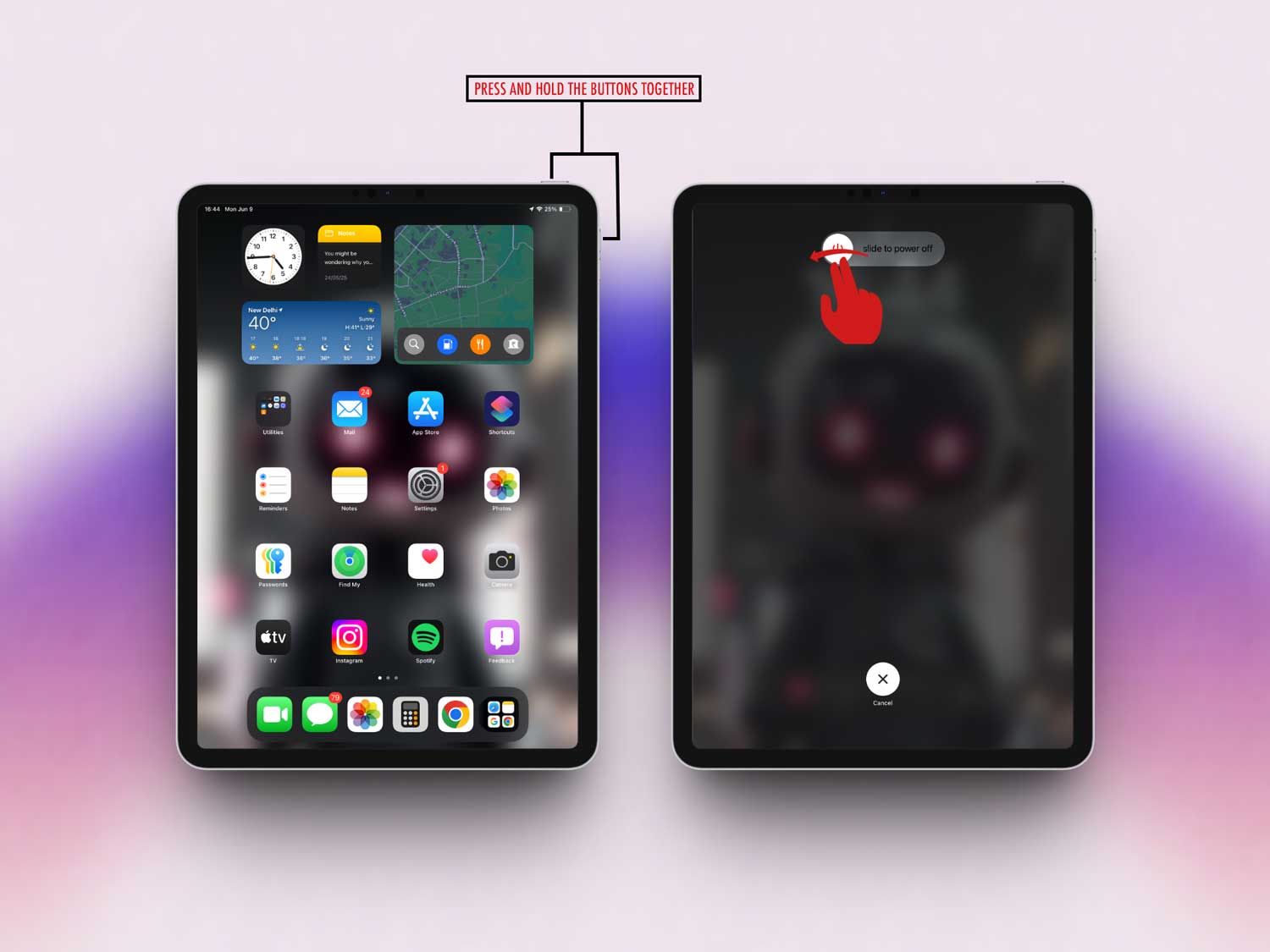
- Press the power button again until you see the Apple logo.

Once it powers back on, test the home button. Feeling better? Great! If not, let’s keep going.
#3: Update iOS
If your iPad’s software is out of date, it can cause all kinds of weird problems—including a stubborn home button.
Let’s make sure you’re up to date:
- Open Settings on your iPad.

- Tap General.
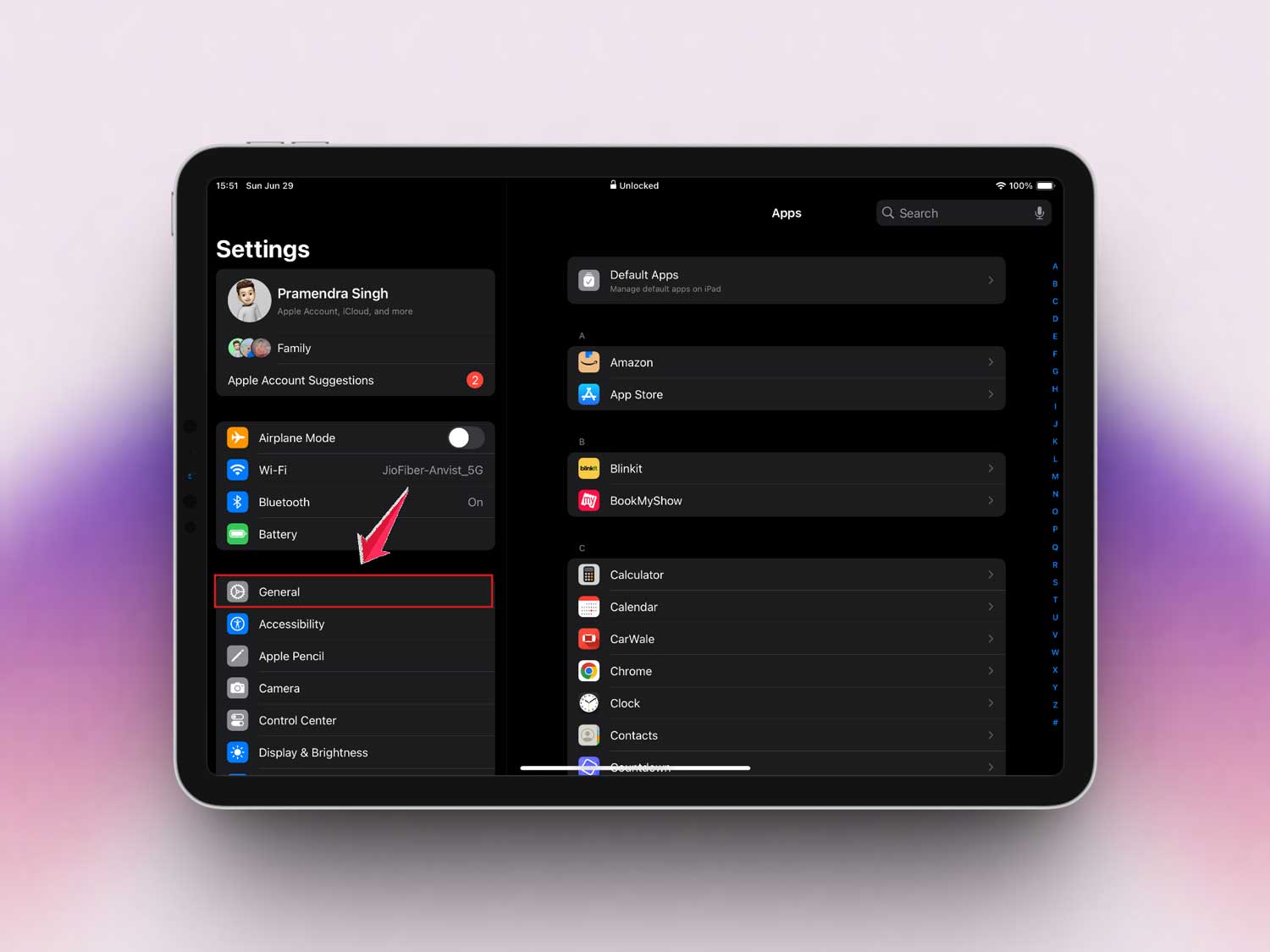
- Then Software Update.

- If you see an update, tap Update Now.
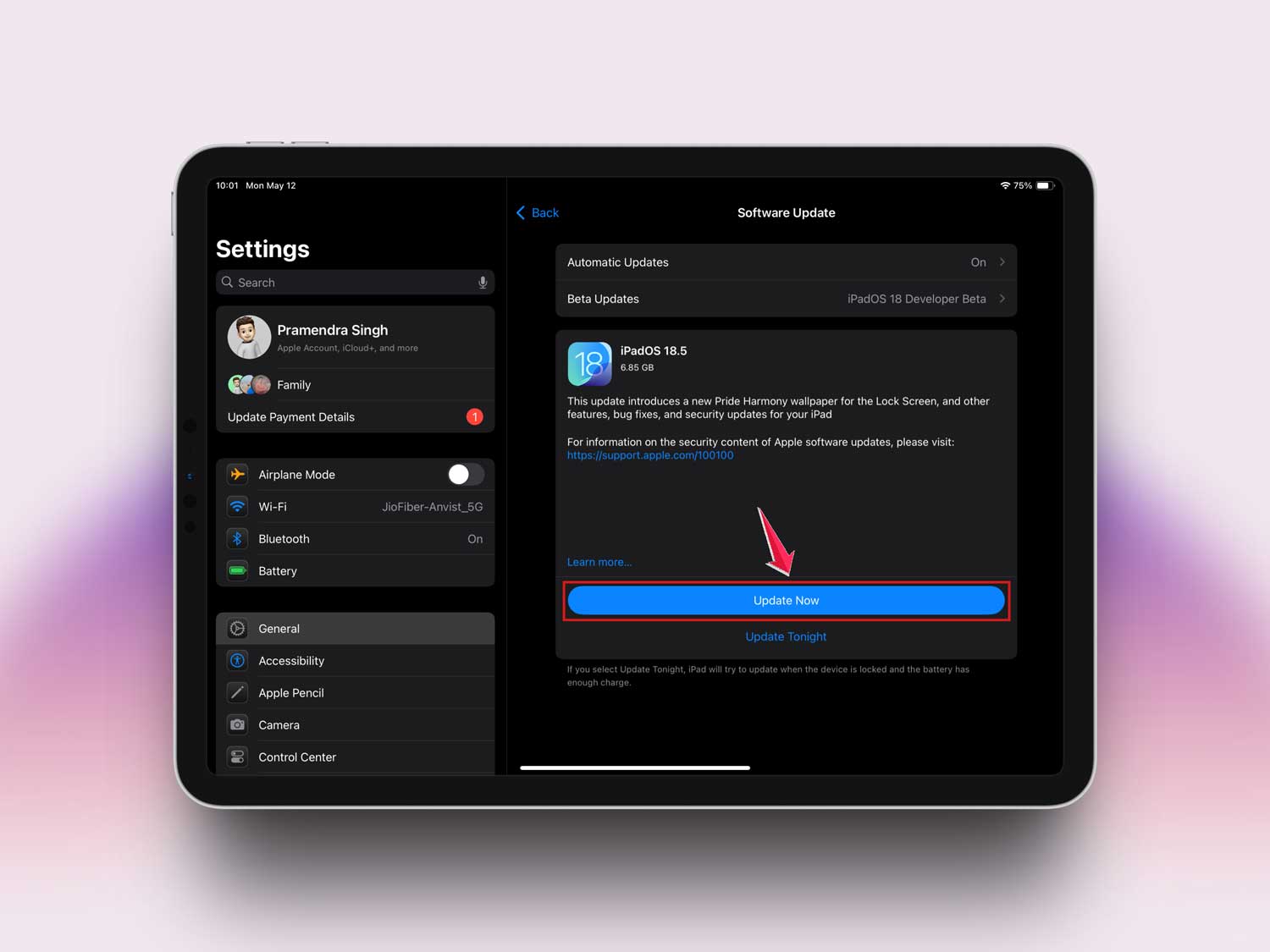
Updates often fix bugs and improve performance. So it’s a good idea to stay current. After updating, test your button again.
#4: Calibrate the Button
If the button still feels weird, you might need to recalibrate it. Don’t worry—it’s easy and quick.
Here’s how you do it:
- Open a default app like Notes.
- Hold the power button until “Slide to power off” appears.
- Release the power button, then press and hold the home button until the app closes.
This little trick helps reset how the button talks to the software. It can make a big difference!
#5: Use AssistiveTouch
If nothing else works, don’t worry—you still have options. You can use an on-screen button called AssistiveTouch. It’s super handy and easy to set up.
Here’s how:
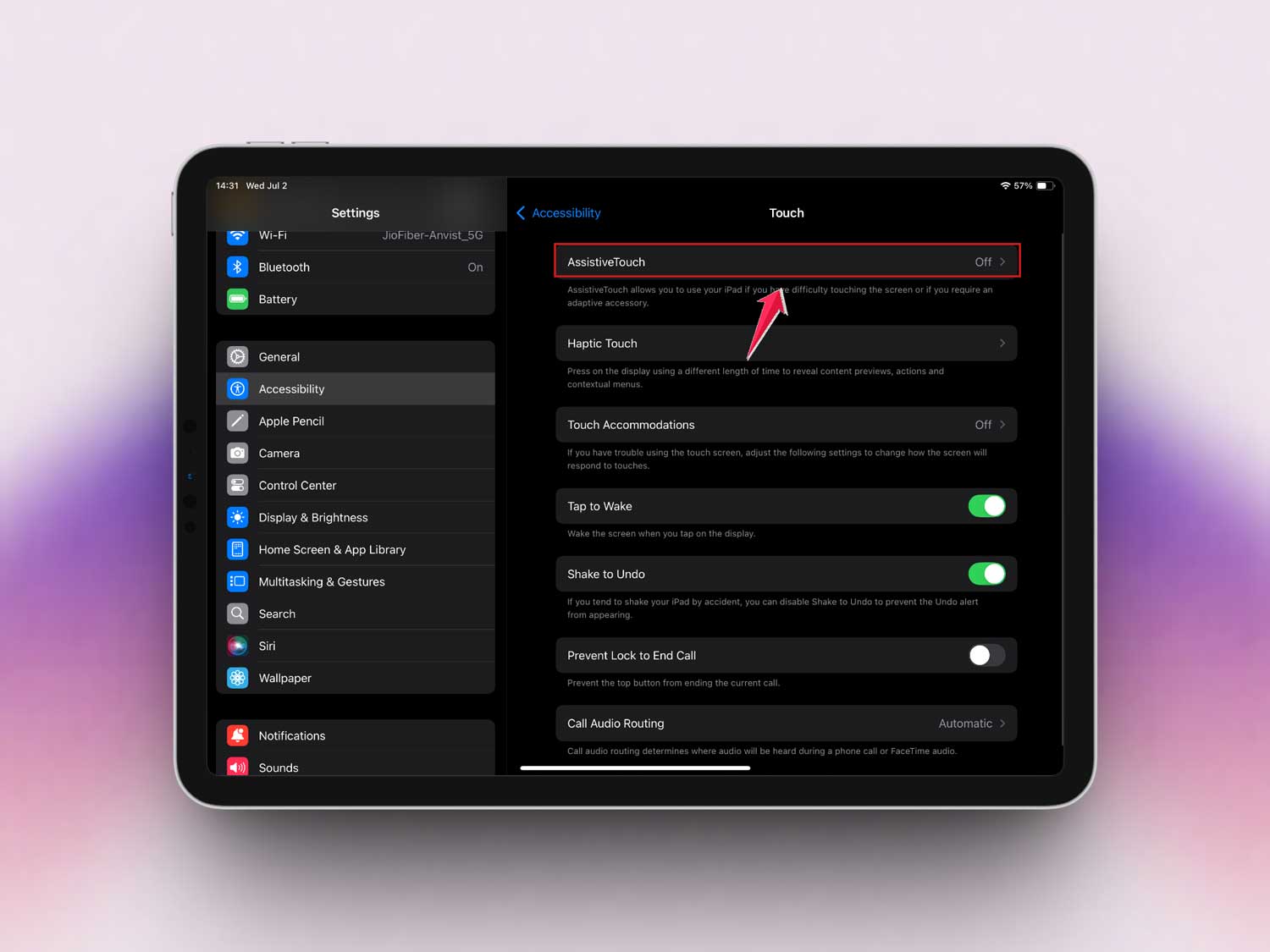
- Go to Settings > Accessibility.
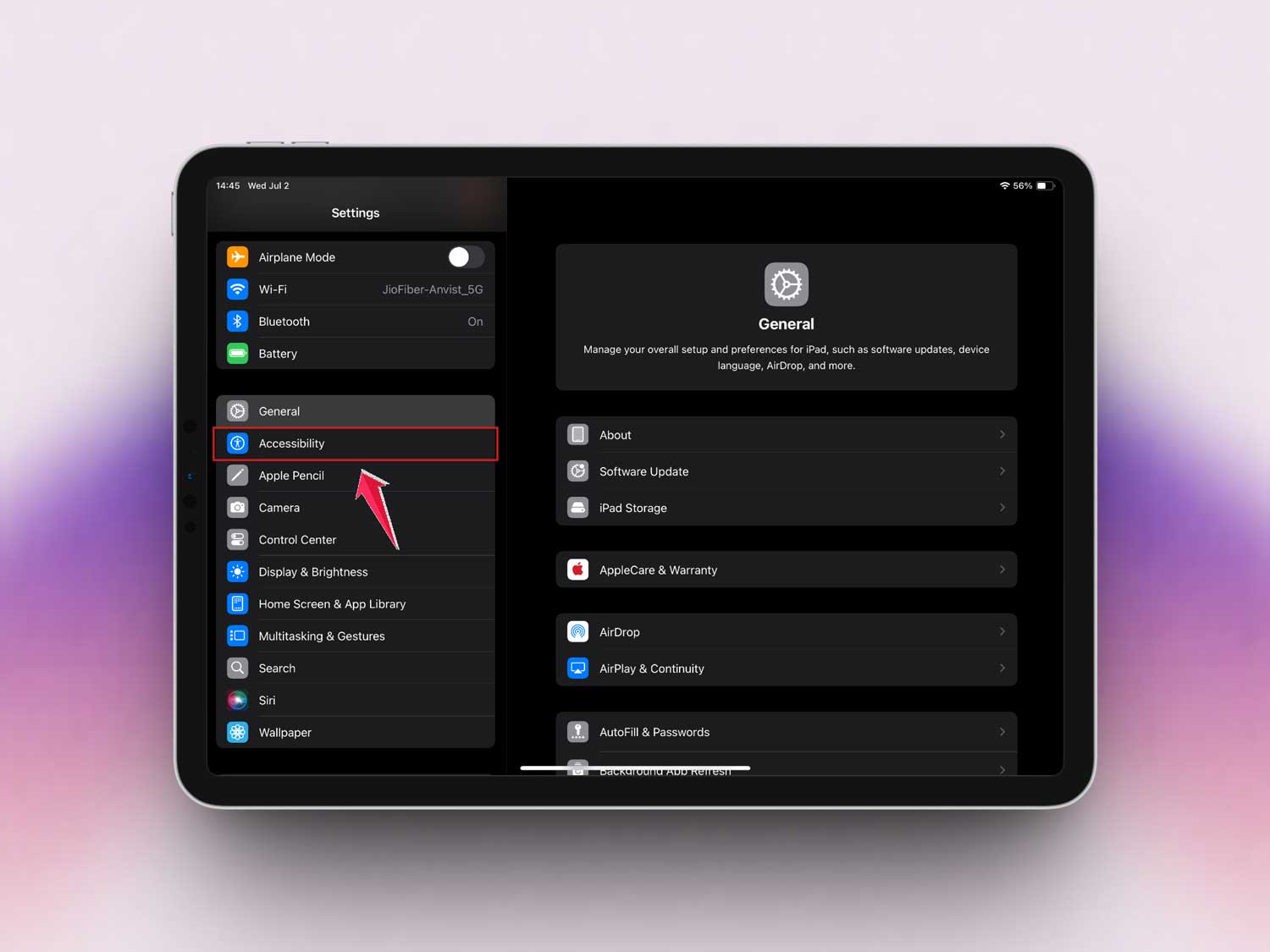
- Tap Touch.

- Then AssistiveTouch.
- Toggle it on.
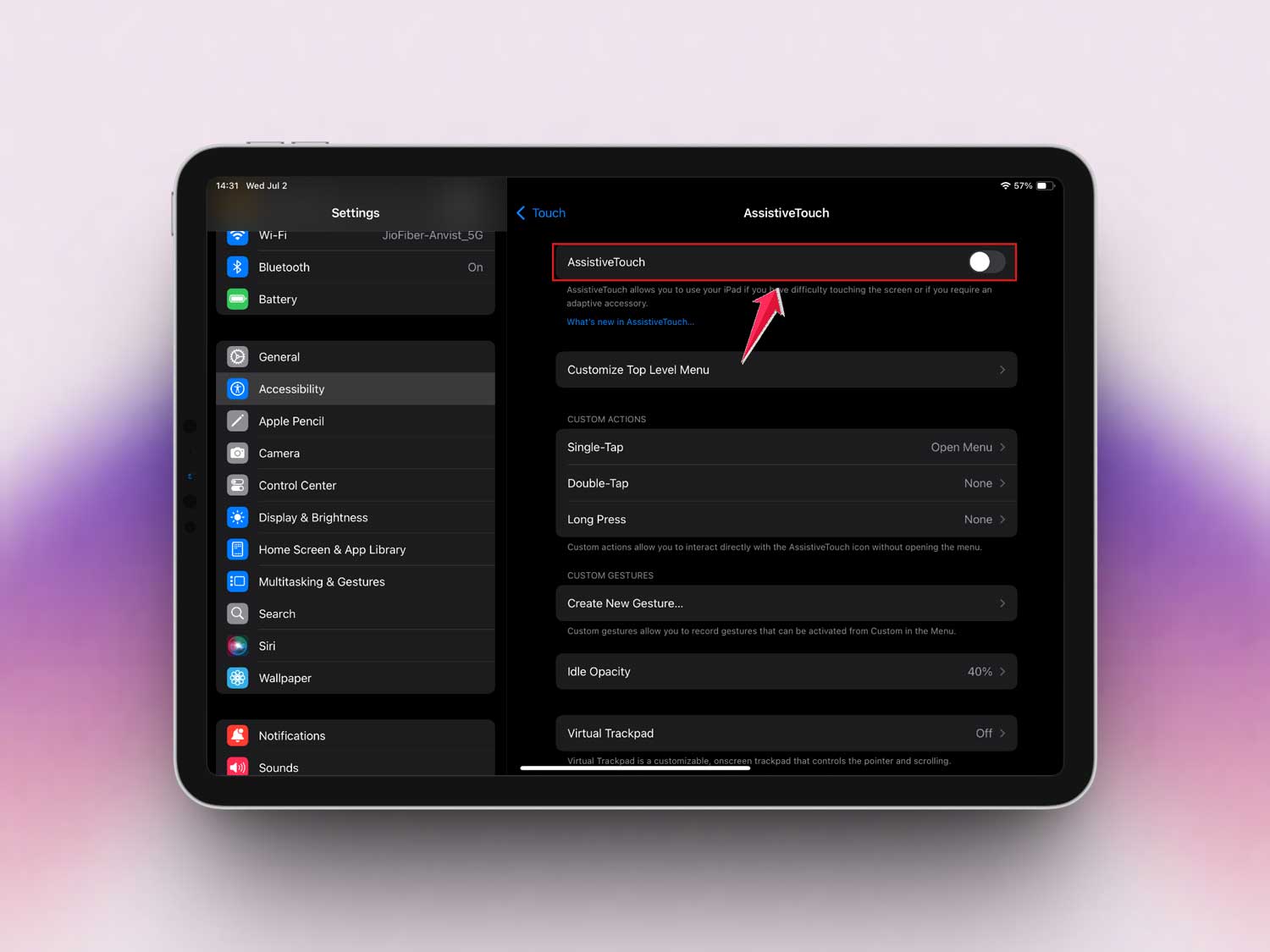
Now you’ll see a little button floating on your screen. You can use it just like the real home button. It’s a lifesaver when the physical button isn’t working right.
We’ve covered a lot of ground here. Hopefully, one of these fixes has brought your home button back to life. But if not, don’t lose hope. There’s still more you can do to keep your iPad running smoothly!
How to Keep Your iPad’s Home Button Working Longer
Now that you’ve fixed the button (or found a workaround), let’s talk about keeping it in good shape for the long run.
1. Keep It Dry
Moisture is the enemy. Even a tiny bit of water can mess up the button. So, keep your iPad away from spills, rain, or sweaty hands. If your hands are damp, just give them a quick wipe before using your iPad.
2. Don’t Overload with Apps
Too many apps running at once can slow down your iPad and make the buttons less responsive. Try closing apps you’re not using. A lighter load means a happier iPad—and a happier home button.
3. Clean It Regularly
A quick wipe every now and then keeps dirt from building up. Use a soft, slightly damp cloth and gently clean around the button. It only takes a minute and can save you a lot of trouble later.
4. Mind the Pressure
I get it—when the button doesn’t respond, it’s tempting to press harder. But don’t! Pressing too hard can actually make the problem worse. Be gentle. Your button will thank you for it.
5. Consider a Protective Case
A good case can protect your iPad from drops, dirt, and moisture. Just make sure it doesn’t cover the home button. You want easy access while keeping it safe from harm.
With these simple habits, you can keep your home button working like new for a long time.
The Takeaway
Dealing with a stubborn iPad home button can be super frustrating, but it’s usually nothing serious.
A simple clean, a quick restart, or setting up AssistiveTouch can make a huge difference. Most of the time, it’s just a little hiccup—not a major disaster.
So don’t stress. Try these easy fixes first. If they work, awesome! If not, you’ve still got options like AssistiveTouch to keep things running smoothly. Your iPad isn’t giving up on you—and you’re not giving up on it either!
Your button deserves some love, too! Let me know in the comments if this helped you out. I’d love to hear your experience!