Did you know that over 100 million people worldwide use Apple Watches? That’s a lot of wrists sporting these smart devices!
If you’re one of those millions and you’ve got a pair of Raycon earbuds, you might be wondering how to get them working together.
Connecting your Raycon earbuds to your Apple Watch isn’t always straightforward.
Sometimes, you might find your devices just won’t pair up, leaving you frustrated and unable to enjoy your music on the go, or wondering how to connect wireless earbuds to a device if things don’t go smoothly.
Sometimes, an Apple Watch not syncing properly can also interfere with new connections.
But don’t worry. That’s why we’re here. In this article, you’ll learn how to connect your Raycon earbuds to your Apple Watch.
We’ll walk you through the process step by step, making it as simple as possible. You’ll also find out which Raycon models work best with Apple Watches and how to troubleshoot common issues.
Let’s get started on making your Raycon earbuds and Apple Watch the perfect pair!
How to connect your Raycon earbuds to your Apple Watch
Did you know that wireless earbuds have become incredibly popular, with millions of people using them daily?
If you’ve got a pair of Raycon earbuds and an Apple Watch, you might be wondering how to get them working together. Don’t worry. It’s easier than you might think!
Before you start
First things first, you need to make sure your Raycon earbuds are compatible with your Apple Watch.
Not all models work together, so it’s worth checking this before you begin. Here’s what you need to do:
- Make sure both your earbuds and Apple Watch are charged properly.
- Update your devices to the latest software versions.
- Keep your earbuds and watch close to each other during the process.
Now, let’s get your devices connected!
Step 1: Prepare your Raycon earbuds
To get your earbuds ready for pairing:
- Take your earbuds out of their case.
- If they don’t turn on automatically, press and hold the button on each earbud until you see a light flash.
Your earbuds are now in pairing mode and ready to connect.
Step 2: Set up your Apple Watch
Now it’s time to get your Apple Watch ready:
- On your Apple Watch, tap the digital crown to go to the Home screen.
- Find and tap the “Settings” app.
- Scroll down and tap “Bluetooth”.
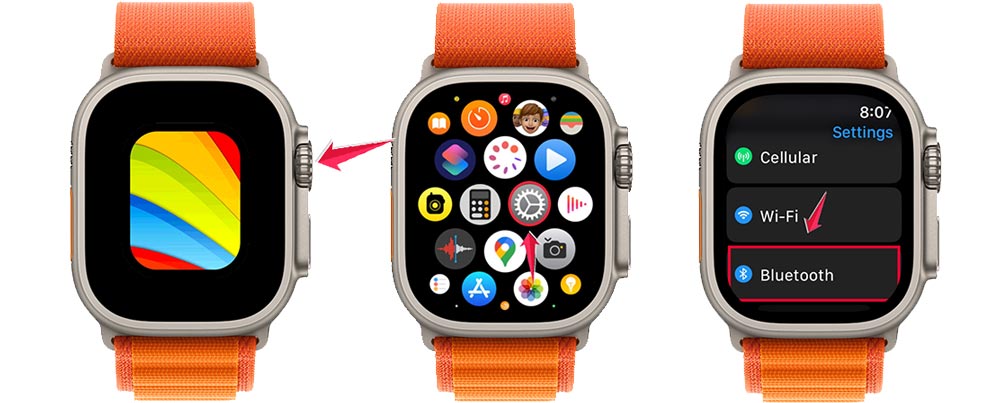
Your watch is now looking for nearby devices to connect with.
Step 3: Connect your devices
Here’s where the magic happens:
- In the Bluetooth menu on your Apple Watch, look for your Raycon earbuds in the list of devices.
- When you see your earbuds listed, tap on their name.
- Wait a moment while your watch connects to the earbuds.
If all goes well, you should see a message saying your earbuds are connected.
Step 4: Test your connection
To make sure everything’s working:
- Try playing some music or a podcast on your Apple Watch.
- You should hear the audio coming through your Raycon earbuds.
If you can’t hear anything, try adjusting the volume on your watch or reconnecting your earbuds.
Troubleshooting tips
If you’re having trouble connecting:
- Try putting your earbuds back in their case and taking them out again.
- Or you might need to reset wireless earbuds to clear old connections.
- Restart your Apple Watch.
- Make sure your devices are close to each other.
- Check that both devices have enough battery power.
Remember, technology isn’t always perfect. If you’re still having issues, don’t hesitate to reach out to Raycon or Apple support for help.
Now that your Raycon earbuds are connected to your Apple Watch, you can enjoy your favorite tunes, podcasts, or even take calls right from your wrist.
It’s a great way to stay connected while you’re on the go, whether you’re working out, commuting, or just relaxing at home.
The takeaway
Connecting your Raycon earbuds to your Apple Watch doesn’t have to be a headache. With the right steps, you can enjoy wireless audio from your wrist in no time.
Remember, the key is to ensure both devices are compatible, charged, and up-to-date. Start by enabling Bluetooth on your watch, then put your earbuds in pairing mode.
Select them from the list on your watch, and you’re good to go. If you encounter issues, don’t forget the basics: check battery levels, keep devices close, and restart if needed.
Many people think connecting wireless earbuds to a smartwatch is complicated, but it’s simpler than you might expect. With a bit of patience and the right guidance, anyone can do it.
So go ahead and give it a try. Once you’ve got your Raycon earbuds paired with your Apple Watch, you’ll wonder how you ever lived without this convenient setup.
Whether you’re working out, commuting, or just relaxing, you’re now ready to enjoy your audio wirelessly and hassle-free.
We’d love to hear about your experience connecting your Raycon earbuds to your Apple Watch. Share your thoughts in a comment below!