Has your iPhone gone missing? If you’ve already tried the “Find My” app without success, don’t lose hope.
There’s another way to protect your device that many iPhone users don’t know about. You can also explore ways to find a lost iPhone even if it’s dead or offline if you’re struggling with traditional methods.
Your iPhone has a unique identifier called the IMEI number. Think of it as your phone’s digital fingerprint. This special code can be a powerful tool if your iPhone is stolen and other methods haven’t worked.
In this article, you’ll learn how to use your iPhone’s IMEI number to block a stolen device. You’ll find out what an IMEI number is, where to locate it (even if you don’t have your phone), and how to use it to protect your lost iPhone.
By the end, you’ll have a backup plan to secure your device if the worst happens.
How blocking an iPhone with an IMEI number works
Your iPhone has a special code called the IMEI number. Think of it as your device’s digital fingerprint.
When you first set up your iPhone, your service provider records this number. It’s unique to your phone. No other device in the world has the same IMEI as yours.
If your iPhone is ever stolen, you have a powerful tool at your disposal. You can report the IMEI number to your service provider.
They’ll then add this number to a blacklist. Don’t worry. This isn’t just a local list. Mobile network operators worldwide share this information to help protect your device.
Here’s where this method really shines. Even if a thief tries to use your iPhone with a different SIM card, they’ll hit a wall.
Because of the blacklisted IMEI number, no mobile network will allow that phone to connect. Your stolen iPhone essentially becomes useless to the thief, keeping your device and your data safe.
Remember, knowing your IMEI number before anything happens is key. It’s a good idea to write it down or store it somewhere safe, separate from your phone.
This way, you’re always prepared to protect your device if the worst happens.
How to block a stolen iPhone using its IMEI number
Important note: Only block your iPhone when you’re absolutely certain you won’t find it again. Once blocked, all data on your iPhone will be permanently erased.
Even if you recover your iPhone later, that data won’t be retrievable. So, be completely sure before taking this step.
1. File a police report
If you’re sure your iPhone is stolen, first report it to the police. This isn’t just to help recover your phone, but also to protect yourself legally.
If someone uses your phone for illegal activities, you’ll have documentation proving you reported it stolen.
Visit your local police station, explain the situation, and get a copy of the report. You might also learn tips that can help you find someone else’s lost iPhone if you’re helping someone else, too.
2. Erase your iPhone remotely
To prevent anyone from accessing your personal information, you’ll need to erase all data on your iPhone remotely. Here’s how:
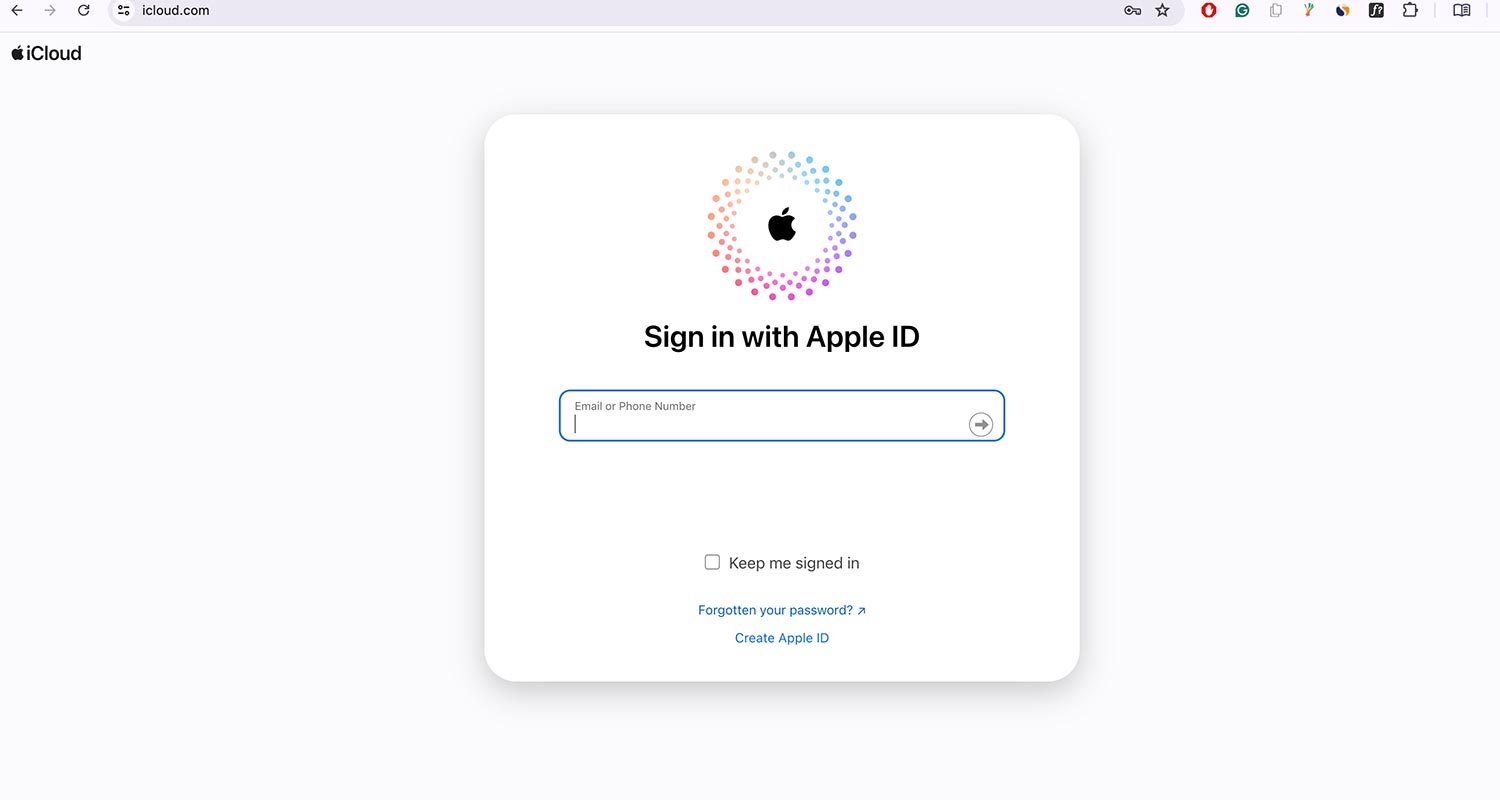
- On a computer or another device, go to iCloud.com.
- Sign in with your Apple ID.
- Click on “Find MY“.
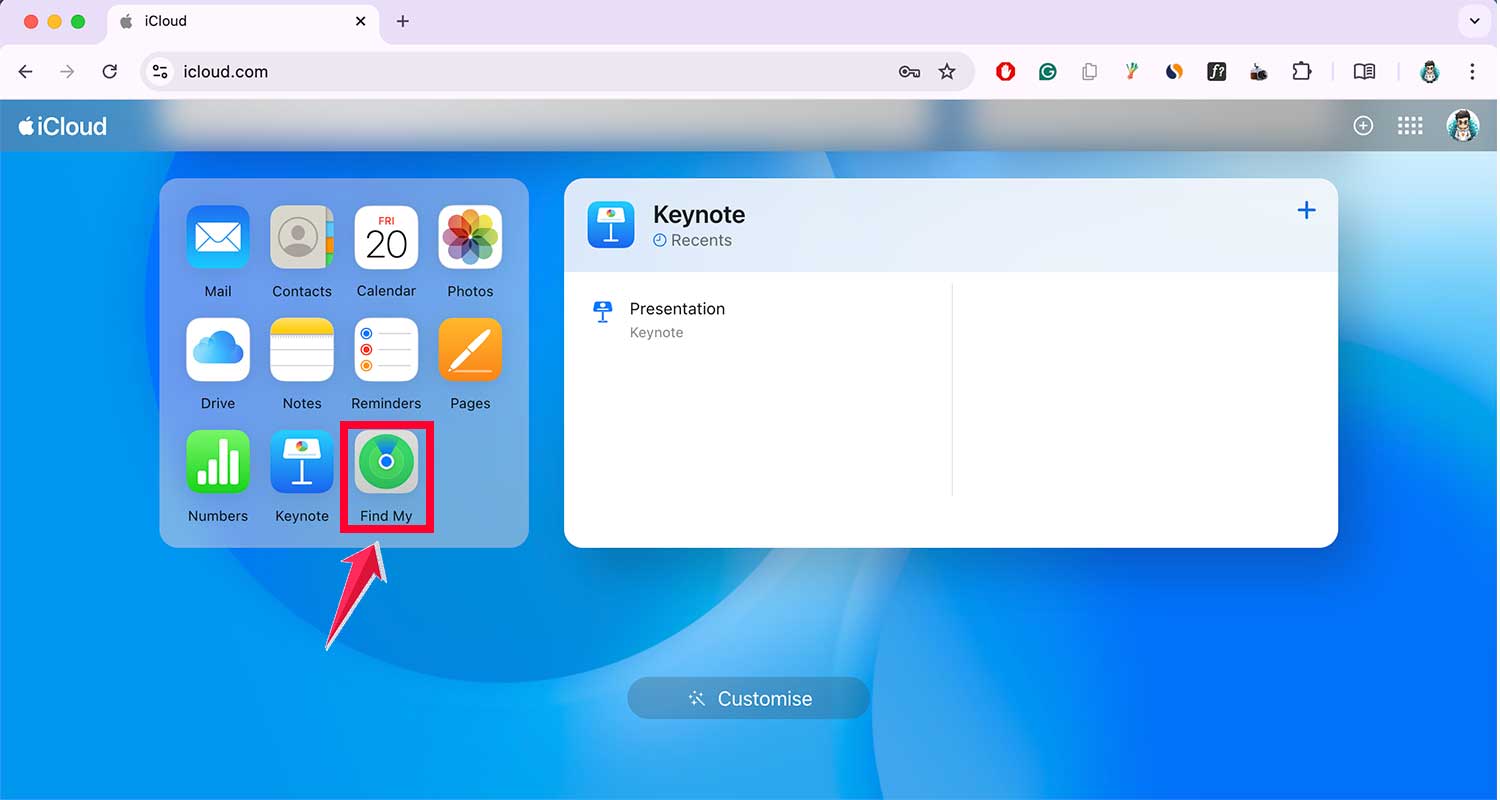
- Select “All Devices” at the top.
- Choose your lost iPhone from the list.

- Click the “Erase this device” button.
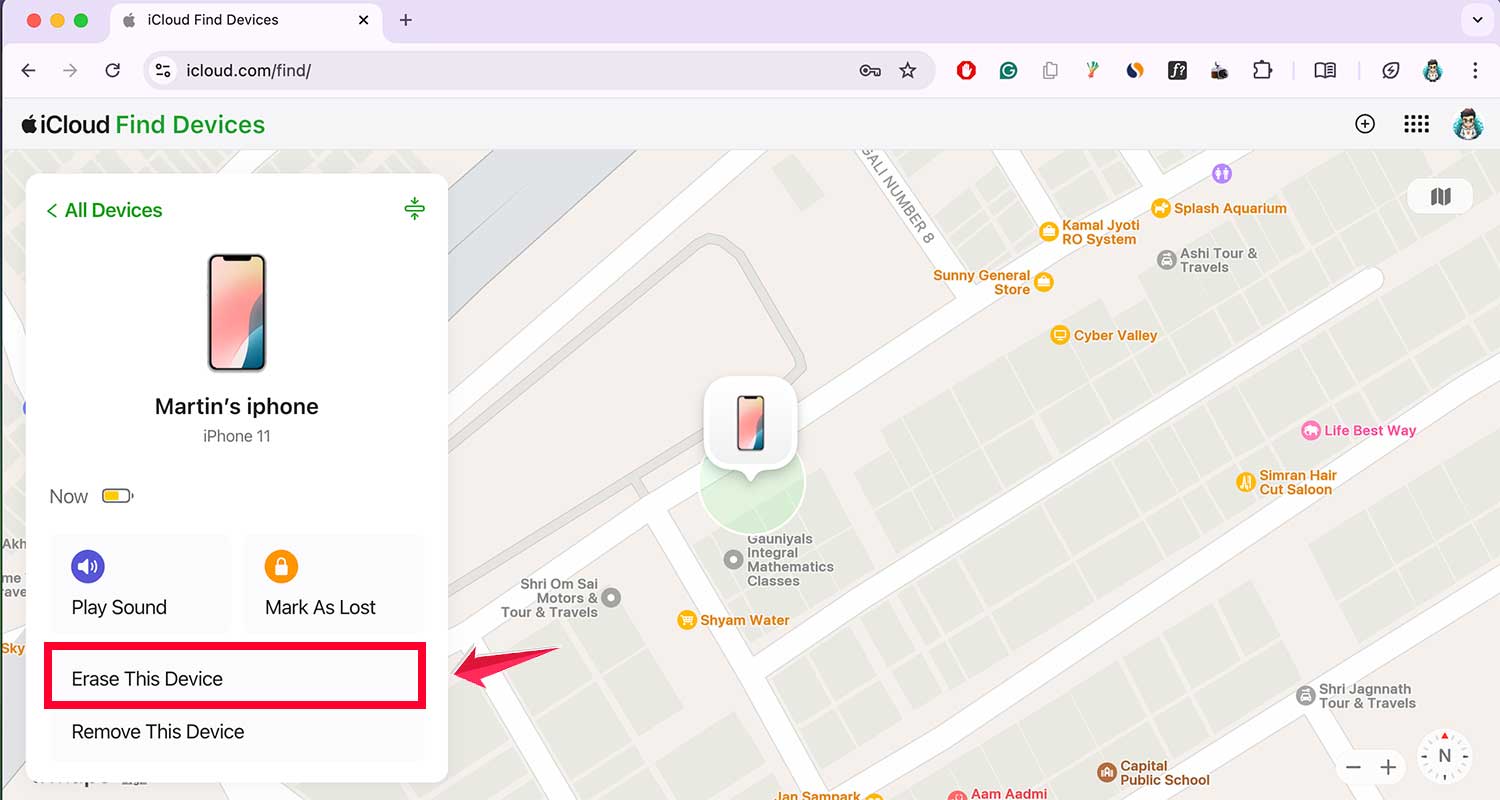
This will remove all your personal data from the iPhone, ensuring your privacy.
3. Locate your iPhone’s IMEI number
Your iPhone’s IMEI number is a unique 15-digit identifier. Here are several ways to find it:
- Check the iPhone’s original box for a barcode label with the IMEI number.
- Look at your purchase receipt or invoice.
- If you still have access to your iCloud account, go to iCloud.com > Find iPhone > choose your device > click on “i” for information.
- Check your iTunes backup if you’ve recently synced your iPhone.
- Look in your email for any correspondence from Apple that might include the IMEI.
- Contact your mobile carrier. They should have the IMEI on record.

Pro tip: It’s a good idea to write down your IMEI number and keep it in a safe place for future reference.
4. Contact your phone carrier
With the IMEI number in hand, call your phone carrier’s customer service. They can block your iPhone from being used on any network.
Be prepared to provide:
- Your name.
- Your iPhone’s IMEI number.
- The police report number (if applicable).
Once you provide these details, they’ll add your iPhone to a blacklist, preventing it from being used with any carrier worldwide.
5. Use AppleCare+ if you have it
If you have AppleCare+, you can make a claim for your lost or stolen iPhone. Here’s what to do:
- Sign in with your Apple ID.
- Don’t remove the lost iPhone from your Apple account yet.
- File a claim for your lost or stolen iPhone.
AppleCare+ covers up to two incidents of loss or theft every 12 months. Remember, the “Find My” feature must have been active when you lost your iPhone for this coverage to apply.
6. Contact your insurance company
If you have phone insurance through your carrier or a third-party provider, it’s time to put it to use.
Give them a call and file a claim. Keep in mind that they’ll likely ask for the police report and IMEI number, so have those handy.
7. Protect your accounts
Now, let’s secure your digital life. As an extra precaution, change the passwords for all accounts you accessed on your iPhone.
You might also want to remove unauthorized devices connected to your iPhone to further protect your accounts.
Focus especially on your Apple ID, email, and any financial apps. This step is crucial in preventing any unauthorized access to your personal information.
8. Safeguard your finances
Did you use Apple Pay or store credit card information on your iPhone? If so, you’ll want to contact your bank and credit card companies right away.
Let them know about the potential security risk. They can help monitor your accounts for any suspicious activity and take preventive measures.
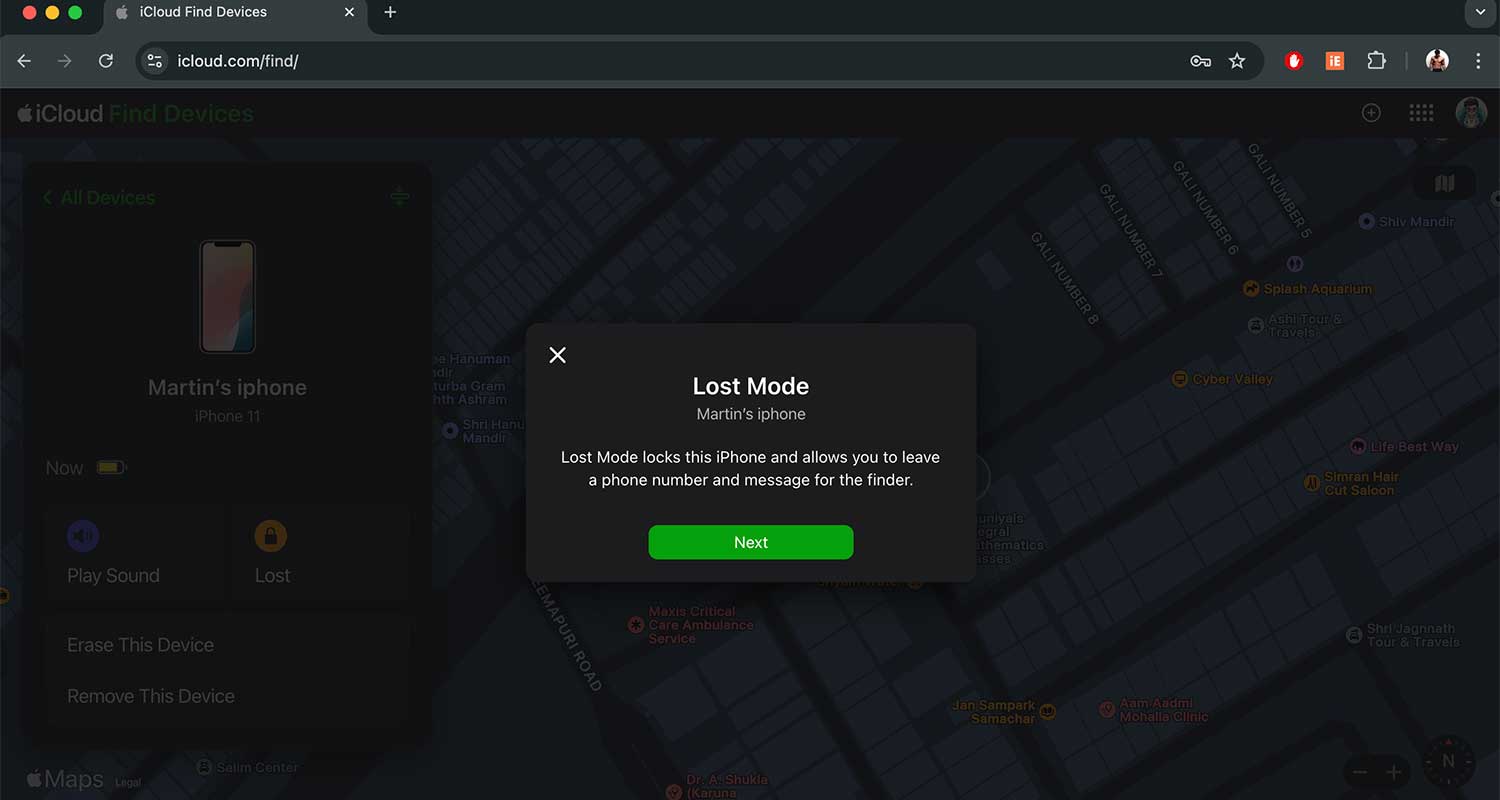
9. Use the “Mark as Lost” feature
If you haven’t erased your iPhone yet, there’s another useful tool at your disposal.
Use the “Mark as Lost” feature in Find My iPhone. You can also track iPhone location history if you’re trying to backtrack where your device might have gone.
This clever feature locks your device with a passcode and displays a custom message with your contact information on the lock screen.
It’s like putting up a “if found, please return” sign on your digital device.
10. Keep an eye out
Don’t forget to check local online marketplaces and second-hand stores. Your stolen iPhone might pop up for sale.
But remember, if you do spot it, don’t try to confront the seller yourself. That could be dangerous. Instead, inform the police and let them handle it safely.
The takeaway
Losing your iPhone can be a big problem. It’s not just about the device itself but all the personal information it contains. But don’t worry. You’re not helpless if your iPhone is stolen.
Your iPhone’s IMEI number is a powerful tool. It’s like a unique fingerprint for your phone that can help protect you.
By reporting this number to your carrier and the police, you can prevent anyone from using your stolen iPhone. This makes it much less appealing to thieves.
Some people think there’s nothing they can do once their phone is gone. That’s not true. Acting quickly can make a big difference. If your device ends up recovered or disabled, there are even options to unlock an iPhone without iTunes.
Remember, the most important thing is to be prepared. Write down your IMEI number and keep it somewhere safe. Know what to do before anything happens.
That way, if your iPhone ever does go missing, you’ll be ready to take action right away. Your quick response can make all the difference in protecting your digital life.
We’d love to hear your thoughts. Have you ever had to deal with a lost or stolen iPhone? Share your experience in the comments below.