You’ve just finished your workout, and you’re looking at the numbers on your Apple Watch.
Maybe you’re wondering, “Are these calorie and heart rate readings even accurate?”
It’s a great question, and you’re not alone in asking it. Just like how you might question certain features in your messaging apps, it’s natural to wonder about your fitness tracker’s accuracy.
Your Apple Watch can actually be quite reliable when it comes to tracking your calories burned and heart rate.
But here’s the thing. Its accuracy depends a lot on how you set it up and use it.
Let’s talk about why this matters to you right now. You’ve put in the effort to exercise, and you want to know if the data you’re seeing reflects your hard work.
Understanding your watch’s accuracy can help you better track your fitness progress and make informed decisions about your health.
In this article, you’ll learn how to make sure your Apple Watch is giving you the most accurate readings possible.
We’ll cover some simple steps you can take to improve its precision, so you can trust the numbers you see after your workouts.
Ready to get the most out of your Apple Watch?
How accurate is your Apple Watch for tracking calories?
When you’ve just finished your workout, and you’re looking at the calorie count on your Apple Watch, you might be wondering if those numbers are trustworthy.
Let’s break it down for you in simple terms.
Your Apple Watch is pretty good at tracking calories, and here’s why:
- It’s smart about your basic calorie needs. Your watch knows how many calories you’d burn just by existing. It uses your age, gender, and size to figure this out. Doctors and scientists agree that this method works well.
- It’s great at tracking your active calories. When you’re moving around and exercising, your Apple Watch shines. It’s one of the best devices out there for tracking the extra calories you burn through activity. Of course, to get the most out of your device, it’s important to keep it properly charged.
But remember, for the best results, you need to set up your watch correctly. Make sure your personal details are up to date in your watch settings.
Now, if you’re finding it hard to close those Activity rings, don’t worry.
You can adjust your exercise goals to better fit your fitness level. This can help keep you motivated and on track.
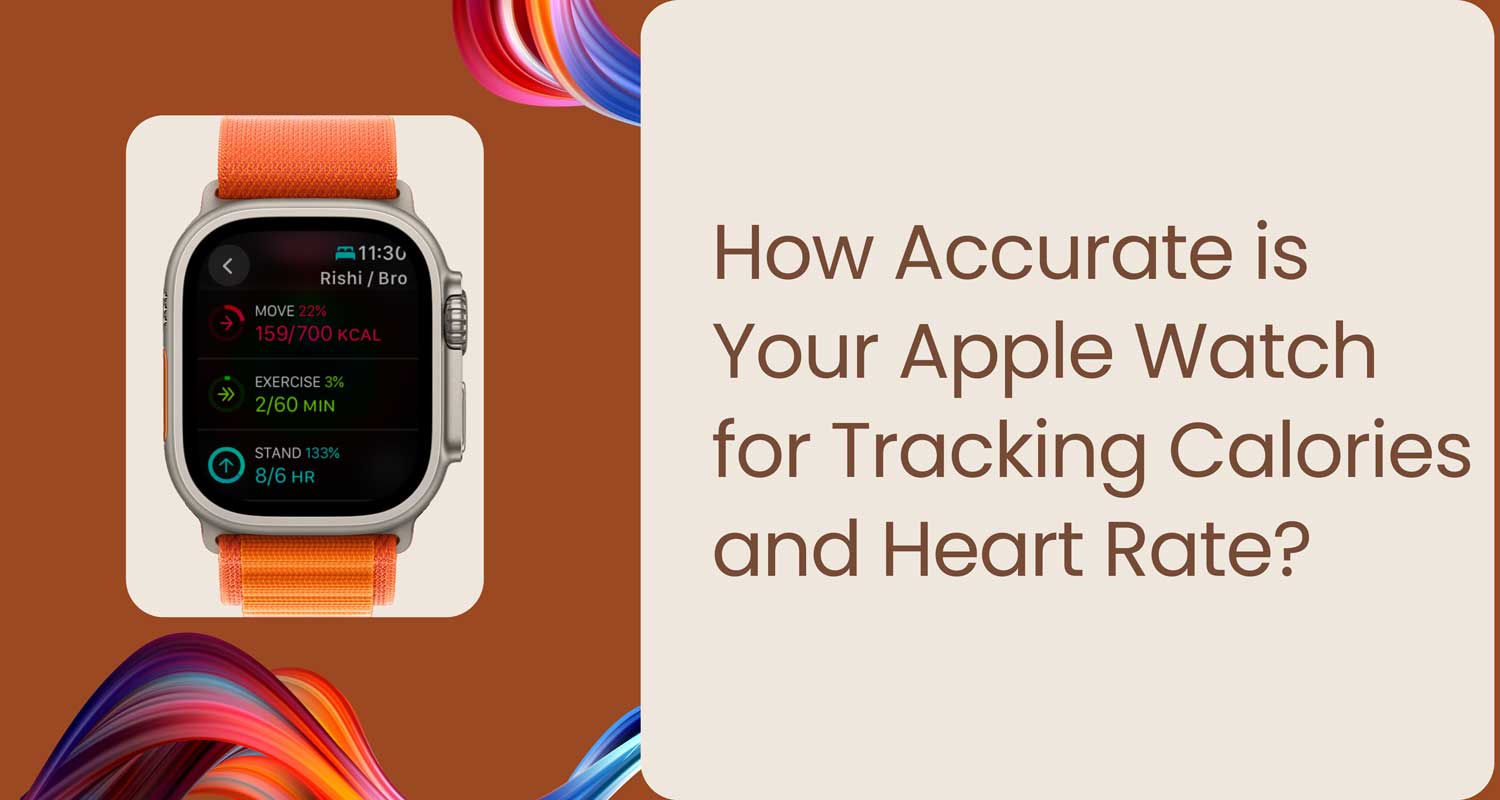
Tap on the crown on your Apple Watch, click on the fitness app, and click in the top left corner to see your stats. Scroll down to change your goals.
What about heart rate accuracy?
Your Apple Watch is also good at measuring your heart rate, especially during exercise.
It even tracks how quickly your heart rate goes back to normal after you work out, which is a great way to see how fit you are.
For the most accurate heart rate readings, try to wear your Apple Watch as much as possible.
And if you need to make adjustments to your recorded workouts, you can always edit your workout data later.
For the most accurate heart rate readings, try to wear your Apple Watch as much as possible.
How does your Apple Watch calculate calories?
Your watch uses your heart rate and movement to figure out how many calories you’re burning. It looks at:
- Your personal health data (like your height and weight).
- How many calories do you burn at rest?
- How many extra calories do you burn when you’re active?
As you move throughout the day, your watch adjusts its calorie count to give you an accurate picture of how much energy you’re using.
Remember, your Apple Watch is a handy tool for tracking your fitness, but it’s not perfect.
Use it as a guide to help you stay active and healthy, but don’t stress too much about the exact numbers. The most important thing is that you’re moving and taking care of yourself!
How to improve calorie tracking accuracy on your Apple Watch
After your workout, you want to make sure your Apple Watch is giving you the most accurate information possible.
Here’s how you can make your watch work better for you:
1. Update your health details
Your watch needs to know your current weight and height to give you accurate readings. Here’s how to update this:
- Open the Health app on your iPhone.
- Tap “Show All Health Data“.
- Find “Height” and “Weight” and update them.
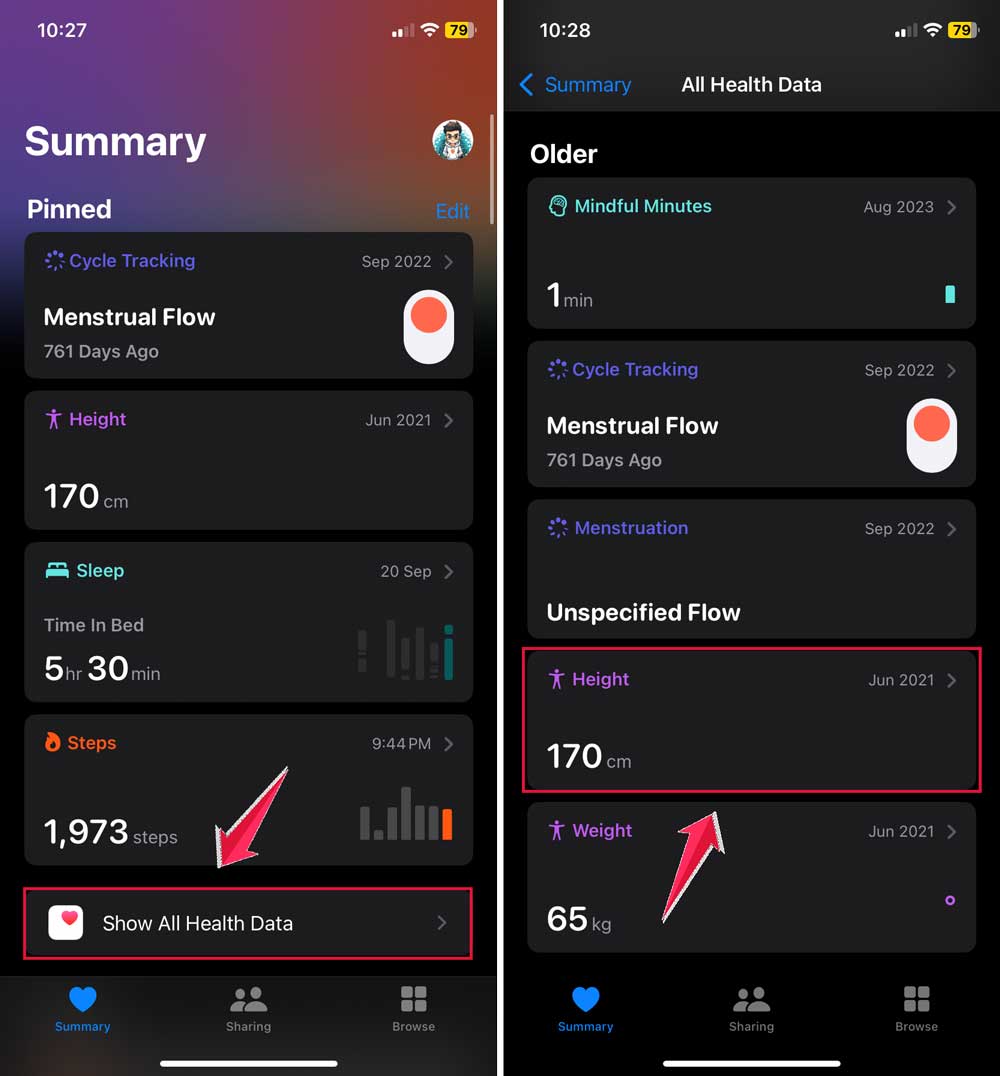
- Tap “Add Data“, put in your new information, and hit “Add“.
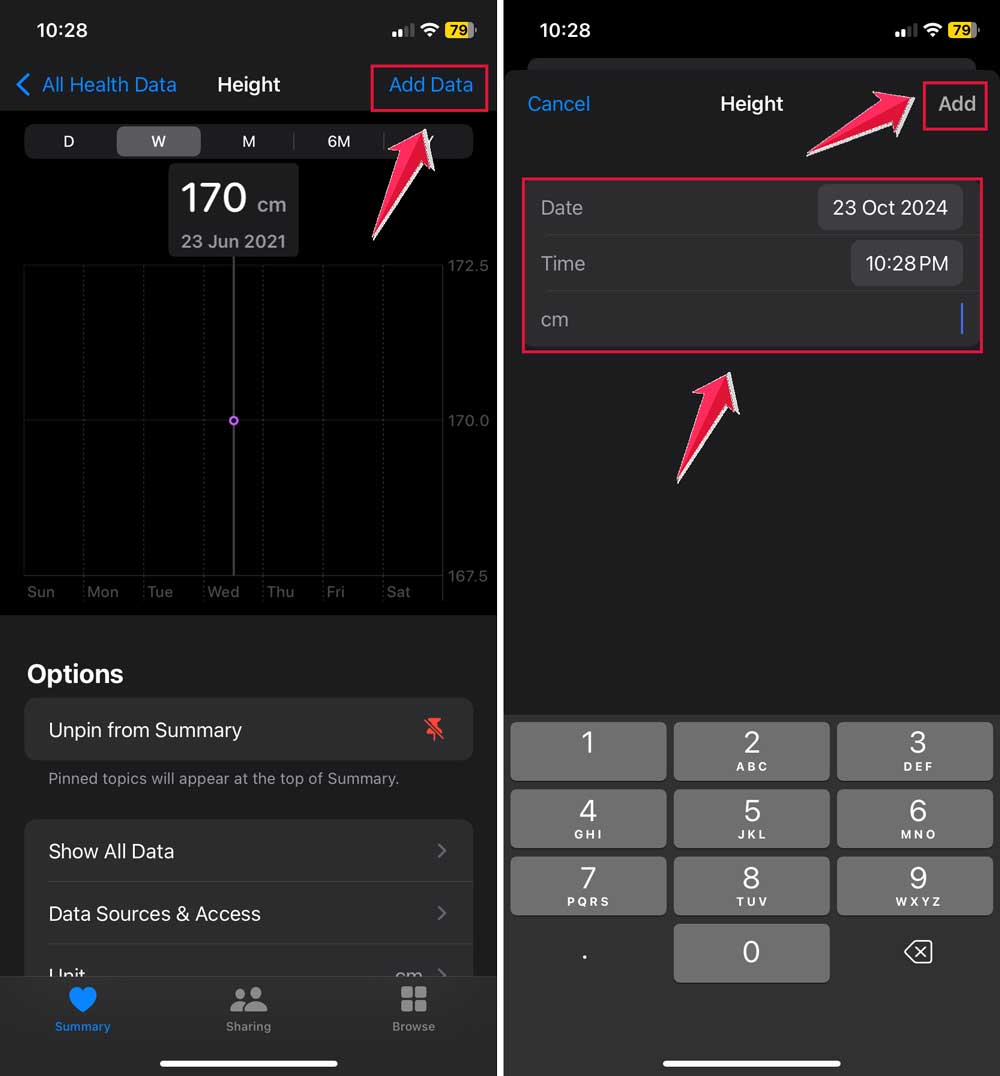
Keeping this information up-to-date also helps track your exercise minutes more accurately.
2. Wear your watch correctly
Make sure your Apple Watch fits snugly on your wrist. If it’s too loose, it might not measure your heart rate correctly.
3. Choose the right workout
When you’re exercising, tell your watch what you’re doing. Pick the right activity in the Workout app on your watch. This helps it track your movements better.
4. Calibrate your watch
If you’ve already updated your details, you can make your watch even more accurate by calibrating it. This helps your watch understand how you move and how fit you are.
Remember: If you have a tattoo on your wrist, it might affect how well your watch reads your heart rate.
Keep this in mind if you notice any strange heart rate readings. Similarly, other device issues, like app crashes, can sometimes affect overall performance.
Different types of calories on your Apple Watch
Your Apple Watch tracks two types of calories:
- Active Calories: These are the extra calories you burn when you’re moving around and exercising.
- Total Calories: This includes your active calories plus the calories your body burns just by existing (like breathing and digesting food).
Your watch keeps track of both, giving you a full picture of how many calories you’re burning each day.
How to set up your Apple Watch for the best results
If your Apple Watch is new, or you want to make sure it’s set up correctly, here’s what to do:
- If it’s a new watch, follow the instructions on the screen for your first outdoor walk or run. This helps your watch learn about how you move.
- Make sure your watch can track how you move:
- On your iPhone, go to Settings.
- Tap “Privacy & Security“, then “Location Services“.

- Scroll down and tap “System Services“.
- Turn on “Motion Calibration & Distance“.
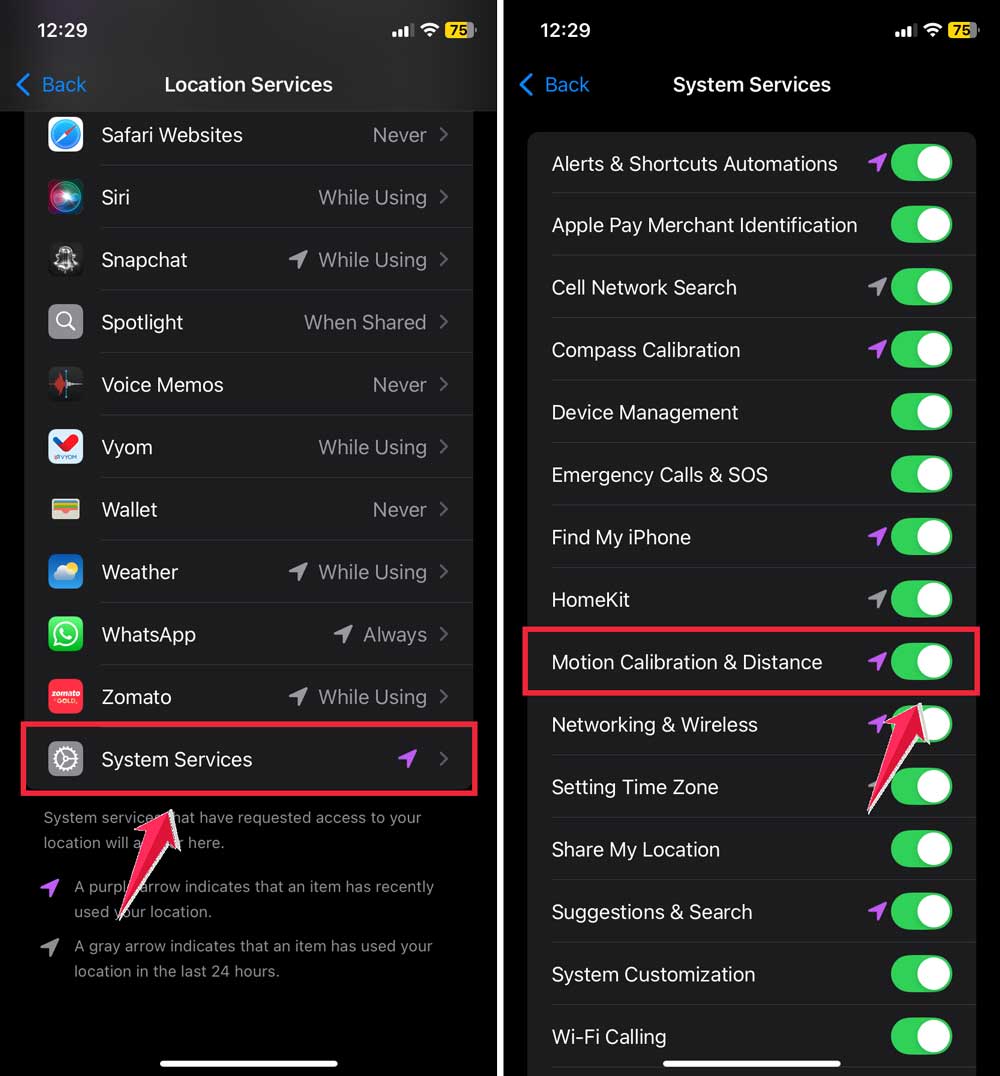
This helps your watch better understand how far and how fast you move.
By updating your information and adjusting these settings, you’re helping your Apple Watch give you more accurate information about your workouts and daily activity.
Remember, the goal is to use this information to help you stay active and healthy, not to obsess over exact numbers. Keep moving and enjoy your fitness journey!
The takeaway
Your Apple Watch is a helpful tool for tracking your fitness, but it works best when you use it correctly. Here’s what you need to remember:
First, keep your personal information up to date. Your watch needs to know your current height and weight to give you accurate readings. It’s like telling a friend about your latest health changes. Your watch needs to know too!
Second, wear your watch snugly and choose the right workout type when you exercise. This helps your watch understand what you’re doing and how hard you’re working. It’s like giving your watch a front-row seat to your workout.
Lastly, don’t worry too much about the exact numbers. Your Apple Watch is a guide, not a perfect measure. The most important thing is that you’re moving and taking care of your health.
Use the information from your watch to motivate you, not stress you out. And while you’re focusing on your health, don’t forget about your device’s health too. Taking care of your battery is just as important for long-term use!
Remember, your Apple Watch is here to help you on your fitness journey. Keep moving, stay active, and let your watch be your cheerleader along the way!
What do you think about this advice? Let us know in a single-line comment below.