You’ve tried calling someone, but it rings once and then goes quiet. Or maybe it jumps straight to voicemail. Now you’re wondering. Is their phone off, or are they ignoring you?
I get it. That feeling of not knowing can mess with your head, especially if it’s someone close. Let’s clear things up today.
I’ll walk you through real signs that help you figure out whether their phone is actually off, or if something else is going on.
No guesses. Just straight-up ways to check.

The call rings once or goes straight to voicemail
This is the most common clue. You call someone, and instead of the phone ringing multiple times, it either rings once or skips right to voicemail.
This usually means one of three things:
- Their phone is off
- The battery has died
- They’re in an area with no network
If it’s off, you might even hear a message like “The number you’re calling is currently switched off.” That’s a dead giveaway.
But here’s the twist. Some phones do this even when they’re on Airplane Mode or out of coverage. So don’t rely on this alone.
Try sending a message and watch what happens
If you’re using iMessage, send them a text and look closely. Does it say “Delivered” under the message?
If not, that means their phone didn’t receive it.

And if your previous messages used to be blue but now turn green, that’s a big hint. It could mean their phone is off or they’ve lost network. or even turned off iMessage. Happens more often than you think.
On WhatsApp, check the ticks. One grey tick means the message was sent, but not delivered. That happens when their phone is off, dead, or not connected to the internet.
So if you’re seeing no delivery signs for a while, there’s a good chance their phone is off.
Check if they’ve been active online
You probably know their usual patterns. Maybe they’re always active late at night or reply quickly.
Now, suddenly they’ve been offline for hours, even though you’ve sent texts or tried calling?
That might be another clue. If someone who’s normally online hasn’t posted, viewed stories, or replied. Chances are their phone is off or they’re disconnected.
This doesn’t prove anything by itself. But when combined with the other signs, it adds to the picture.
Use location sharing if you have access
If they’ve shared their location with you through Find My or Google Maps, you can check if it’s still updating.
When a phone is off or dead, it stops sending location updates.
If the location has frozen at a certain time and hasn’t moved since. That’s another signal that the phone is probably turned off.
You’ll also notice that Find My will say “Location not available” if the phone’s offline.
Try calling with a hidden number
This one’s smart if you suspect you’ve been blocked, or just want to test things without calling directly.
You can hide your number and call them. How? Let’s see.
On iPhone, you can try these settings. Simply go to Settings > Apps > Phone > Show My Caller ID, and turn it off.
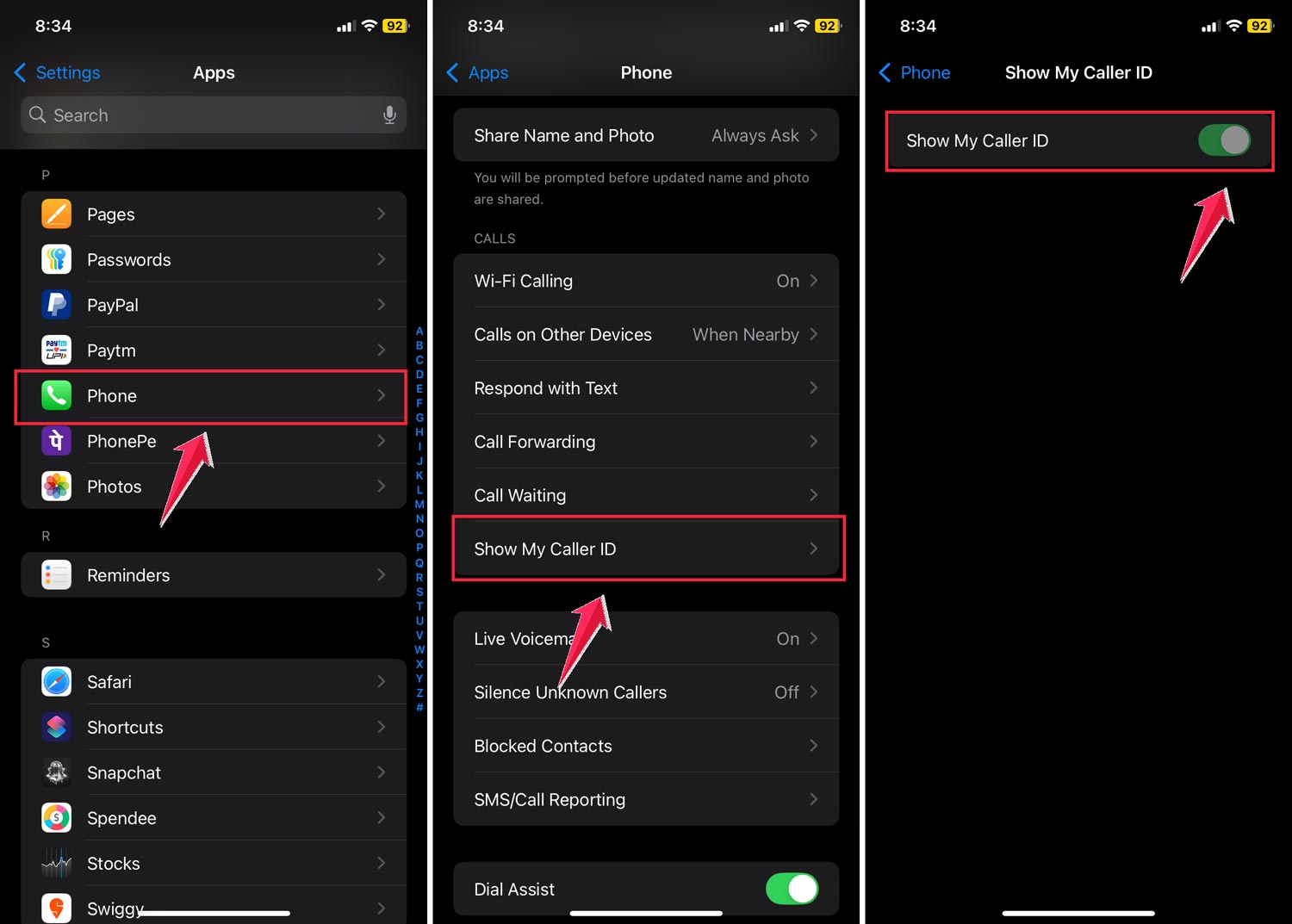
Or dial #31# before their number.
In the US, you can also use *67 before the number.
Now call. If it behaves exactly the same way. straight to voicemail or one ring. Then their phone might actually be off.
But if the phone rings normally with your hidden number, and not when you call normally… You might be blocked.
Still not sure? Try these signs
You don’t need to be a tech wizard. Just observe how the phone behaves.
If it rings many times before voicemail. The phone is on, but maybe it’s on silent.
If it rings once and cuts off. It might be off, dead, or unreachable.
If it gives a “not reachable” beep-beep sound. Usually, that means the network can’t find the device, like when it’s turned off or out of coverage.
You might also receive a message like: “This user is currently not reachable.” That’s another hint the phone’s probably off.
Is the phone on airplane mode?
A phone in Airplane Mode behaves just like it’s off. You won’t be able to call or text. Location won’t update either.
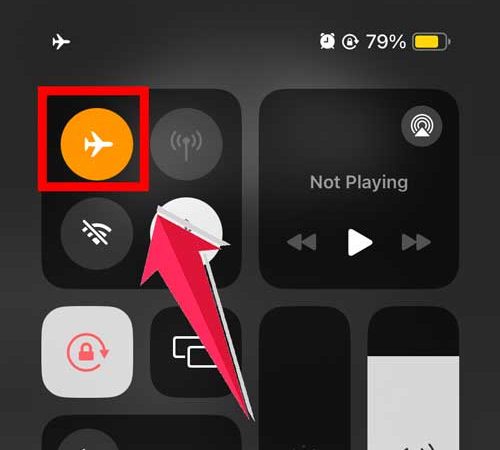
So don’t panic if you see all the same signs. Airplane Mode fools everyone.
Why do people use it?
- To save battery
- To disconnect for a while
- To stop notifications while sleeping or working
So it might not be personal. They could just be taking a break.
What about “Do Not Disturb” mode?
This is another trick phones use to avoid interruptions.
If their phone is on DND, it won’t ring. Your call might still go through, but they won’t get notified.
Some phones send the call straight to voicemail or silence it. If you call twice within a few minutes, the second call might go through. That’s one way to test.
On iPhones, you might see a little moon icon beside their name if you’re texting them. That’s a subtle hint they’re on Do Not Disturb.
Can you tell if the phone is off without calling?
Yes, you can. kind of.
You’ll have to look at indirect clues:
- Check message delivery status
- Watch their last seen on apps like WhatsApp, Telegram, or Instagram
- Look for location update delays
- Use a different number or hidden call to test
None of these is 100% reliable alone. But when you put them together, they give you a strong sense.
What if you’ve been blocked?
Sometimes it’s not the phone. It’s the person.
If you’re blocked:
- Your calls will ring once and go to voicemail
- Your iMessages won’t say “Delivered”
- On WhatsApp, only one grey tick will show
- You won’t see their last seen or status updates
- Location sharing stops completely
These are almost identical to the signs of a phone being off, which is why blocking can be confusing.
The only way to really know? Try calling or messaging from another number. If it goes through easily, you’re probably blocked.
Can you track a phone if it’s dead?
Only partially. Apps like Find My iPhone or Google Find My Device can show the last known location, but they won’t track live movements once the phone turns off.
So if it’s dead or off, you’ll only see where it was last seen.
That can still be helpful if you’re trying to reach someone who may have lost their phone.
What should you do when someone isn’t reachable?
First of all. You don’t need to panic at all.
People turn off their phones for all kinds of reasons.
Maybe they’re in a meeting. Or they’re asleep. Who knows?
They will only be able to tell you once they get back to you.
You should also understand that sometimes, people need a break just for personal reasons and it has nothing to do with yoy.
It’s normal. And most of the time, they’ll respond once they’re back online.
If it’s important, leave a voicemail or text. You can also reach out through email, a different app, or even call a mutual friend.
But the key here is patience. Jumping to conclusions or overthinking doesn’t help.
The takeaway
You won’t always get a perfect answer.
You can tell if someone’s phone is off by looking at signs. These include call behavior, message delivery, location updates, and online activity.
Just remember one thing always.
If calls go straight to voicemail, messages don’t get delivered, and there’s no activity online, the phone is likely off or dead.
And if you’re not sure, try using a hidden number or reaching out in another way.
People aren’t always ignoring you. Sometimes their phone really is just off.
Stay calm, give it time, and they’ll likely get back to you when they’re available.