You just sent a voice message. Now you’re staring at your phone, wondering. Did they hear it? Or are they ignoring it?
You’re not alone. Lots of iPhone users send voice messages and never really know what happens after hitting send.
That can feel confusing. Especially if the message was important, emotional, or just something you didn’t feel like typing out.
So let me help you out. I’ll show you exactly how to tell if your voice message was heard. Whether you use iMessage or WhatsApp, I’ve got you covered.
What happens when you send a voice message on an iPhone
When you send a voice message through iMessage, it doesn’t look like much. just a play button and maybe a timer.
But under that, Apple adds a small status. And that’s where the magic is.
If it says Delivered, your message reached their phone. But that doesn’t mean they listened to it yet.
If it changes to Played, then yes. They definitely listened. That’s your confirmation.
Sometimes you’ll also see Kept, which just means they saved it so it won’t disappear.
But here’s the catch: this only works if they have Read Receipts turned on.
If they’ve turned those off, you won’t see Played. even if they heard it. You’ll only see Delivered, and the rest is a mystery.
How to check if someone played your audio message
It’s easy once you know where to look.
Just go back to the conversation and find the voice message you sent.
Look directly underneath the audio bubble. You’ll either see Delivered, Played, or Kept.
If it still says Delivered after a long time, there’s a chance they haven’t heard it yet. Or, they have Read Receipts turned off.
And if you see Played. They heard it. Simple as that.
What about WhatsApp? Can you tell them too?
Yes, and honestly, it’s even easier than iMessage.
When you send a voice message on WhatsApp, the microphone icon and waveform start out grey.
Once they listen, those turn blue. That’s your visual confirmation that the message was heard.
If you see two blue checkmarks next to the message, that also means it was played.
Just keep in mind. If the other person has read receipts turned off, you won’t get blue checks. The voice message might be played, but you won’t see the color change.
Can you see how many times they listened?
No, you can’t.
Whether you’re using iMessage or WhatsApp, you only get to know that it was heard once. That’s it.
You won’t know if they replayed it five times. Or if they laughed so hard they hit replay again.
If you’re curious, you’ll have to ask them. The apps won’t tell you.
Can they see how many times you played their audio?
Nope. That’s private too.
If you replay a voice message on WhatsApp or iMessage, the sender has no clue how many times you’ve listened.
All they get is that first “Played” status or blue ticks. After that, it’s your secret.
So if you’re trying to remember what someone said or just enjoy hearing their voice again. You can replay it freely. No pressure.
What does Kept mean on iMessage?
Sometimes after someone listens to your audio message, you’ll see a word pop up underneath: Kept.
This means they chose to save your voice message instead of letting it disappear.
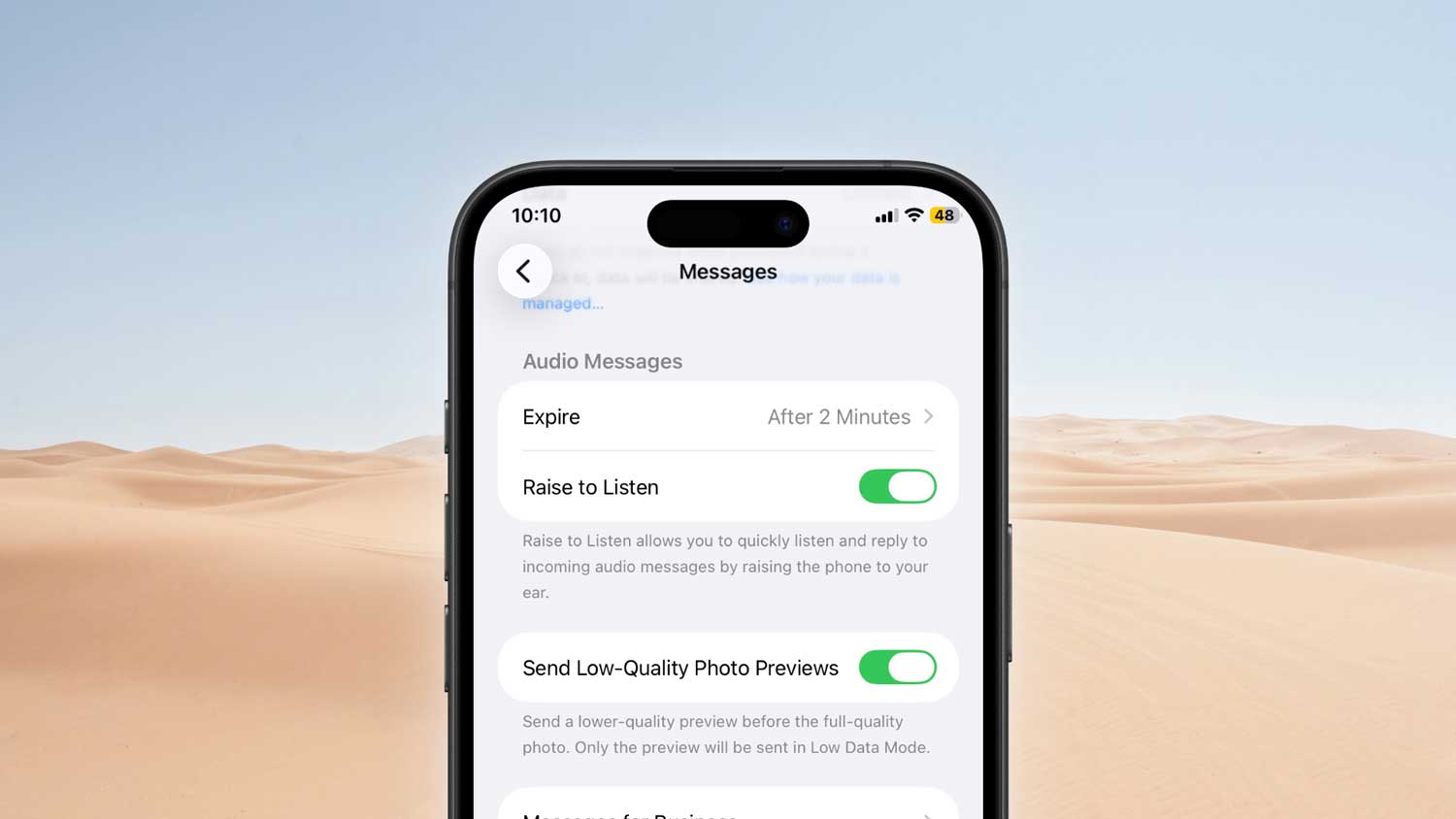
By default, iMessage audio messages are set to expire two minutes after being played. But if they tap Keep, that message stays in the chat forever.
So if you see Kept, take it as a compliment. It usually means your message meant something. Or they want to listen again later.
How to stop your audio messages from disappearing.
Don’t want your voice messages to vanish after two minutes? You can change that.
Here’s how to make iMessage keep all your audio messages forever:
- Open the Settings app on your iPhone.
- Then go to Apps.
- Scroll down and tap Messages.

- Find the Audio Messages section. Tap Expire.
- Change it from After 2 Minutes to Never.
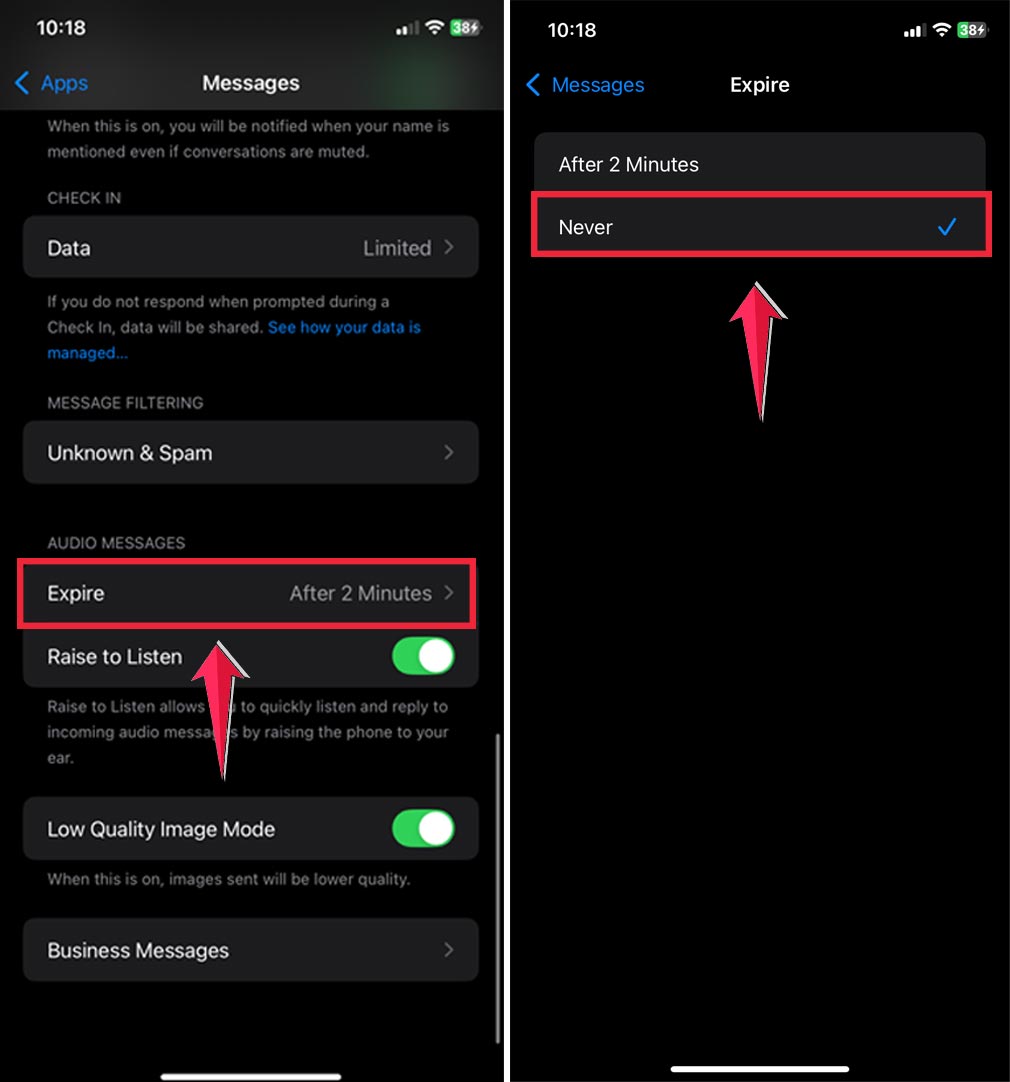
Now your messages won’t disappear unless you delete them manually. You can replay them anytime. even months later.
Do messages expire if they’re not opened?
No. Not right away.
The timer for disappearing starts only after the message is played.
So if someone hasn’t opened your audio yet, it’ll just sit there in the chat. waiting.
Once they hit play, the two-minute countdown begins (unless they changed their settings or hit Keep).
On WhatsApp, you don’t have to worry about expiration. Audio messages there never disappear on their own.
What if Safari is glitchy and you need to reinstall it?
Just a quick side note in case you’re juggling other issues. Like your Safari app acting weird.
Safari can’t be deleted, but you can refresh it by offloading the app. If you’re interested in that, I can walk you through it in another guide.
Let’s stay focused on voice messages for now.
Can you tell if you sent a voice message by mistake?
Yes, and it’s super easy to check.
Just open the conversation where you think it might have happened.
Scroll through your recent messages. Look for the little audio wave icon or play button.
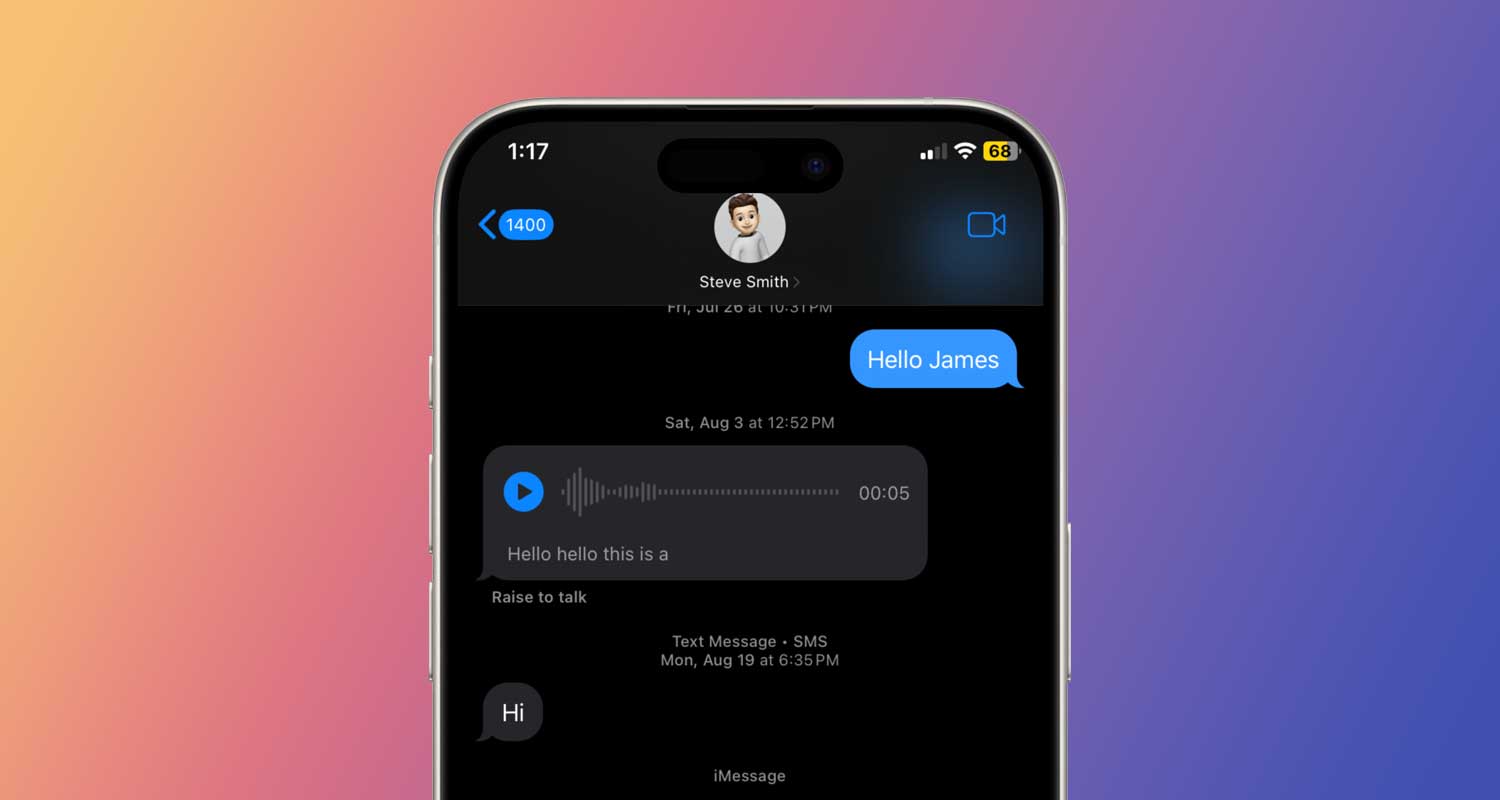
If you see it there and don’t remember sending it. Then yes, you probably did.
If your settings are still on the two-minute auto-delete, the message might already be gone. So if you don’t see anything, you’re in the clear.
Can someone tell if you listened to a voice message on WhatsApp?
Yes, they can. If read receipts are turned on.
The moment you play a voice message, the microphone icon turns blue on their screen. And the two blue checkmarks appear next to the message.
So even if you don’t reply, they’ll know you heard it.
Want to prevent that? You can turn off read receipts in WhatsApp’s settings. But keep in mind. This also means you won’t be able to see when others listen to your messages either.
What if someone turned off their read receipts?
Then it gets tricky.
On both iMessage and WhatsApp, read receipts control a lot more than just typing indicators.
If someone turns them off, you won’t see Played in iMessage. And on WhatsApp, you won’t see blue ticks. even if they listened.
You’ll only see Delivered. Which means your message reached their phone. but not whether they heard it.
If you absolutely need to know, the only option is to ask them directly.
Do voice messages disappear after sending?
That depends on the app.
On iMessage, audio messages disappear two minutes after being played, unless the recipient taps Keep or changes their settings.
On WhatsApp, messages stay in the chat forever. unless you or the other person deletes them manually.
So if you’re using iMessage and don’t want a message to vanish, make sure to hit Keep. Or change your expire setting to Never.
What if your voice message is stuck on Sending?
If your audio message just sits there saying Sending for too long, it might be a connection issue.
Check your internet. Switch between Wi-Fi and mobile data. Sometimes that’s all it takes.
If that doesn’t help, try restarting the app. Or force close Messages and open it again.
Worst case? Restart your iPhone. That usually clears out whatever’s stuck.
How to make sure your voice messages are always saved.
If you send or receive a lot of audio messages, you should make sure they’re not disappearing without you realizing it.
Here’s how to double-check your settings:
- Open Settings.
- Scroll down and go to Apps.
- Tap Message.
- Scroll to Audio Messages. Tap Expire.
- Change it to Never.
This way, you don’t have to worry about voice messages vanishing before you get a chance to replay them.
The takeaway
Now you finally know what’s going on with your audio messages.
If you’re using iMessage, look for the word Played under your message. That’s your sign, it’s been heard. If it just says Delivered, they haven’t listened yet. Or they’ve got read receipts off.
On WhatsApp, it’s even easier. Just watch the play icon. When it turns blue, you’re good. That means they listened.
You’ll never see how many times someone replayed your voice message. But that’s okay. The important thing is that it was heard.
And now that you know how all this works, you can send your next voice message with total confidence.
Got more questions about audio messages or iPhone tricks? Drop a quick comment. I’d love to help.