Is your phone feeling slow, heavy, or just plain full? Don’t worry—you’re not the only one. That “storage almost full” pop-up can feel like a slap in the face, especially when you’re just trying to take one more photo or download an app. It’s frustrating, right?
Most of us don’t realize how quickly we fill up our phone’s space. Photos, videos, and apps seem harmless at first, but they quietly pile up. Then there are those sneaky cache files—tiny bits of data apps store to run faster.
They seem helpful, but over time, they eat up space. And let’s not forget system updates. They’re important, sure, but they also gobble up your gigabytes before you know it.
But here’s the good news—you don’t need to delete your favorite apps. Seriously. You just need to manage your storage a little smarter.
I’m going to walk you through some simple, effective tips to free up space while keeping the apps you love. Sound good? Let’s dive in and fix that storage problem together.
What’s Really Taking Up Space on Your Phone?
Let’s break it down. If you’re wondering why your phone keeps running out of space, it’s probably because of a few common things you might not even notice.
1. Your phone is full of hidden clutter
You and I both know how easy it is to let stuff pile up. Files, screenshots, documents—they hide in the background. It’s like a messy drawer you never open… until you need something and realize it’s jam-packed.
2. Too many photos, videos, and music files
We all love capturing memories and saving our favorite songs. But let’s be honest—these are major space hogs. A few high-quality videos or albums can eat up several gigabytes without warning.
3. Cache files and app data build up fast
Apps store data to load faster. That sounds helpful, right? But over time, that data becomes useless clutter. It’s like digital dust. You never see it, but it’s there, filling up your storage bit by bit.
4. System updates take up more space than you think
Every time your phone updates, it saves files in the background. They’re needed, but they also take up more space than you might expect. If you don’t clean up after updates, things get tight fast.
5. How you use your phone matters
Do you have apps you never open? Old games? Downloaded files you forgot about? All of that adds up. Even if you’re not using them, they’re still taking up valuable space.
Now that you know what’s causing the problem, let’s fix it. You don’t have to delete your apps. You just need to clean up smartly. Let’s go!
Best Ways to Free Up Storage Without Deleting Apps
#1 Clear App Cache
This is one of the easiest things you can do, and it works like magic. Apps build up cache so they load faster, but over time, that cache turns into junk. Clearing it can give you a quick storage boost.
Here’s how to clear app cache:
- Go to Settings on your phone.
- Tap Apps or Applications.
- Select any app you use a lot or that seems slow.
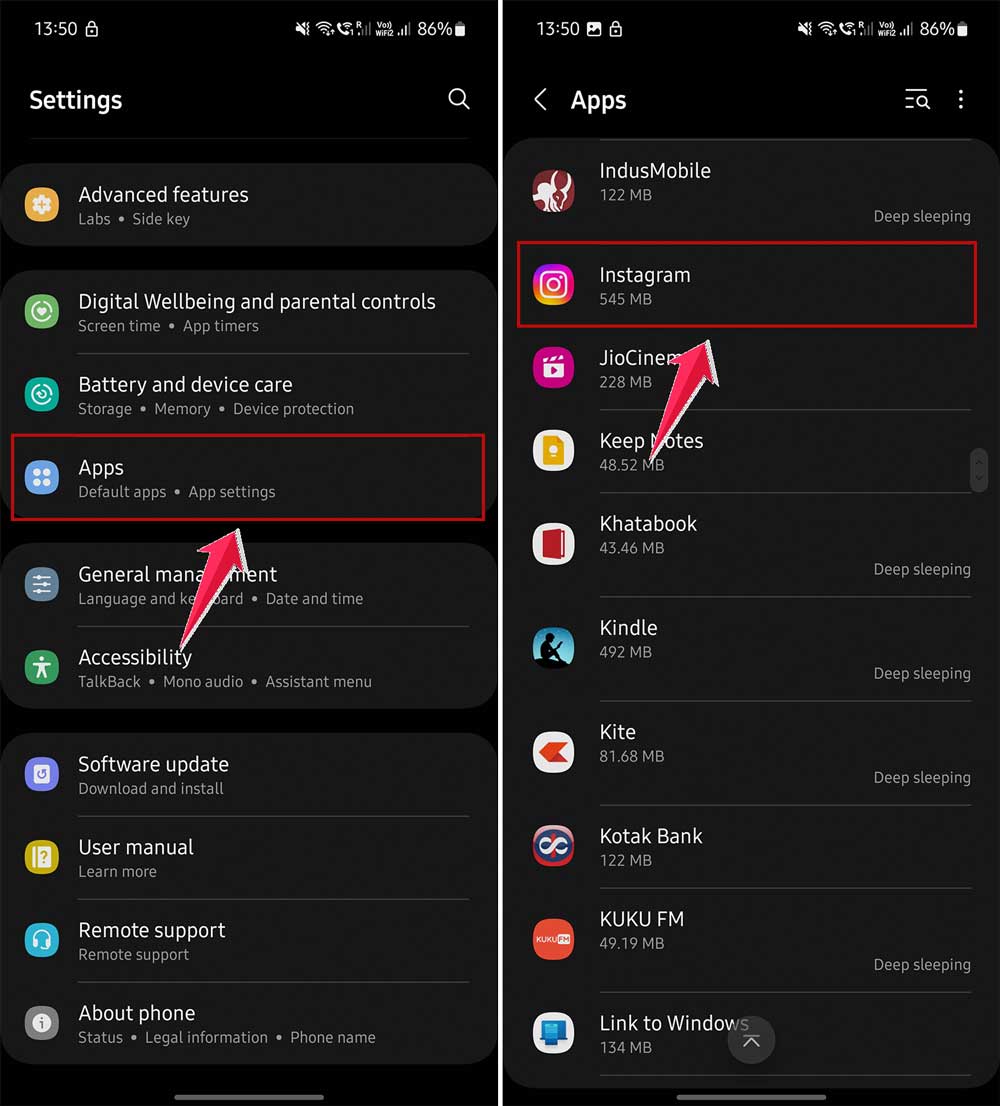
- Tap Storage.
- Hit Clear Cache.

That’s it. You don’t lose anything important, and your phone gets a little breathing room.
#2 Manage Your Photos and Videos
Photos and videos take up a huge chunk of space. You might not even realize how many you’ve got until you scroll back to 2020. It’s time to clean house.
Here’s how to manage them smartly:
- Use cloud apps like Google Photos or iCloud to back them up.
- Once backed up, delete the local copies from your device.
- Go through your gallery once a month to remove duplicates and blurry shots.
You’ll still have access to your memories—just not all stored in your phone’s limited space.
#3 Use Cloud Storage
If you’re not using cloud storage yet, it’s time. Think of it as an extra closet for your digital stuff. You can store documents, videos, and even photos there without using up your phone’s internal memory.
Here’s what to do:
- Sign up for Google Drive, Dropbox, or iCloud.
- Upload big files like videos, PDFs, or unused documents.
- Delete the local files once they’re safe in the cloud.
This way, you keep everything and still free up space.
#4 Offload Unused Apps
Got apps you don’t use every day? Don’t delete them—just offload them. This removes the app but keeps all your data, so when you reinstall it, everything’s still there.
Here’s how to do it on iPhones:
- Go to Settings > General > iPhone Storage.
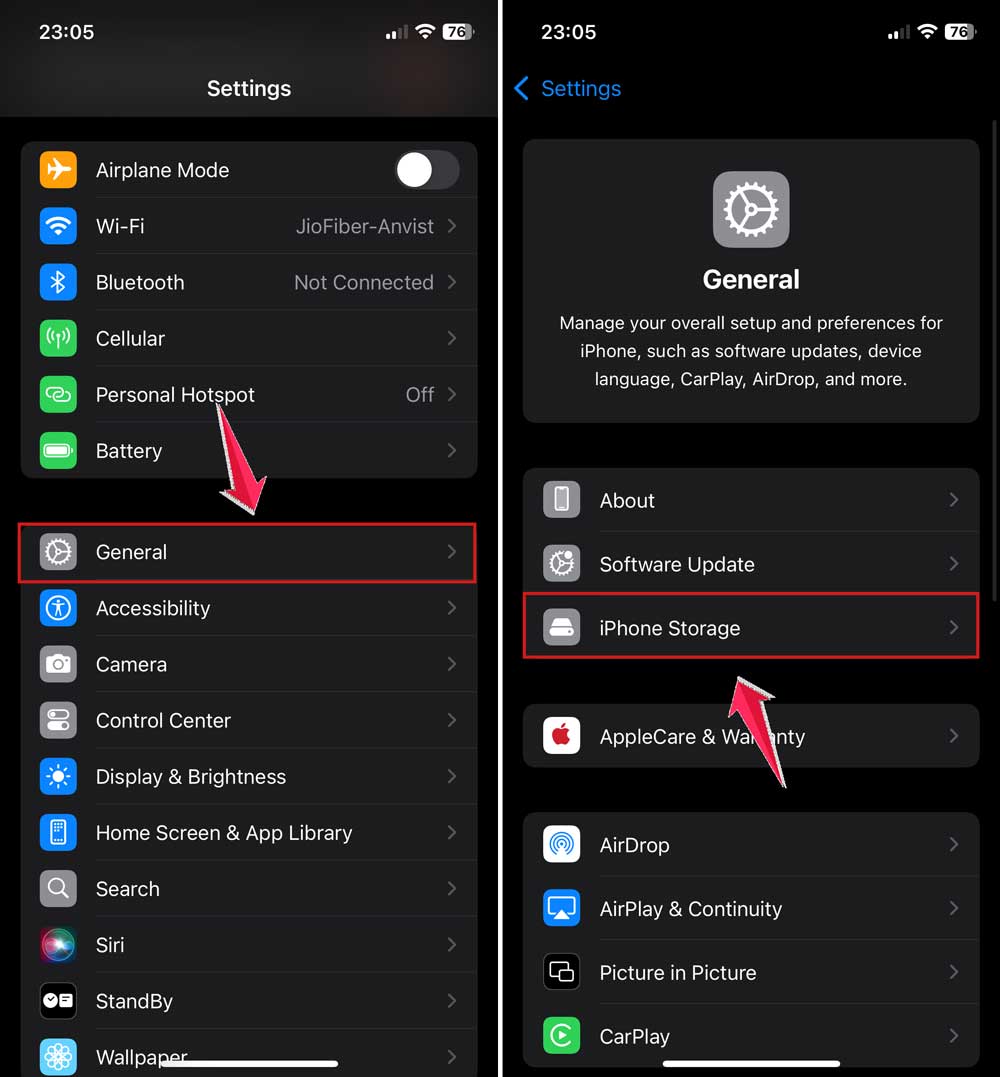
- Tap on any app you don’t use often.
- Choose Offload App.

For Android users, move large apps to an SD card if your phone supports it. It works the same way—less space used on your phone, more room to breathe.
#5 Delete Old Messages and Attachments
Messages aren’t just text anymore. They come with photos, videos, voice notes—and all of that adds up. Especially in apps like WhatsApp or Messenger. Let’s clean them up.
Here’s what to do:
- Open your main messaging app.
- Scroll through and delete old conversations you no longer need.
- Check settings in apps like WhatsApp to clear media-heavy chats.
Also, check for automatic message backups. They can be sneaky space hogs too.
More Smart Storage Tips You’ll Want to Try
1. Make Space with External Storage
If your phone has an SD card slot, use it. Move your photos, videos, and even some apps there. It’s like adding an extra drawer to your phone.
2. Lower the Media Quality
Do you really need every photo in HD? Probably not. Lowering your camera’s resolution saves tons of space, and you’ll still get great shots.
3. Enable Auto-Delete for Messages
Set your phone to auto-delete texts after 30 or 90 days. You won’t even notice they’re gone, but your storage will thank you.
4. Restart Your Phone Regularly
Restarting your phone clears temporary files and refreshes memory. It’s simple and makes a difference. Try it once a week.
5. Use Built-In Storage Tools
Most phones now come with smart storage tools. They find unused files, large downloads, and old documents you can delete. Use them. They’re there to help.
The Takeaway
Running out of storage space is annoying, but you don’t have to delete your favorite apps. You just need to be a little smarter about how you manage your files.
From clearing app cache to using cloud storage, there are so many simple ways to clean up your phone without losing anything important.
We’ve covered it all—photos, apps, messages, and even those sneaky cache files. It’s all about taking control and making space where you can.
Your phone will run faster, feel lighter, and you’ll finally stop seeing that dreaded “storage full” message.
So go ahead—try these tips today. You’ve got this. And if you’ve got any other smart tricks for saving space, comment below and share your ideas. Let’s help each other out!