You’re lying in bed. Having a great FaceTime chat. Maybe you’re laughing with a friend or whispering goodnight to someone special.
And suddenly… it disconnects. No warning. No goodbye. Just silence.
That’s frustrating.
If this happens to you often. especially around the 3 to 4-hour mark. You’re not alone. Thousands of iPhone users deal with this every night. The worst part? It always seems to happen when the conversation is just getting good.
Let’s fix that.
FaceTime doesn’t have a time limit (but…)
You might be wondering if Apple is cutting off your calls on purpose. The answer is no. FaceTime doesn’t have any built-in timer or limit. You can stay on for 10 hours if you want.
But still, calls drop. Especially around 3–4 hours. And that’s not FaceTime’s fault. It’s something else.
Let me show you what’s really going on behind the scenes.
Your phone company might be cutting the call
This is actually the most common reason.
Some mobile carriers silently end calls after 3 or 4 hours. Even if you’re on Wi-Fi. Yes, even if you’re using FaceTime instead of normal voice calls. That 4-hour limit? It’s real.
They don’t always announce it. But it’s baked into their system.
If your FaceTime calls consistently drop around the same time, this is likely the reason.
You can call your carrier and ask about it. Or just redial after it drops. Not ideal, but it works.
Your phone might be overheating
If you’re holding a warm phone after hours of FaceTime, that’s a red flag.
Your iPhone or iPad starts heating up during long video calls. And when it gets too hot, it will automatically shut down background processes to protect the hardware. That includes FaceTime.
You don’t need to be doing anything wrong. Even just charging your phone while FaceTiming in bed can make it overheat.
Let the phone breathe. Avoid keeping it under blankets or pillows during long calls. If it’s plugged in, take off the case. And keep brightness low if possible.
Your battery could be giving up
Long FaceTime calls eat battery fast.
If you’re not charging during the call, your phone may shut off the app to save power. Or it may simply die without warning.
On the other hand, charging while FaceTiming can cause overheating, like we just talked about.
So what do you do?
Use a stable charger. Place the phone on a flat, open surface. Don’t tuck it in. Let it breathe.
Weak Wi-Fi or data means dropped calls
Even a small hiccup in your internet connection can kill a FaceTime call.
And at night, this happens more often than you think. Routers reset. Signals weaken. Networks throttle heavy users. Or your Wi-Fi just acts up.
To avoid this, try to stay near your router. If possible, switch to a stronger network. And if you’re on mobile data, make sure FaceTime is allowed to use it.
Just go to:
- Settings → Cellular or Mobile Service.
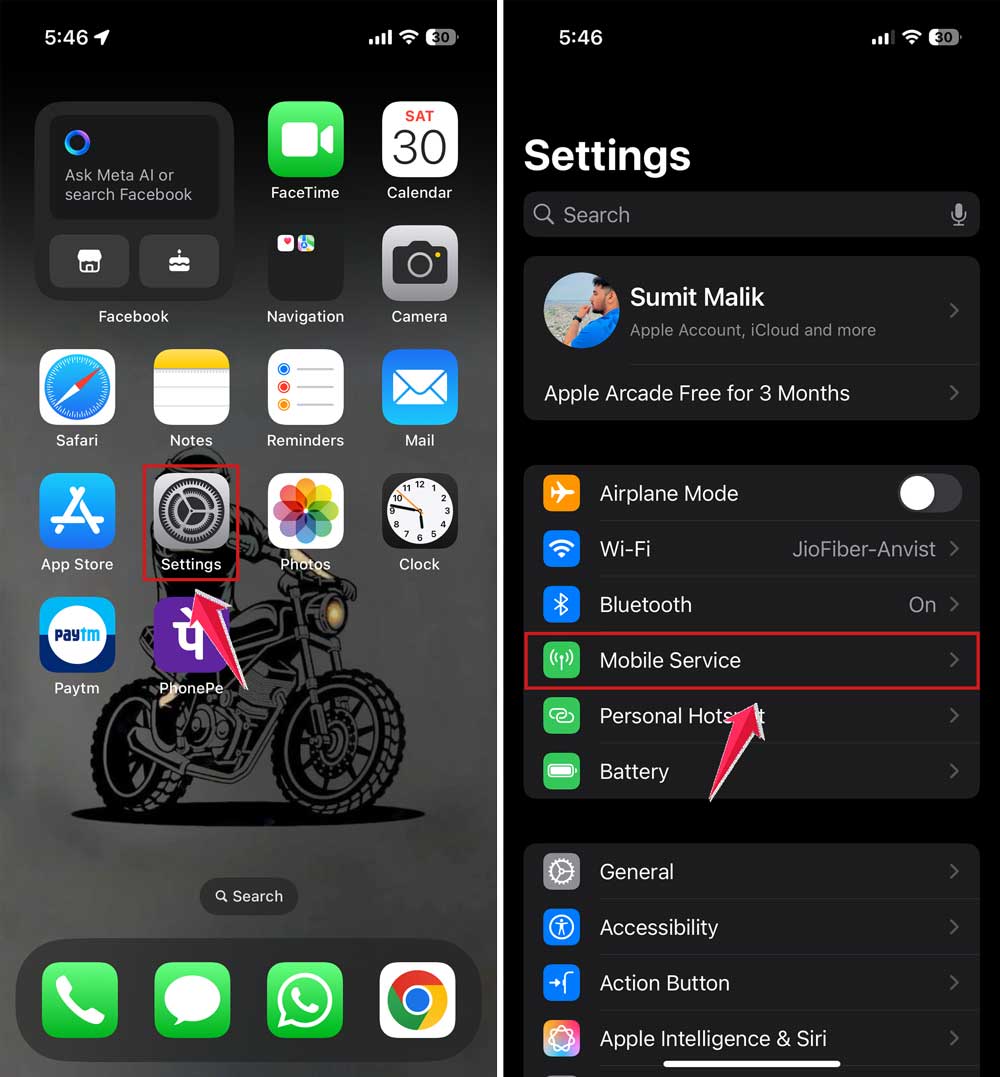
- Then scroll down to FaceTime → turn it ON.
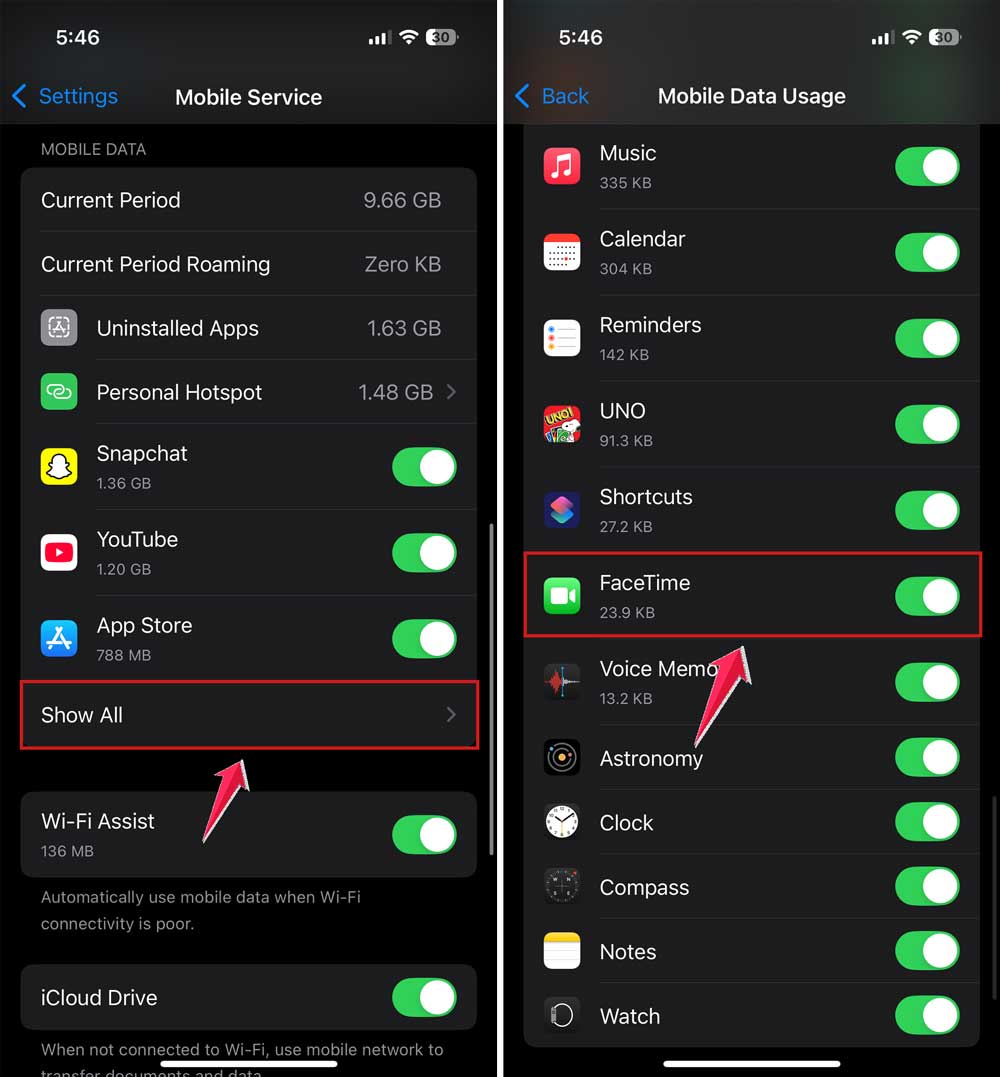
If it’s already on, try switching between Wi-Fi and mobile to see which one’s more stable at night.
Your time settings might be messing with FaceTime
Sounds weird, but trust me. It matters.
If your iPhone or iPad has incorrect time settings, Apple services like FaceTime can get confused. Especially during long calls that stretch past midnight.
To fix this:
- Go to Settings → General.
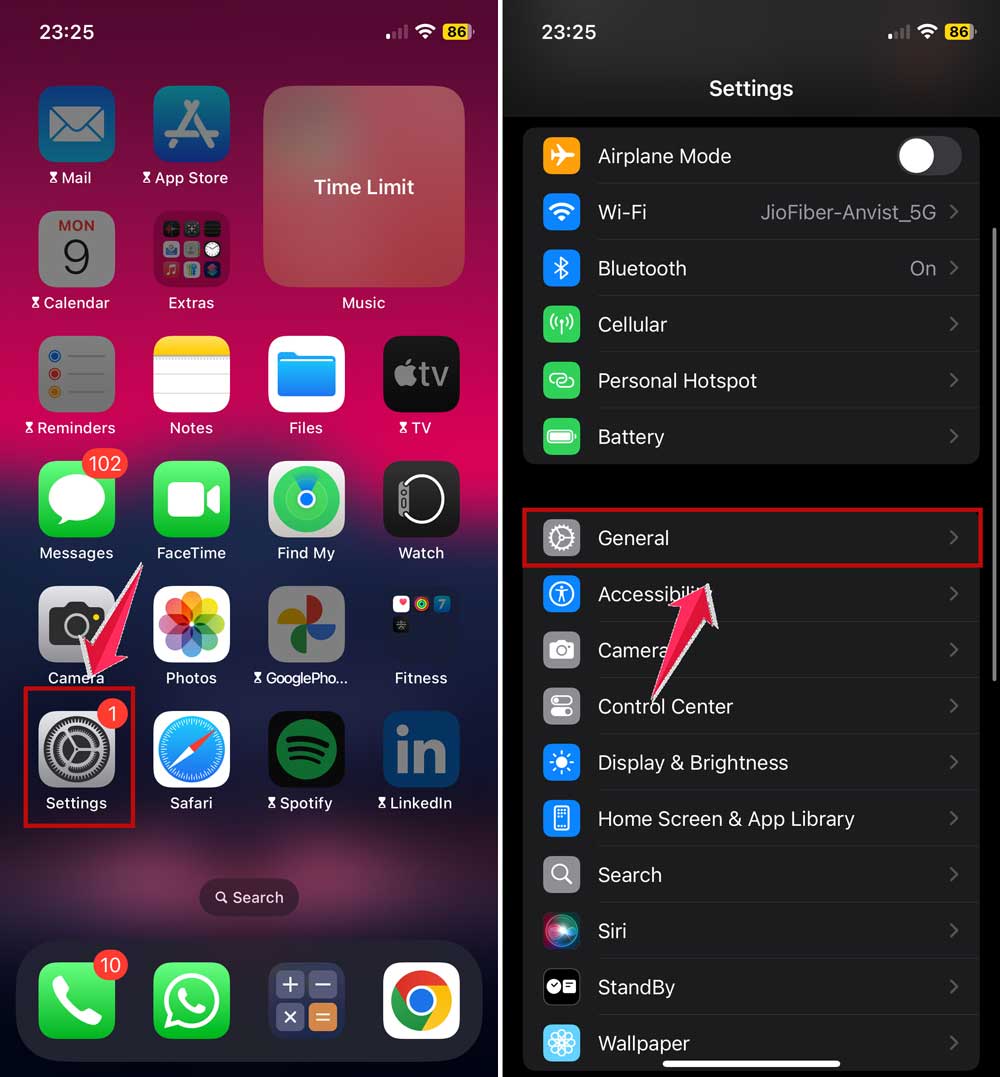
- Then tap on Date & Time.
- Now turn on “Set Automatically.”
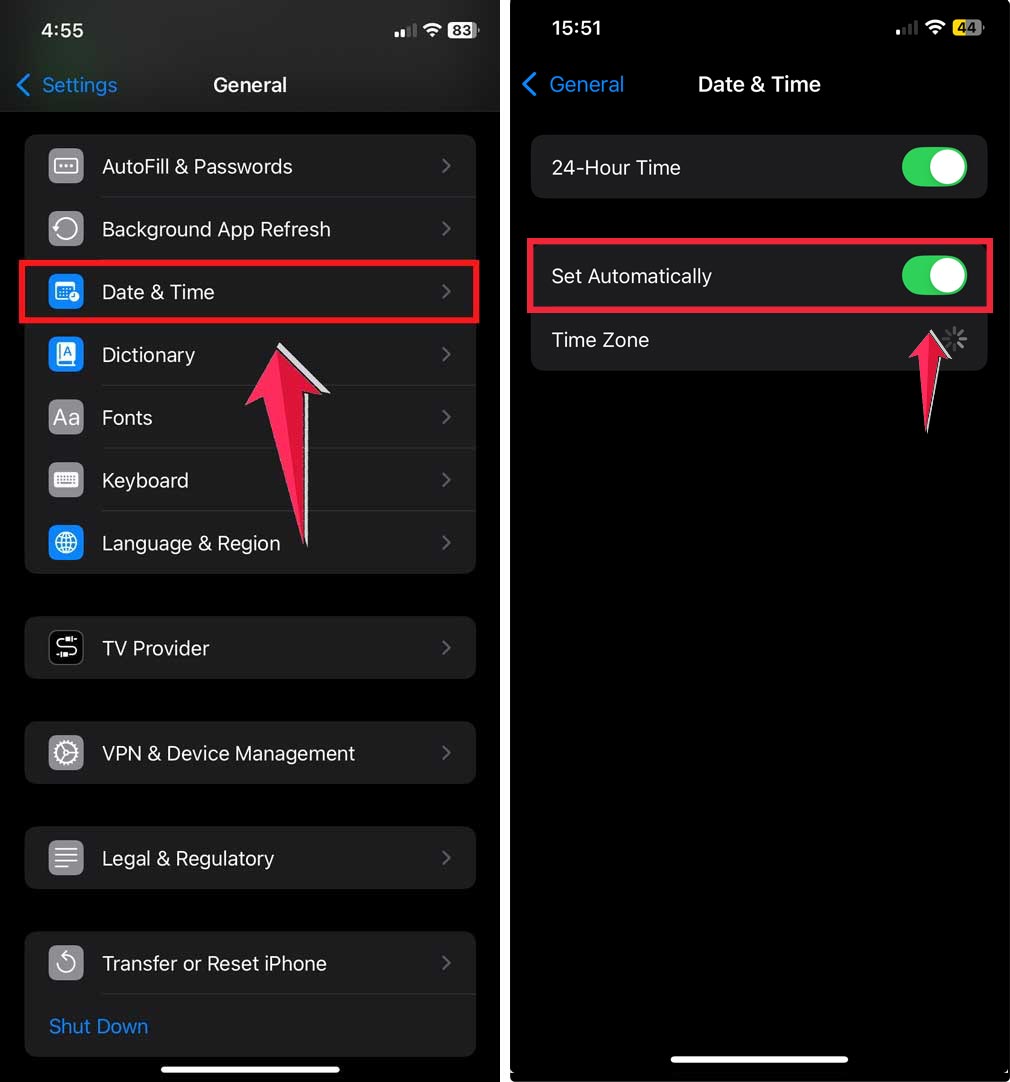
This one setting can save you from random disconnects at night.
Your iPhone background apps might be interfering
If you’ve got 20 apps running in the background while FaceTiming, your device might slow down or crash.
Especially older phones.
Too many apps = less memory = more chance of FaceTime quitting unexpectedly.
Before your call, swipe up and close all the apps you’re not using.
Someone might have ended the call by mistake
This happens more than people admit.
Late at night, you or the other person might tap the screen, adjust the phone, or move your head. and accidentally hit the End button.
Especially if you’re using your face or ear to hold the phone.
To avoid this, prop your phone on a stand or pillow instead of holding it. Less chance of touching the screen accidentally.
Your iOS might need an update
Apple fixes bugs all the time. If your phone hasn’t been updated in a while, there could be glitches that mess with FaceTime.
To check: Go to Settings → General → Software Update.
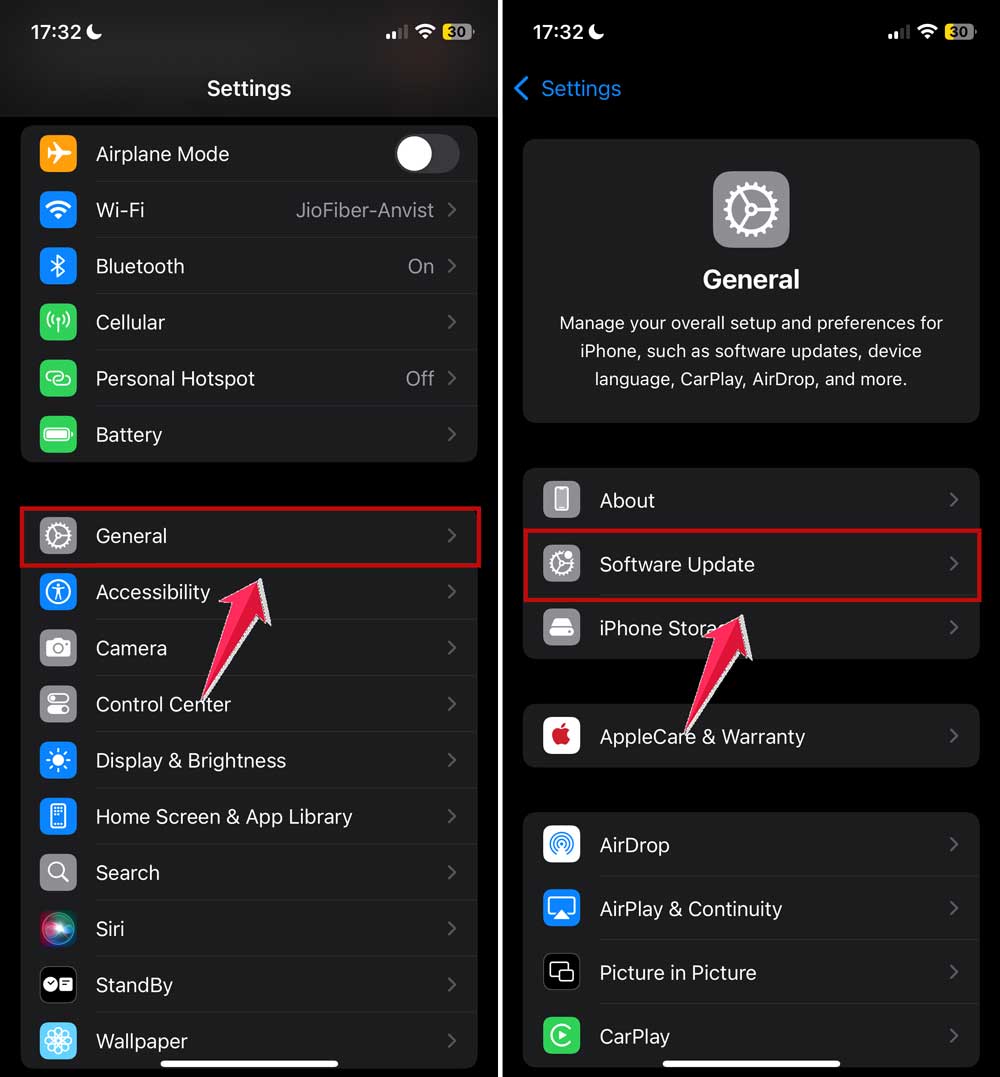
If there’s an update waiting, install it.
Also, restart your phone before long FaceTime calls. It clears up memory and avoids weird bugs mid-call.
Your storage or memory might be full
When your phone is out of space or RAM, apps crash. FaceTime is no exception.
Even if you have 1 GB free, that might not be enough for a high-quality video call.
Restart your device. And clear out any junk you don’t need. Photos, videos, or unused apps. Every bit helps.
Crossing midnight can sometimes trigger a drop
If your call spans midnight, your system or carrier might see it as a “new day” and drop the connection.
It doesn’t happen to everyone. But some users do notice this strange pattern.
If this sounds like your issue, just keep it in mind and redial if needed.
Even your SIM card might be the problem
This is rare, but if your SIM is loose or slightly misaligned, it can cause signal drops. even on Wi-Fi calls.
To be safe, power off your phone, eject the SIM using a pin, wait 10 seconds, then insert it back carefully.
Turn your phone on and see if the issue improves.
What to do if FaceTime still keeps hanging up
You’ve tried everything, and it’s still disconnecting?
There might be a deeper glitch in the system. In that case, you can try logging out and back into FaceTime.
Here’s how:
- Go to Settings → Apps.
- Scroll down and tap on FaceTime.
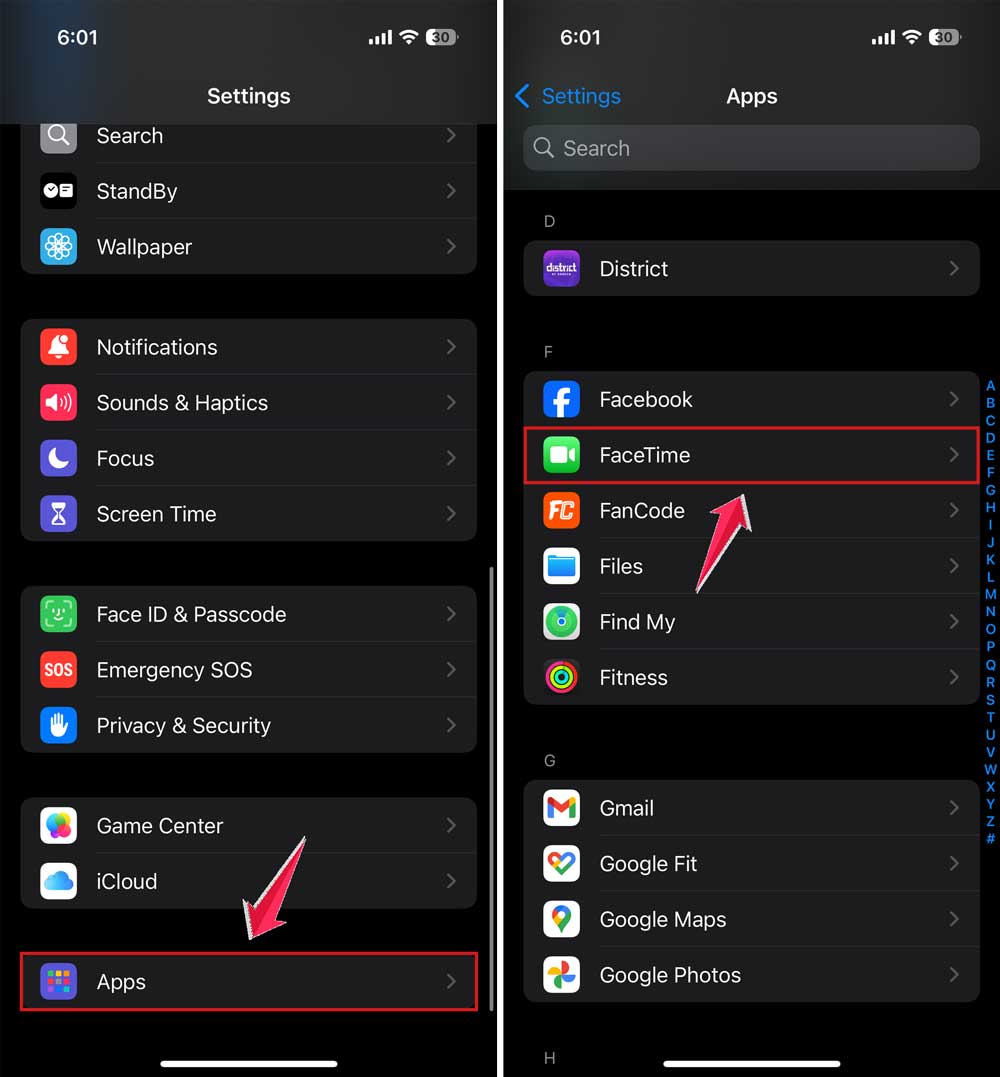
- Then tap your Apple ID.
- Choose Sign Out. Then, sign back in with the same Apple ID.
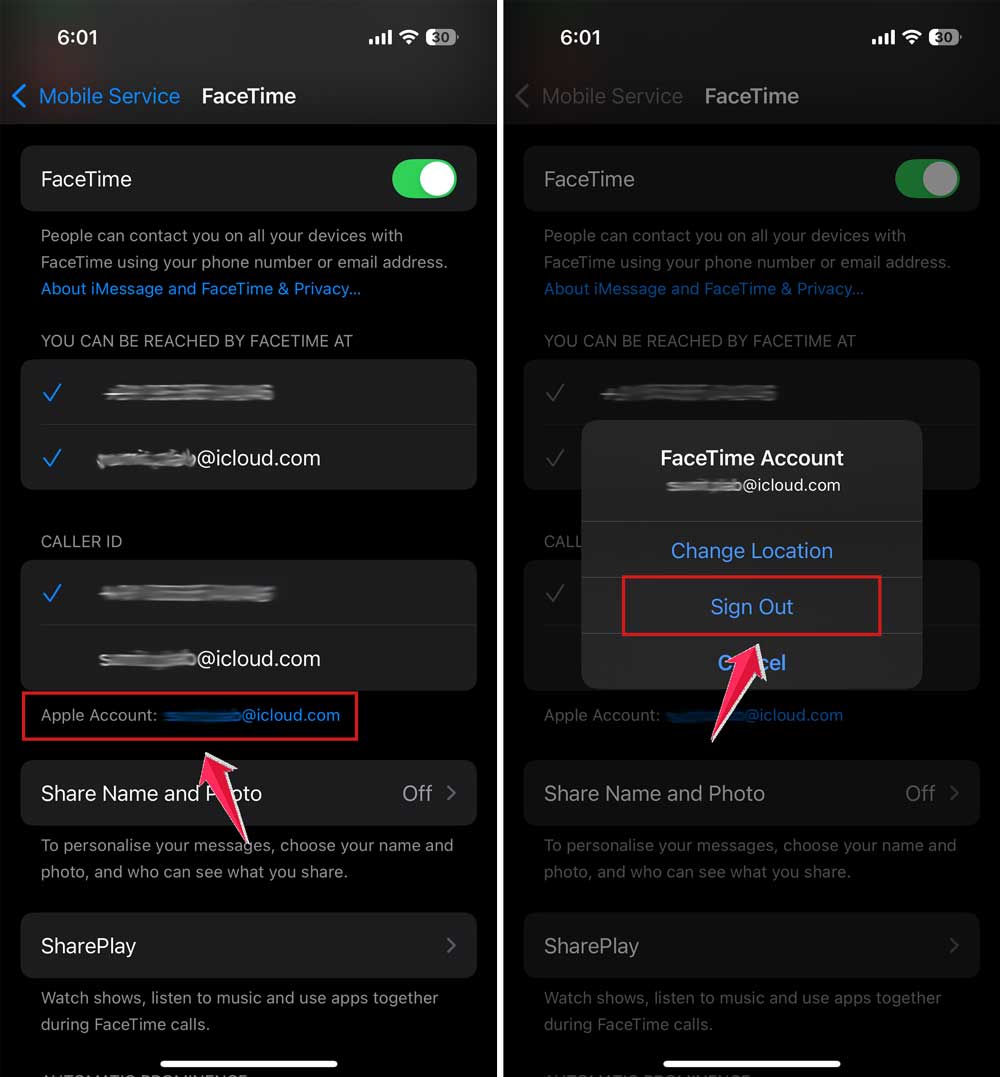
This refreshes your FaceTime settings and can clear hidden bugs.
If you are still facing problems. You then can try calling in shorter sessions or redialing after 3–4 hours. Not ideal, but it works around the carrier issue.
The takeaway
You now know FaceTime doesn’t cut you off. But something else might be.
Whether it’s your carrier, battery, overheating, or poor internet, most of these issues are fixable with small changes.
So next time you’re having a late-night chat, you’ll be ready. Fewer drops. Less frustration. More time to talk, laugh, and stay connected.
And if nothing works? Apple Support is just a step away.
Let me know if you want a version of this for iPad, Mac, or even a troubleshooting guide for when FaceTime doesn’t connect at all.