You blocked someone. Or maybe they blocked you. You’re not texting anymore. You’re not calling.
But there’s one question still bothering you… Can you still see their location? Or can they still see yours?
Let’s break it down clearly so you know exactly what’s going on. No guessing. No confusion. Just answers.
You can sometimes still see their location
You might be surprised, but blocking someone doesn’t always stop location sharing.
You can still see their location if they shared it with you before blocking you.
You might still see it in the Find My app on iPhone or in iMessage. But if they go in and turn it off manually, you won’t see it anymore.
You should know that blocking only stops texts, calls, FaceTime, and iMessages. It doesn’t automatically turn off location sharing unless the person does that themselves.
You can’t see their location if they removed you from sharing
You lose access the second they go into settings and stop sharing their location with you.
You won’t get a message. You won’t get an alert. The location will just vanish. In Find My, it will say “No location found” or just disappear completely.
You should respect their privacy if they made that choice. Trying to track someone after they removed you isn’t just a privacy issue. It’s crossing a line.
You might still see their location in iMessage
You can still see someone’s location in iMessage if they didn’t turn it off.
You’ll see a little map in your message thread. If it still updates in real-time, they haven’t removed you yet. But if it’s frozen or says “Location not available,” then they’ve stopped sharing it.
You need to remember: blocking someone doesn’t stop iMessage location sharing unless they go in and do it manually.
So yes, it’s possible to still see it after being blocked. But not guaranteed.
You definitely can’t see their location on social apps after being blocked
You won’t be able to see their location anymore on:
- Snapchat
- Messenger
You get removed automatically when you’re blocked. You won’t see their live location. On Snapchat, their Bitmoji disappears.
On WhatsApp, you’ll see “Live location ended.” On Messenger, their location sharing just stops.
You can’t do anything about it unless they unblock you and re-share it.
You can’t see the location on Google Maps if you’re blocked
You get removed from Google Maps location sharing, too.
You’ll either get a message that says “Not sharing location with you” Or the map will just stop showing them entirely.
You need to know that Google treats blocking as a full privacy barrier. Once you’re blocked, you’re removed from all shared lists.
You can’t rely on Find My if they turned off sharing
You might still see their last known location in the Find My app. But once they block you and turn off sharing, it stops updating.
You’ll see either nothing or their last known spot. Not live tracking. If the sharing time expired, it ends automatically.
So even if you think you still have access, it’s probably just leftover data.
You might still be visible to them unless you stop sharing too
You should also check if you are still sharing your location with them.
Blocking someone doesn’t stop them from seeing your location unless you remove them.
You can do this in the Find My app, iMessage, or Family Sharing settings.
You should open your Settings. Go to Privacy > Location Services > Find My. Then remove them if you don’t want them tracking you anymore.
You’re in control of who sees your location. Always.
You can still be tracked if you forget to turn off Family Sharing
You might be part of a Family Sharing group on iPhone. If so, blocking someone won’t remove them automatically from location sharing.
You’ll need to go into your Family Sharing settings and turn it off manually.
You should:
- Open Settings
- Tap your name at the top
- Choose Family Sharing
- Go to Location Sharing
- Turn it off for the person you no longer want to see your location
You shouldn’t assume blocking does everything. Always check this separately.
You can’t track someone on Android after being blocked
If you’re using Android and the person blocks you, your access is gone.
You can’t see their location on Google Maps or any built-in tracking app.
You’ll be removed from any sharing lists instantly.
You won’t get any more updates. And you won’t be able to request access again unless they unblock you and choose to share again.
You can’t track someone if they turn off their location
Even if you’re not blocked, someone can just go into their settings and turn off their location completely.
Once that happens, no app can show you where they are.
You won’t see anything live. You won’t get notified. And you won’t know if they’ve blocked you or just disabled sharing.
You shouldn’t assume you’re blocked just because you can’t see their location. It might just be that they turned off location services.
You can’t track someone if they’re offline
If their phone is off, in airplane mode, or has no signal. Location sharing pauses.
You’ll only see their last known location, not their current one.
You can’t get real-time updates until they come back online.
You should wait and check again later.
You can stop them from seeing your location
You might be the one who wants more privacy.
You can go into:
1. Find My → People → select the person → Stop Sharing My Location
2. iMessage → open the chat → tap name → Stop Sharing Location

3. Settings → Privacy → Location Services → Turn off completely
You decide who sees your location. You can change it any time with or without blocking.
You can unblock someone and start sharing location again
Sometimes, you might change your mind about someone you’ve blocked.
Let’s walk through how you can unblock them and start sharing locations again if you want to.
1. Unblock the person
To unblock someone:
- Open the Settings app on your iPhone.
- Scroll down and tap Phone, Messages, or FaceTime (whichever one you used to block them).
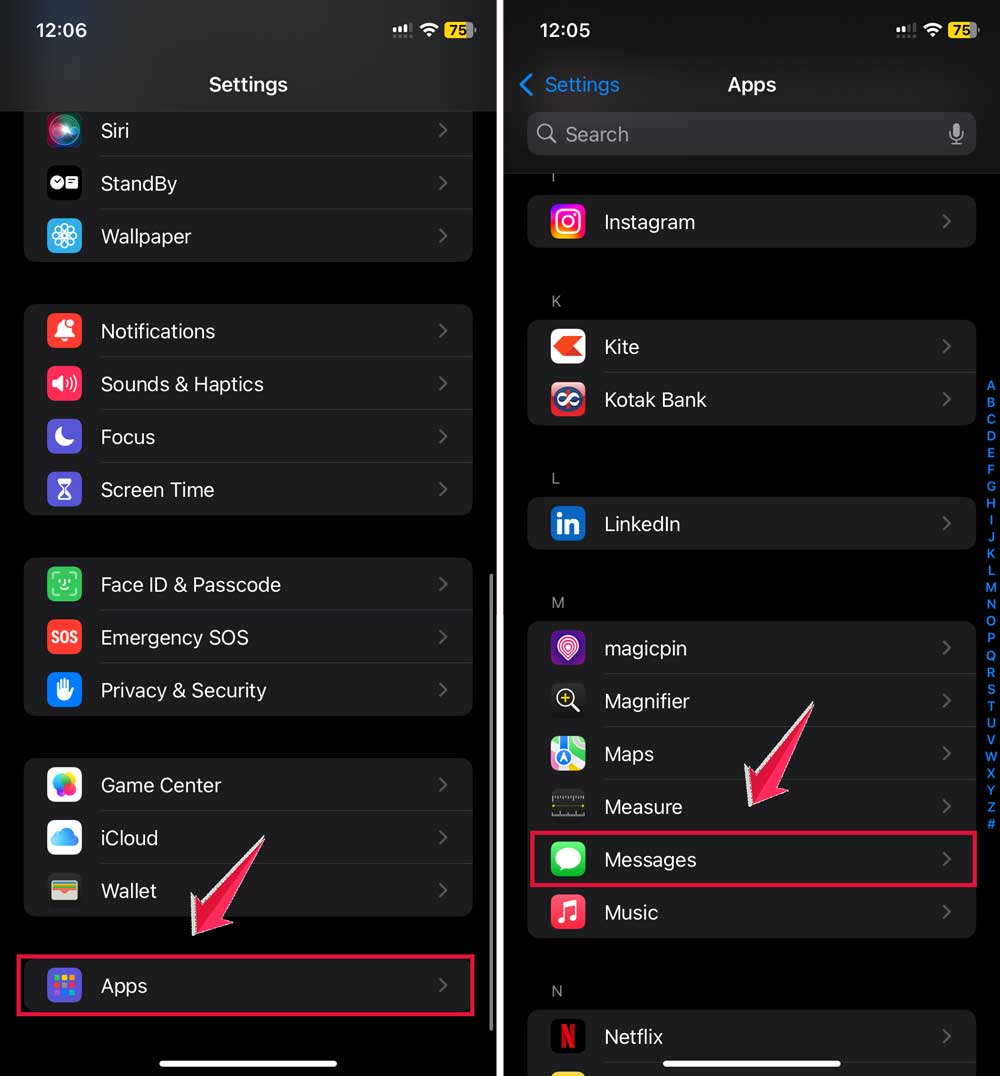
- Tap Blocked Contacts.
- Find the person’s name or number on the list.
- Swipe left on their name.
- Tap Unblock.
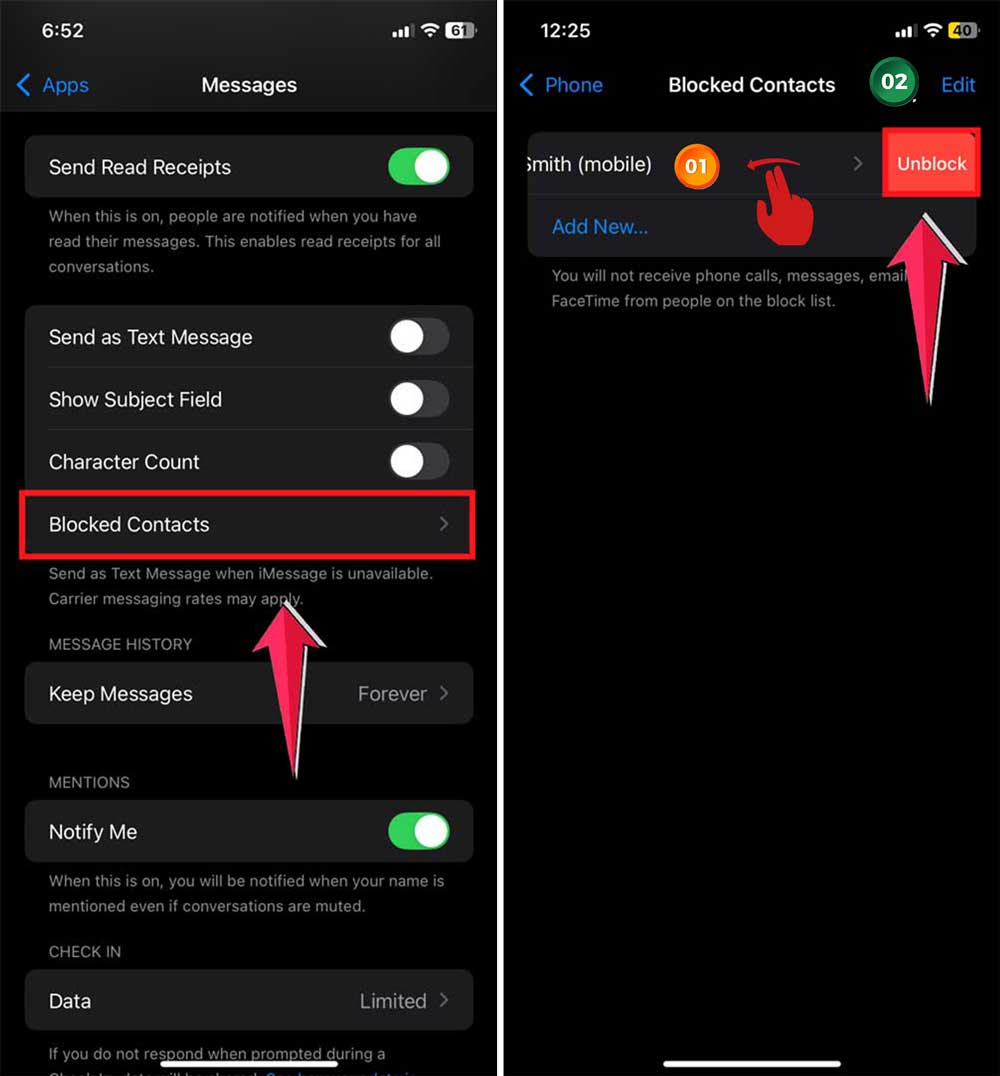
Now they’re unblocked and can contact you again.
2. Share your location again (if you want to)
Now that you’ve unblocked the person, you can choose to share your location with them if you want. Here’s how:
Using the Find My app:
- Open the “Find My” app on your iPhone.
- Tap the “People” tab at the bottom.
- Tap on the “+” button.
- Tap the “Share My Location” button.

- Type in the name or phone number of the person you want to share with.
- Tap “Send“.
- Choose how long you want to share your location (one hour, until end of day, or indefinitely).

Using Messages:
- Open a conversation with the person in the Messages app.
- Tap on their name at the top of the screen.
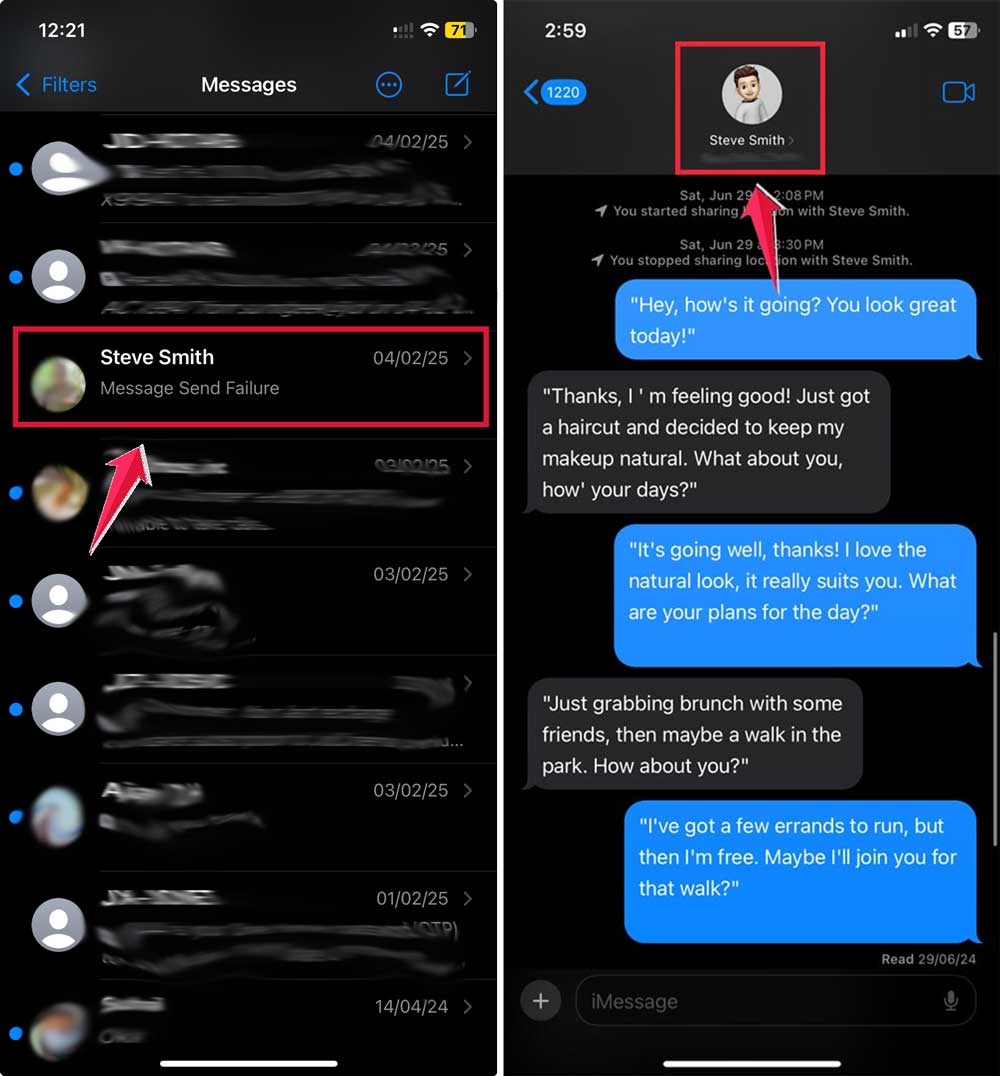
- Tap “Share My Location“.
- Choose how long you want to share your location.
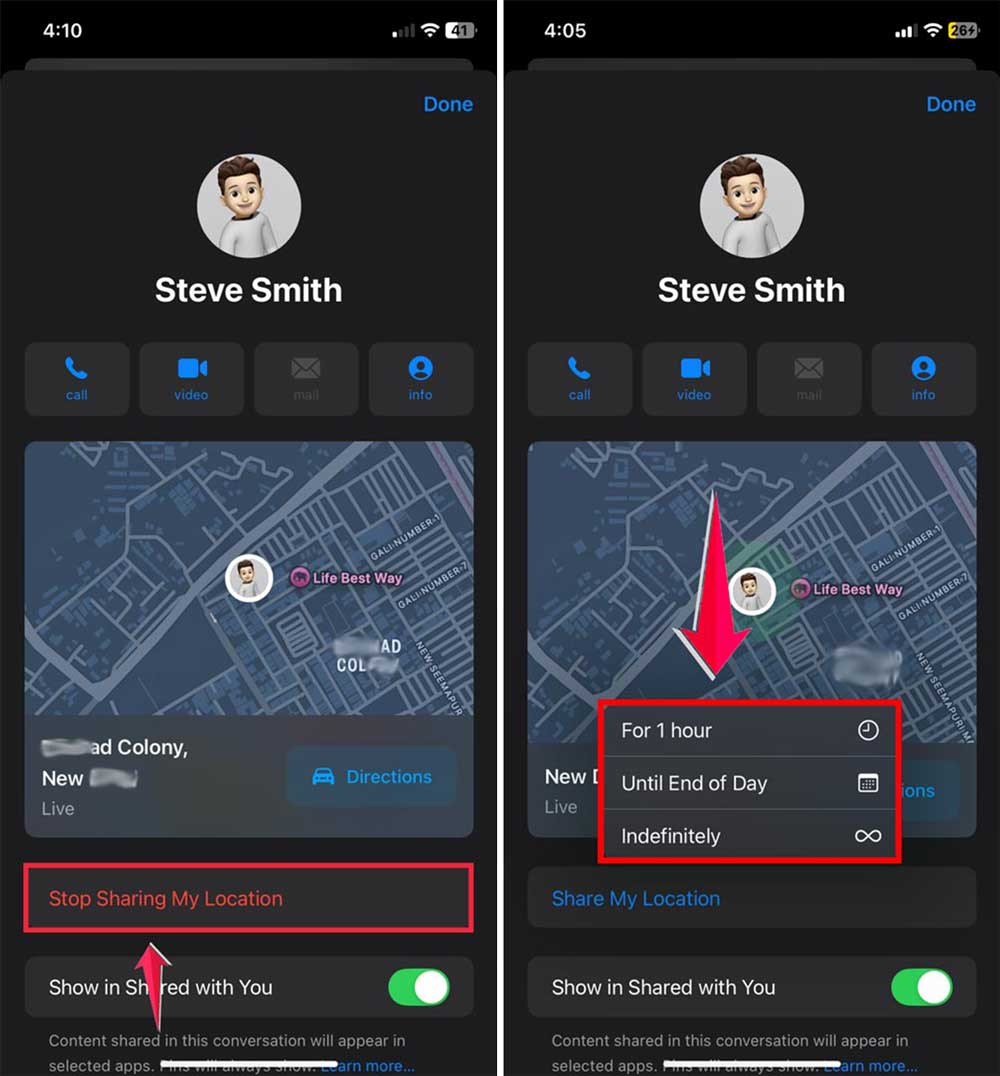
That’s it. You’ve now unblocked the person and started sharing your location again.
You just need to remember one thing.
Blocking someone only stops communication. If you were sharing your location before, you’ll need to stop that separately.
And if you unblock someone, they won’t automatically see your location again unless you share it manually.
You’re always in control. Apple gives you the tools. You just need to use them the way that works best for you.
The takeaway
You can sometimes see someone’s location after they block you. But only if they didn’t turn off sharing.
You won’t get a message when they stop sharing. You’ll just stop seeing updates.
You should check each app. Like Find My, iMessage, Family Sharing, WhatsApp, Snapchat, Google Maps, and Messenger. Every app handles this differently.
You should also double-check your own settings. Make sure you’re not sharing with someone you’ve blocked or no longer trust.
You can change location sharing anytime. You don’t need to block someone to stop sharing. But blocking doesn’t always stop location sharing either.
You’re the one in charge of your privacy.
So take a minute. Check your settings. And stay in control of who sees where you are.