Ever wanted to keep your whereabouts private without alerting anyone? Whether you’re planning a surprise or need some alone time, you can stop sharing your location smoothly and quietly.
This guide will show you how to take control of your digital footprint across various devices and apps. Ready to manage your privacy?
Let’s dive in and explore how you can stop sharing your location without others knowing.
If you’re curious, you can even pause location on Find My without removing someone.
How to Turn Off Location without the Other Person Knowing
Good news! You can stop sharing your location without the other person receiving an automatic notification.
Here’s how you can do it quietly:
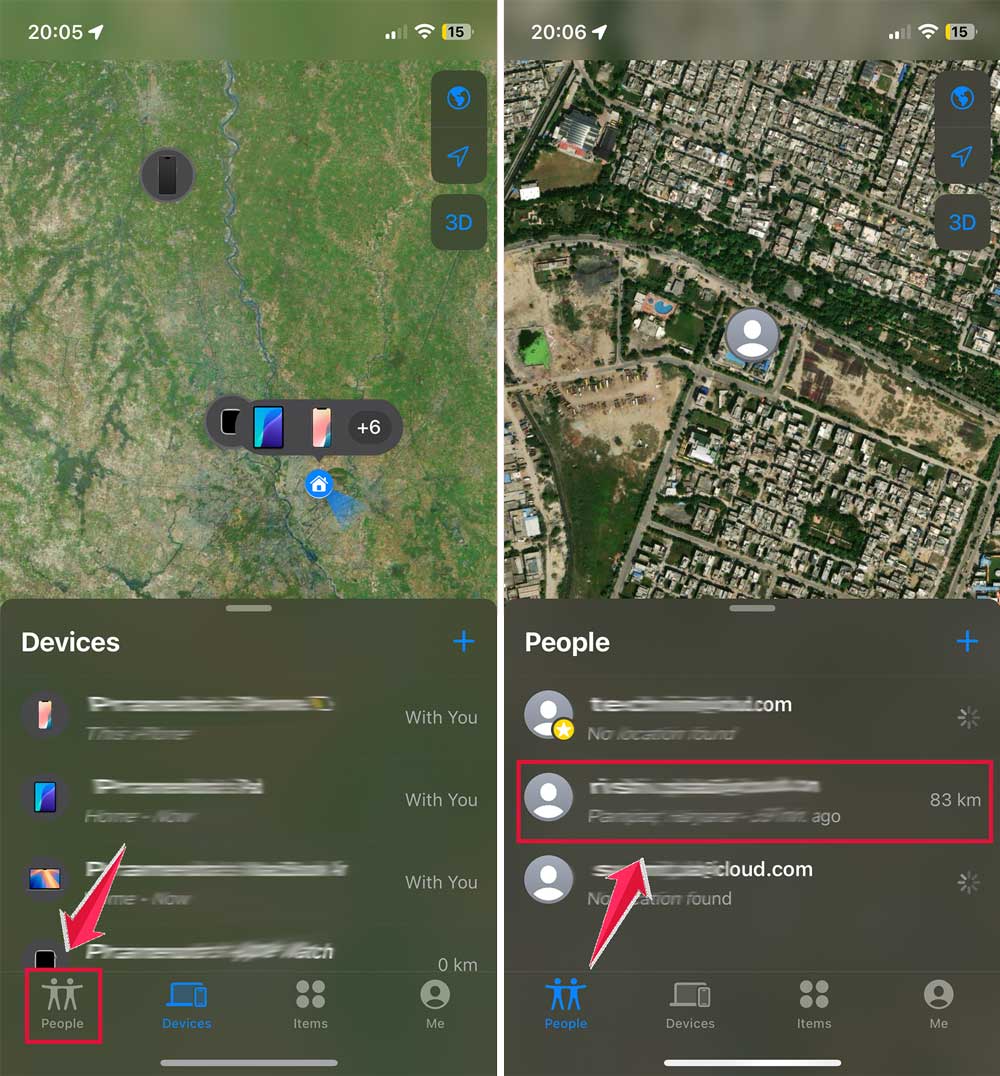
- Find the “Find My” app on your device and open it.
- Look at the bottom left of your screen and tap on “People”.
- Choose the person you want to stop sharing your location with.
- Scroll down until you see “Stop Sharing My Location” and tap on it.
- A confirmation message will appear. Tap “Stop Sharing Location” again to confirm.
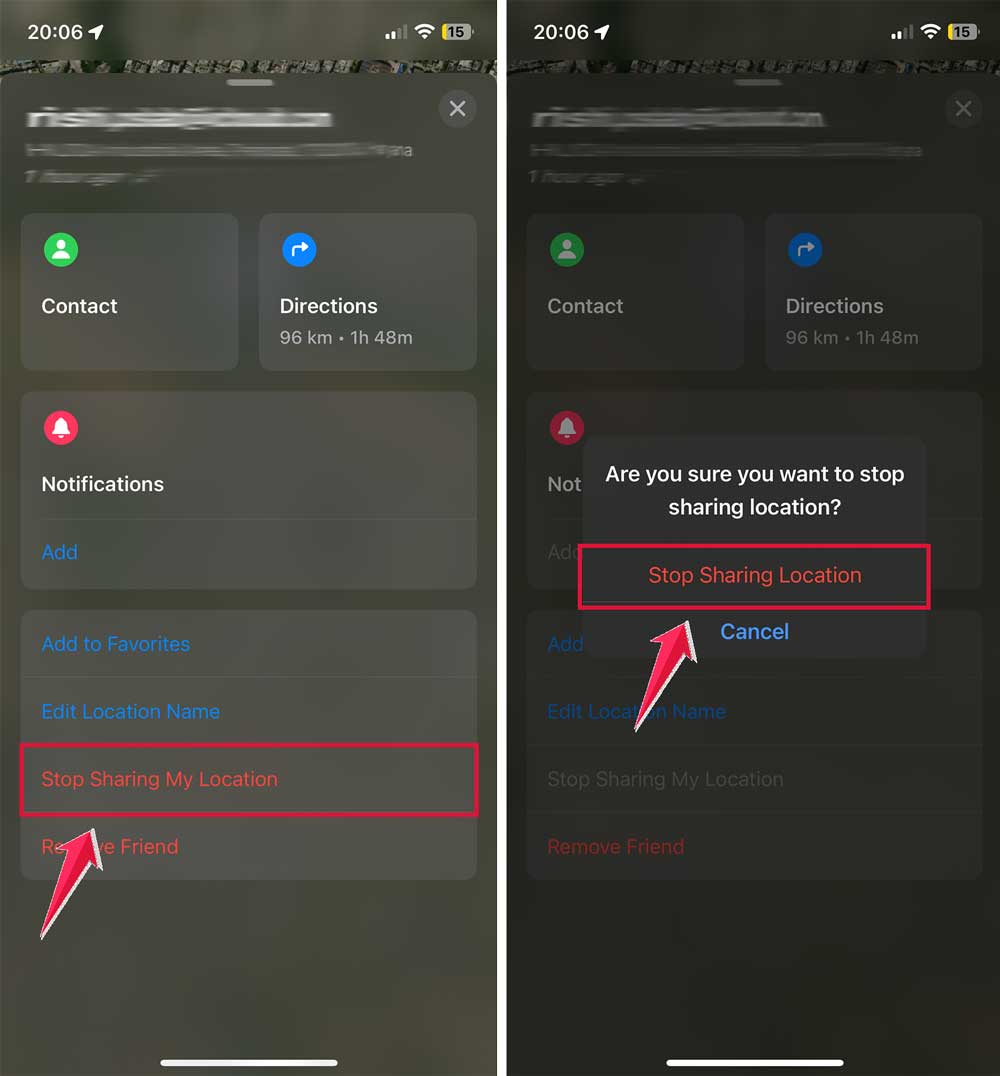
That’s it! You’ve now stopped sharing your location discreetly. The app will only show a notification on your device, not on the other person’s.
But here’s something to remember: If the other person tries to check your location, they’ll notice they can’t see it anymore. Also, if you decide to share your location with them again later, they will get a notification at that time.
How to Temporarily Turn Off Location on iPhone without Them Knowing
How to Temporarily Turn Off Location on iPhone without Them Knowing
If you need a temporary break from sharing your location, there’s a simple way to do this on your iPhone without anyone knowing:
- Open the Find My app on your iPhone.
- Look for Me in the bottom right corner and tap it.
- Find the Share My Location option and toggle it off.
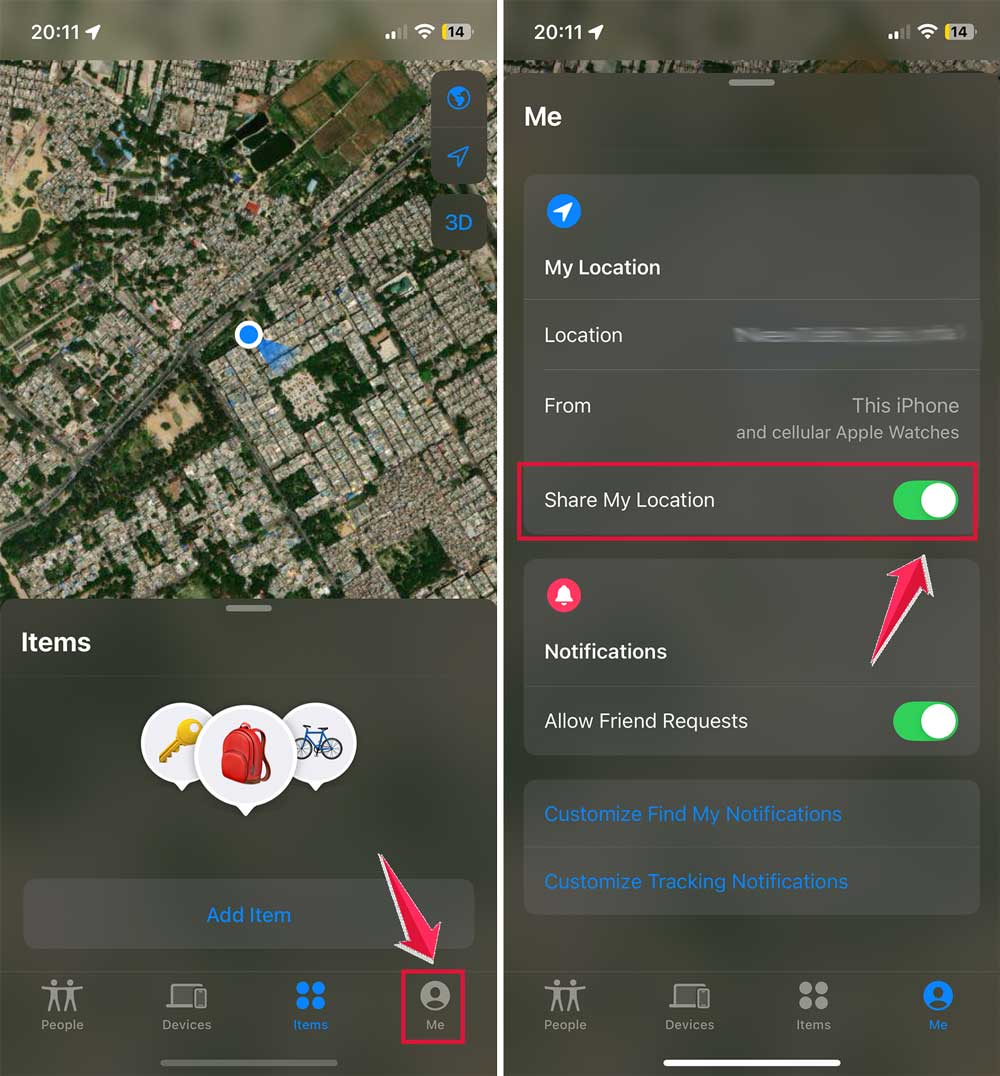
When you’re ready to share your location again, just toggle Share My Location back on. It’s that easy!
Here’s something important to remember: This method only pauses location sharing while the toggle is off. Your location will start being shared again as soon as you turn it back on.
Also, keep in mind that if you misplace your device while location sharing is off, the Find My feature won’t be able to locate it. You’ll need to turn location sharing back on for this feature to work.
This temporary solution gives you control over your privacy when you need it, without permanently changing your settings or alerting others.
Here Are Some Alternatives to Location Sharing
If you’re looking for ways to balance privacy and safety, there are some alternatives to continuous location sharing worth considering:
#1 Temporary Sharing Options
In the Find My app, you can now share your location for a limited time. This feature gives you more control over when you’re visible to others. You can opt to share your location for:
- Just one hour
- Until the end of the day
- Any custom time period you choose
This way, you’re only visible during times you’re comfortable with, giving you more flexibility in managing your privacy.
If you’re doing this for safety or security, you might also want to check your iPhone unlock history to see if your device has been accessed unexpectedly.
#2 Check In feature on iOS
You can also take advantage of the “Check In” function. This feature is designed to enhance safety without compromising privacy. Here’s how it works:
- You set up a Check In when you’re heading to a destination.
- Your chosen contact can see your location temporarily.
- Once you confirm your safe arrival, the location sharing automatically stops.
This method is perfect for situations where you want someone to know you’ve arrived safely without needing to share your location continuously.
Conclusion
Managing your location settings effectively is crucial for balancing your privacy and safety.
Each of these methods gives you control over who can see your location and when, without compromising your comfort or security.
It’s important to regularly review your location settings. Your needs and preferences might change over time, so make sure your settings always align with what you’re comfortable with.
By staying informed and proactive about your privacy settings, you can enjoy the benefits of location-based services without unnecessary worry.
If you need more help with your location settings, don’t hesitate to look for more information or ask for assistance.