Ever felt like playing a harmless prank on a friend? Or maybe you just need a short break from someone without actually blocking them for real.
Well, you’re in luck!
You can make it seem like you’ve blocked them on iMessage! This is a simple prank you can pull off using just your phone.
Whether you’re in the mood for a laugh or want to give someone a tiny lesson, I’ve got some tricks for you!
There are some fun and sneaky ways to make someone think, “Wait, did they really block me on iMessage?”
Keep reading, and I’ll show you how to do it!
Why Make Someone Think You’ve Blocked Them?
Imagine this: Your friend keeps leaving you on “read” (yep, they read your message but didn’t reply). It’s pretty frustrating, isn’t it?
But what if you could turn the tables? Make them think you’ve blocked them on iMessage and then enjoy their puzzled reaction. It’s all in good fun!
Or, maybe you just need a break without actually cutting someone off, like when you want to stop receiving messages from someone without blocking them.
Pretending to block them means they can still message you, but here’s the catch: They won’t know if you’ve received it because it won’t show as “delivered“. Sneaky, huh?
If the idea of pranking your friends sounds like fun, stick around. I’ve got some clever tricks that’ll leave your pals wondering if they’ve been blocked.
Let’s dive into the fun!
Different Ways To Make Someone Think You’ve Blocked Them on iMessage
Before we dive in, ever wondered if someone blocked me, will they still get my texts? Let’s reverse-engineer that!
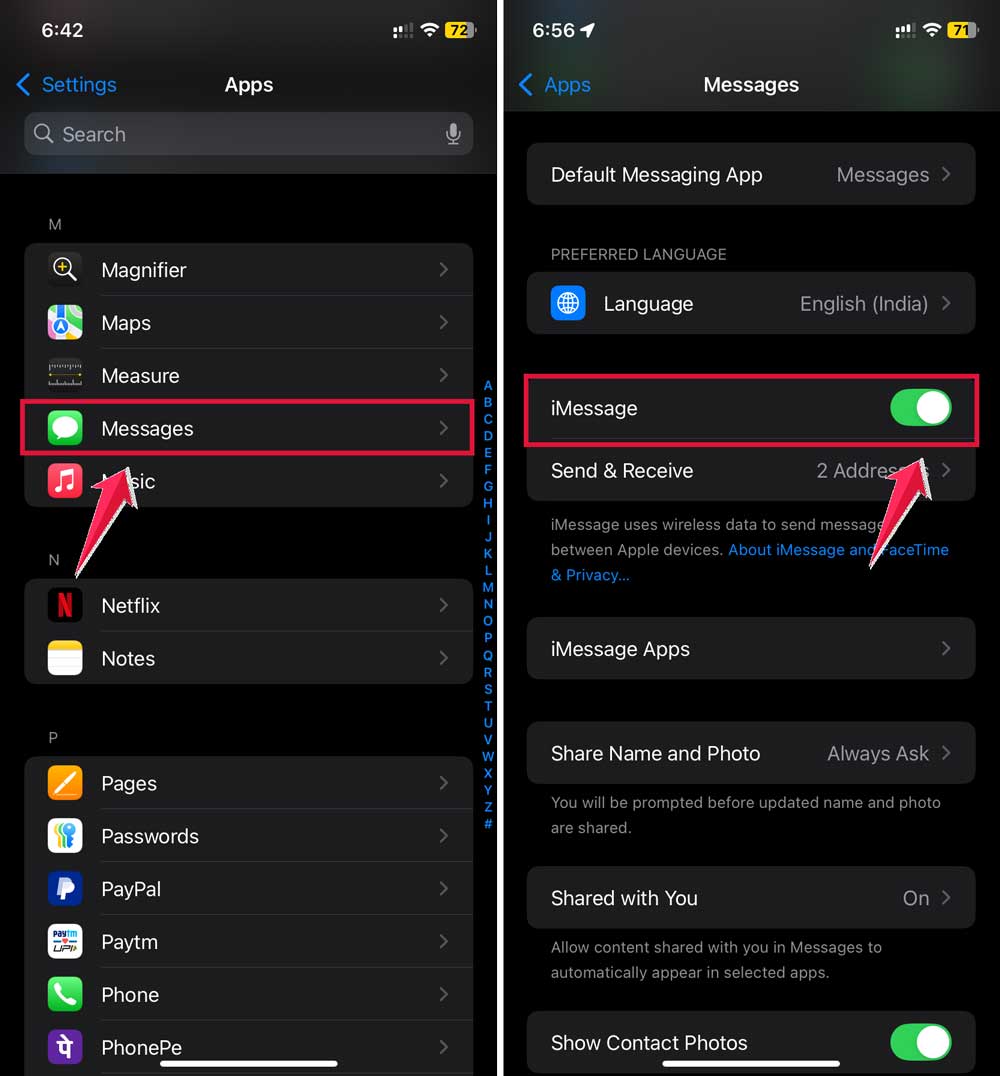
1. Disable iMessage Temporarily
Turning off iMessage for a bit can make their texts undeliverable. They’ll start wondering what’s going on!
How to do it:
- Go to Settings.
- Scroll down and click on Apps.

- Tap on Messages.
- Toggle off iMessage.
2. Turn Off Read Receipts
Make it look like you’re ignoring their messages by turning off read receipts. They’ll see their messages as sent but not read, which can be pretty frustrating!
How to do it:
- Open Settings.
- Then tap on Apps.
- Scroll down to Messages.
- Toggle off Send Read Receipts.

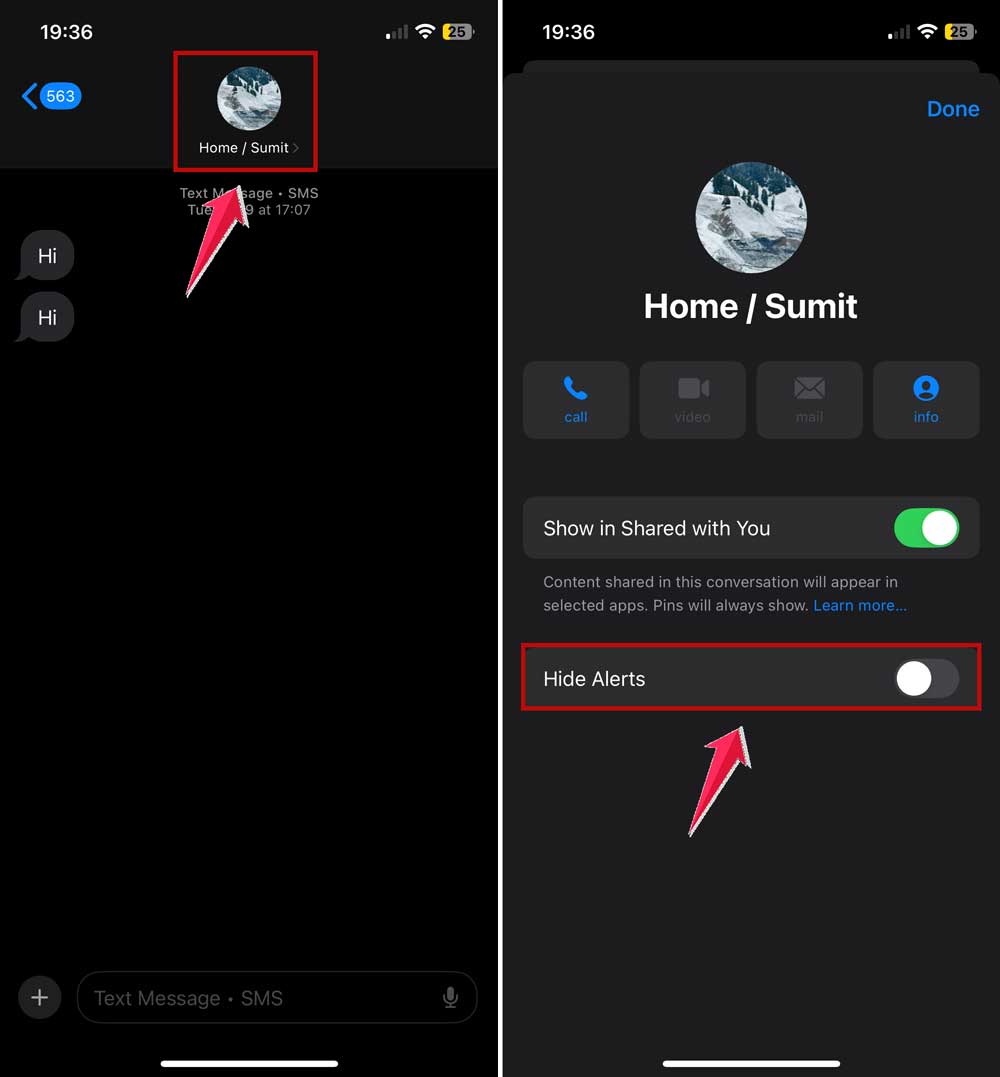
3. Mute Them
Mute their messages so you won’t be notified when they text you. It will seem like you’re not receiving their messages at all.
Steps:
- Open the conversation in Messages.
- Tap on the contact’s name or profile picture.
- Toggle on Hide Alerts.
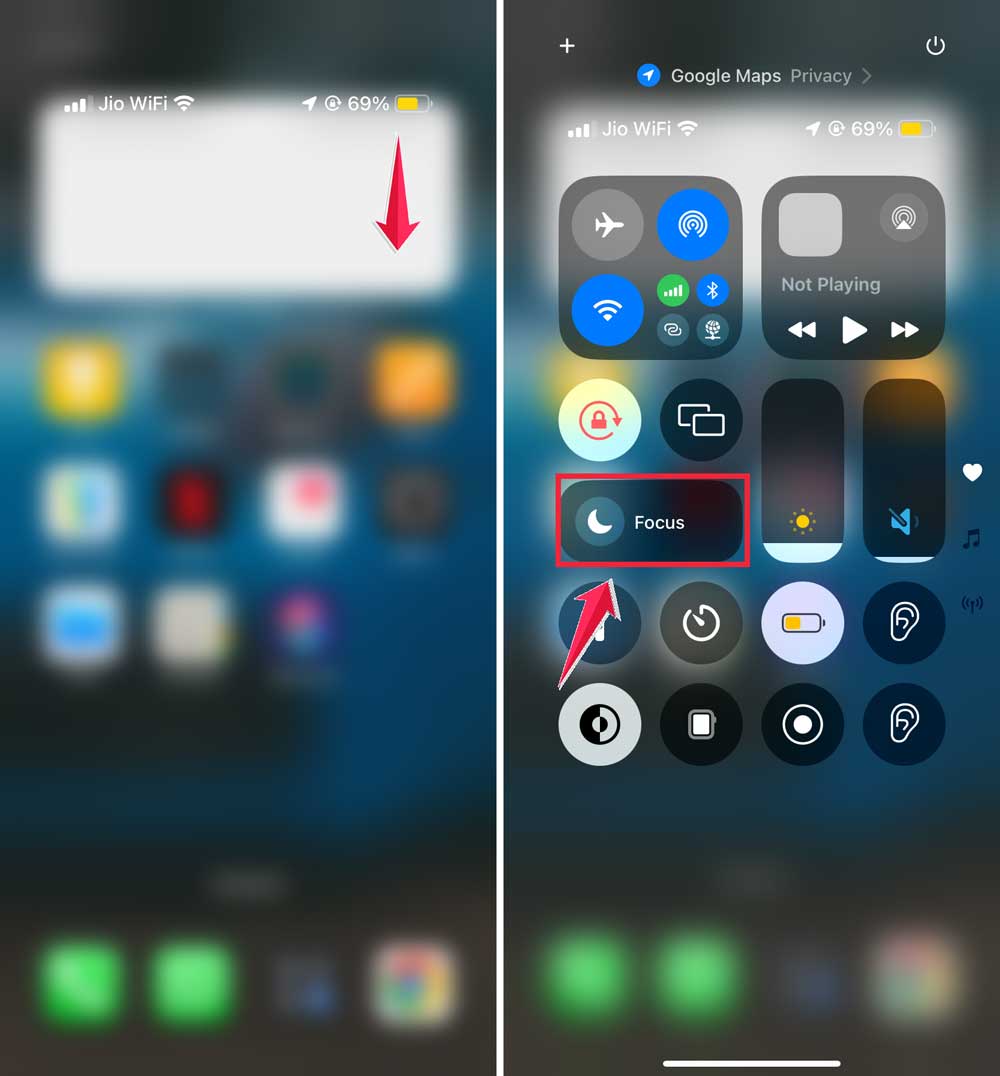
4. Enable Do Not Disturb (DND) Mode
Turn on DND mode to stop notifications. Or go one step further and turn off incoming calls on your iPhone completely.
They’ll think you’re unavailable or ignoring them.
How to do it:
- Swipe up (or down) to access the Control Center.
- Tap the Moon icon.
 5. Disable Cellular Data
Turn off cellular data to make it look like your phone is unreachable.
This can add to the mystery of why they can’t get through to you.
Steps:
- Open Settings.
- Tap on Cellular.
- Toggle off Cellular Data.

6. Disable “Share Name and Photo”
Turn off sharing your name and photo in iMessage to add to the mystery.
They’ll wonder why they can’t see your info anymore.
How to do it:
- Go to Settings.
- Scroll down and click on Apps.
- Tap on Messages.

- Toggle off Share Name and Photo.

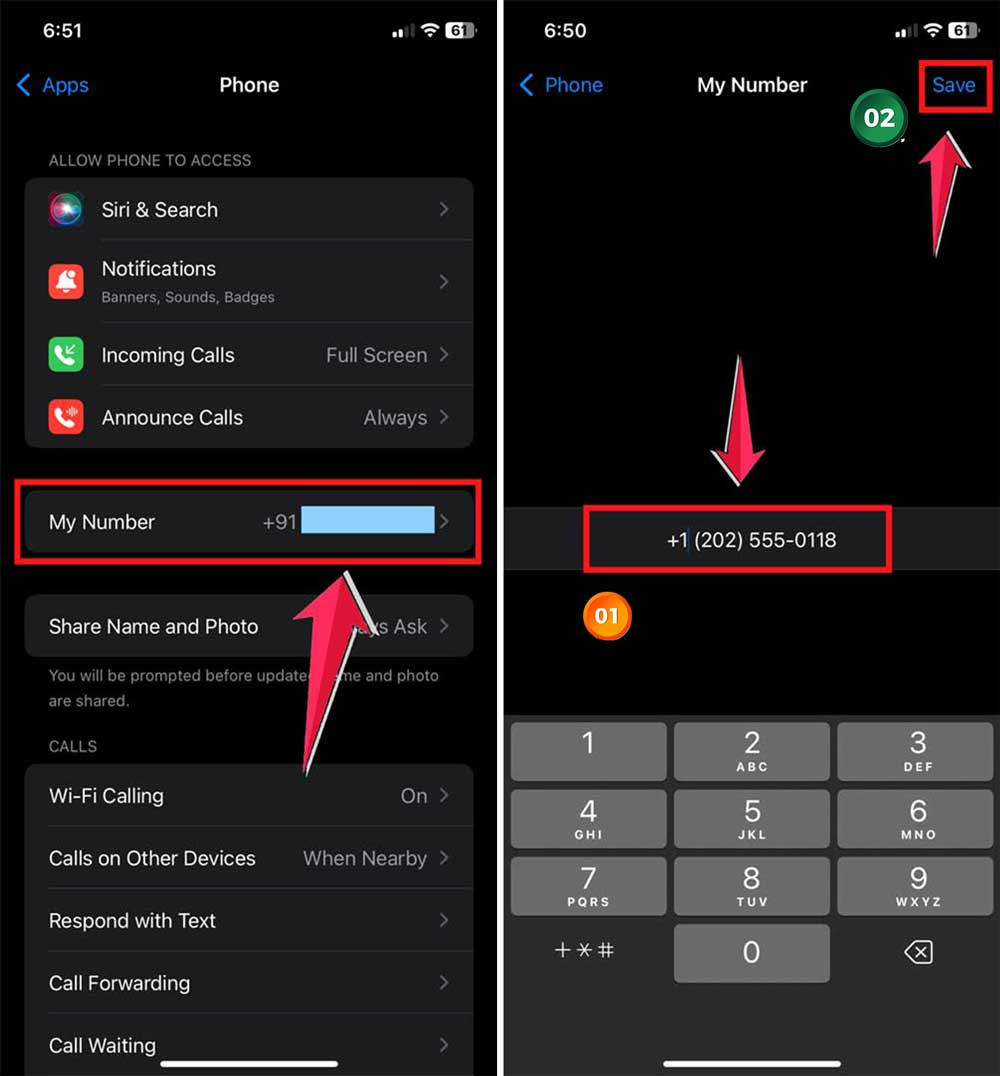
7. Change Your Number (Temporarily)
Change your number temporarily so any messages to your old number won’t be delivered.
This can really make them think they’ve been blocked.
Steps:
- Open Settings.
- Tap on Phone.

- Select My Number and change it.
8. Block Them Temporarily
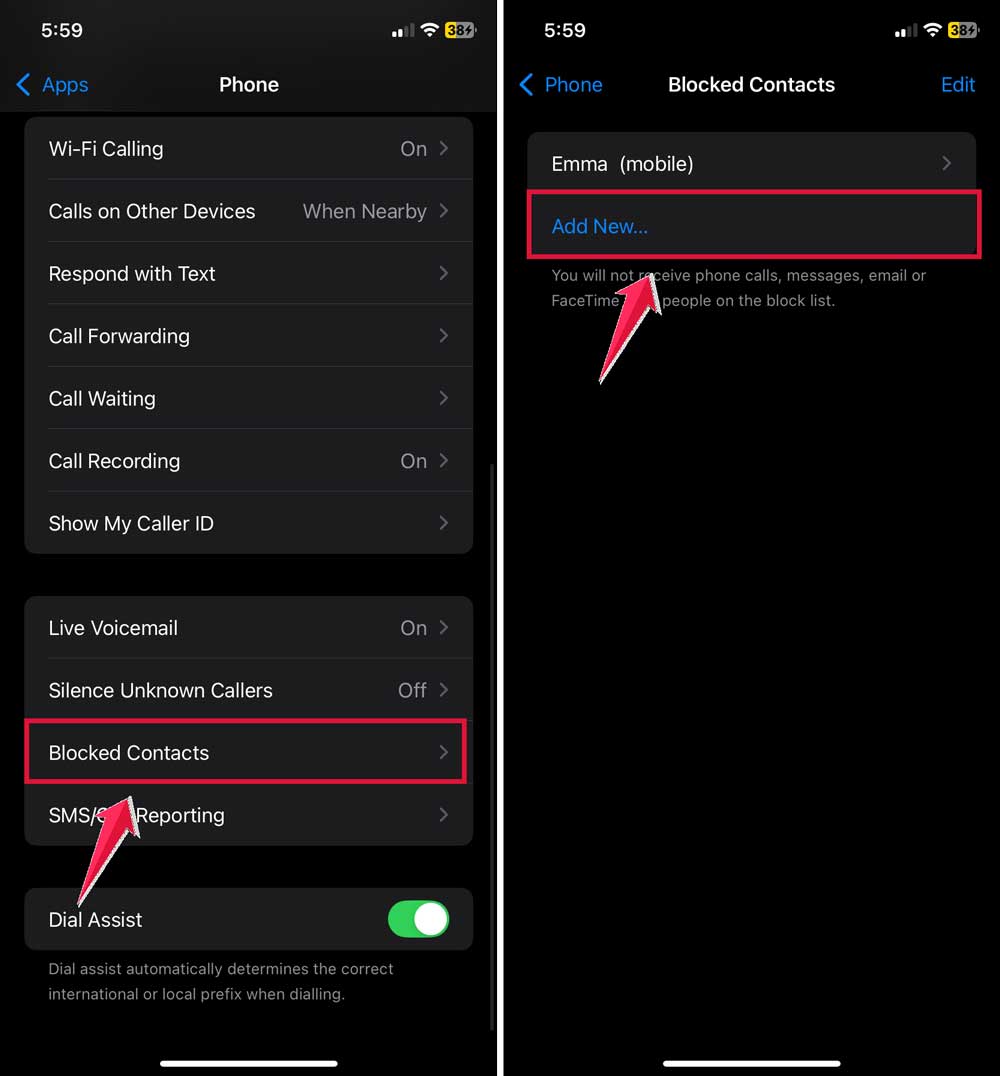
For a full-on prank, block them temporarily. They won’t be able to contact you at all.
How to do it: (Phone)
- Go to Settings.
- Click on Apps.
- Tap on Phone.
- Select Blocked Contacts.
- Add their contact.
How to do it: (Messages)
- Go to Settings.
- Click on Apps.
- Tap on Messages.
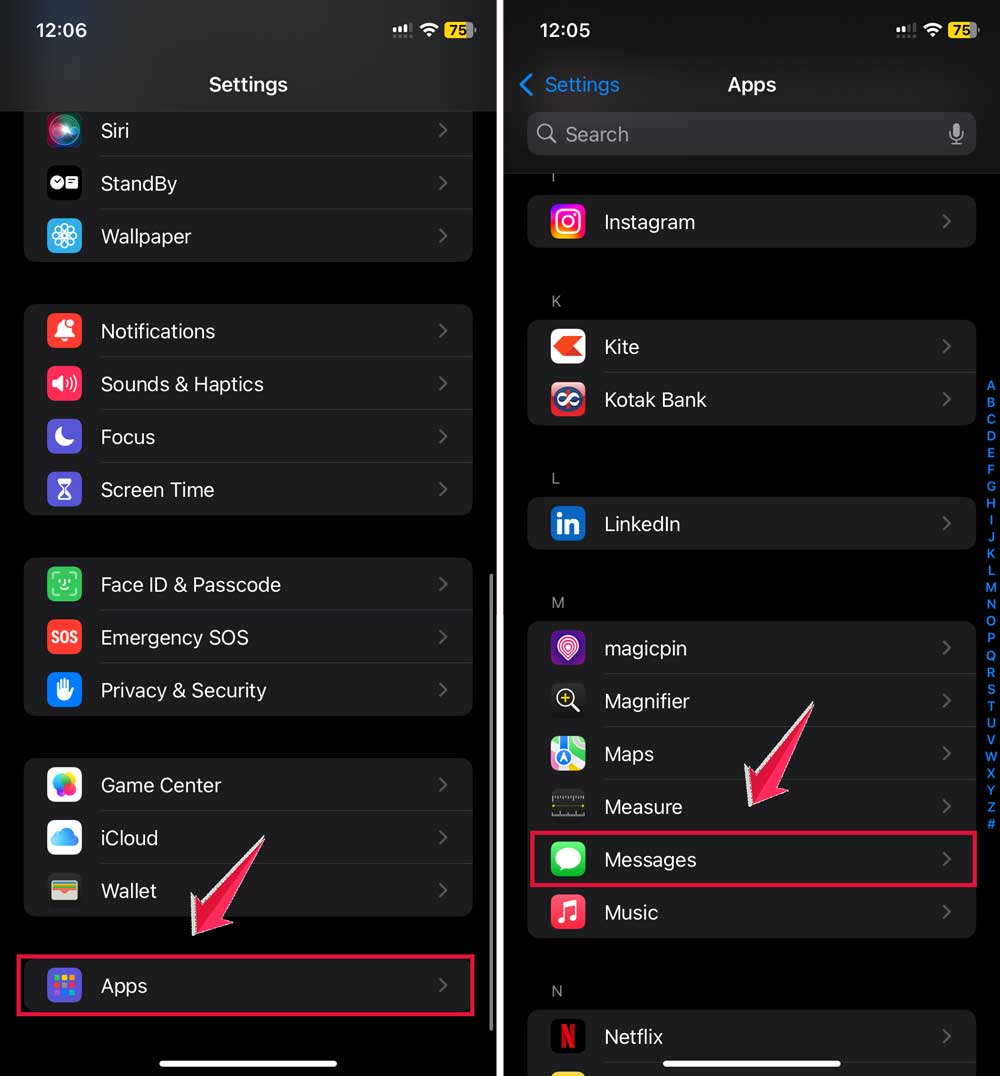
- Select Blocked Contacts.
- Add their contact.

9. Turn on Airplane Mode
Turn on Airplane Mode to make your phone unreachable. They’ll think your phone is off or out of service.
How to do it:
- Swipe up (or down) to access the Control Center.
- Tap the Airplane Mode icon.

And if you’re on the receiving end, here’s how to know if someone’s phone is dead on iMessage.
Wrapping It Up!
Alright, buddy, ready to have some fun with iMessage pranks? We just explored nine clever tricks to make someone think you’ve given them the “blockaroo” on iMessage.
So, if you’re feeling a bit mischievous, go ahead and try them out. Just remember, it’s all in good fun. Enjoy yourself and happy texting!
Remember, these tricks are all about having a bit of harmless fun. Use them wisely, and make sure everyone involved is in on the joke eventually.
Have a blast with your pranks and keep it light-hearted!